
SlotGlow
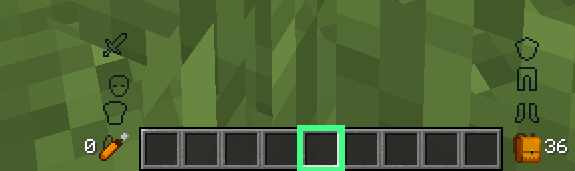
SlotGlow is a client-side Fabric mod that replaces Minecraft’s default hotbar selector with a fully customizable glowing highlight.
截图


介绍
SlotGlow
SlotGlow is a client-side Fabric mod that replaces Minecraft’s default hotbar selector with a clean, customizable glowing highlight.
Instead of the normal gray selected-slot box, SlotGlow lets you create your own custom hotbar style with colors, glow effects, rainbow mode, opacity settings, outlines, animations, and more.
Features
- Custom glowing hotbar selector
- Replaces the default Minecraft selected-slot highlight
- Color presets like purple, blue, green, red, gold, pink, white, and more
- RGB color sliders for custom colors
- Rainbow mode
- Pulse animation
- Glow effect settings
- Outline thickness settings
- Inner outline and double outline options
- Corner mark effects
- Opacity controls
- Slot position offsets
- Hide highlight when the selected slot is empty
- Full Mod Menu configuration screen
- Helpful setting descriptions/tooltips
- Client-side only
Configuration
SlotGlow is configured through Mod Menu.
To change the settings, open Minecraft and go to:
Mods → SlotGlow → Configure
From there, you can customize the color, glow, rainbow mode, pulse speed, size, opacity, outline style, and more.
Requirements
- Fabric Loader
- Fabric API
- Mod Menu
- Cloth Config API
Compatibility
SlotGlow is client-side only, so it does not add blocks, items, mobs, or gameplay changes. It only changes how your hotbar looks on your screen.
Perfect for players who want a cleaner, cooler, and more personal Minecraft HUD.
常见问题
SlotGlow 支持哪些 Minecraft 版本?
SlotGlow 支持 Minecraft Java 版 1.21.11,可用的加载器:Fabric。下载时注意选择和你游戏版本一致的文件。
SlotGlow 怎么安装?
先用 PCL2 或 HMCL 启动器安装对应版本的 Fabric,再把下载的 .jar 文件放进游戏目录的 mods 文件夹,重新启动游戏即可。开启了版本隔离的,mods 文件夹在 versions/版本名 下面。运行环境:仅客户端。
评论
登录后评论和评分