
截图
介绍
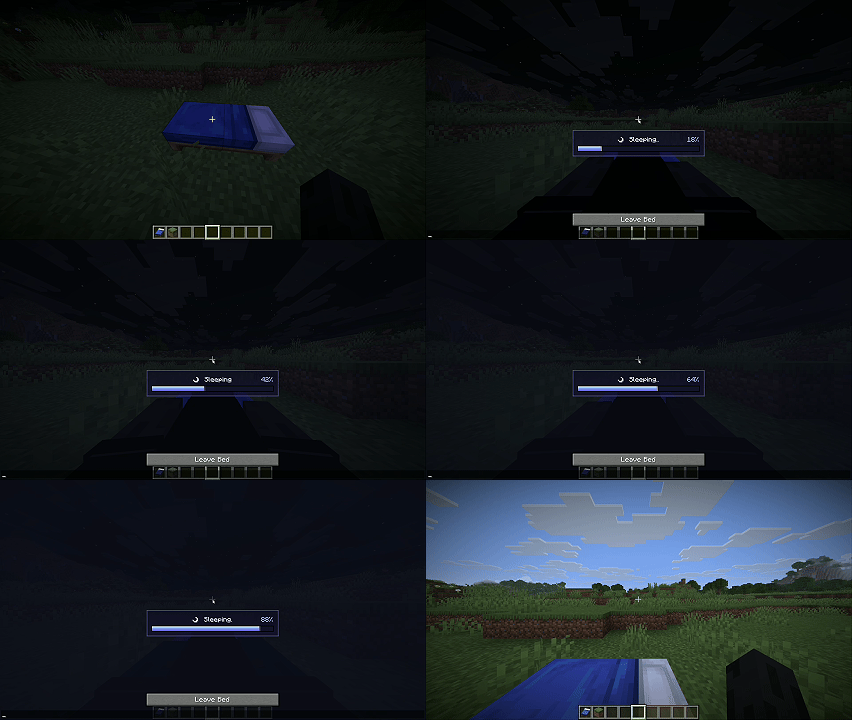
Sleep Progress Bar is a lightweight Fabric client-side mod that makes sleeping feel clearer and more polished. When your player gets into a bed, the mod displays a centered moonlit status panel with a smooth blue-to-purple progress bar, an animated “Sleeping…” label, and a percentage readout so you can see exactly how close the sleep timer is to completion.
Features
- Shows a clean sleep progress bar while the player is in bed.
- Displays the current sleep progress as a percentage.
- Adds a subtle animated glow at the end of the filling bar.
- Uses a compact HUD overlay that only appears while sleeping.
- Purely visual; it does not change Minecraft’s sleep mechanics, time skipping, or multiplayer sleep rules.
Compatibility
- Minecraft: 1.21.11
- Mod loader: Fabric
- Fabric Loader: 0.19.0 or newer
- Java: 21+
- Client-side: Required
- Server-side: Unsupported / not needed
Installation
- Install Fabric Loader for Minecraft 1.21.11.
- Drop
sleep-progress-bar-1.0.0.jarinto yourmodsfolder. - Launch the game and sleep in a bed to see the overlay.
常见问题
Sleep Progress Bar 支持哪些 Minecraft 版本?
Sleep Progress Bar 支持 Minecraft Java 版 1.21.11,可用的加载器:Fabric。下载时注意选择和你游戏版本一致的文件。
Sleep Progress Bar 怎么安装?
先用 PCL2 或 HMCL 启动器安装对应版本的 Fabric,再把下载的 .jar 文件放进游戏目录的 mods 文件夹,重新启动游戏即可。开启了版本隔离的,mods 文件夹在 versions/版本名 下面。运行环境:仅客户端。
titanitus 的其他作品
查看全部 →
DonutSMP Auction Sniper
Automatically buys cheap Items on the Auction for Profit on DonutSMP

Feather Boop
Use a feather to launch Entities like fireworks

Past Death Ghost
A client-side Fabric mod that leaves a translucent ghost and death message at your last death location.
评论
登录后评论和评分