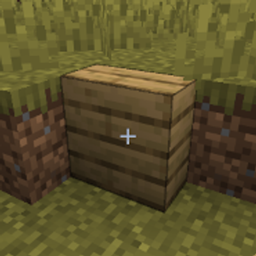
Slabs But Vertical
Vertical half-blocks for Minecraft. Same look as normal slabs — just stood on end.
介绍
Vertical Slabs
Vertical half-blocks for Minecraft. Same look as normal slabs — just stood on end.
Works with all vanilla slabs, and automatically adds vertical versions of slabs from other mods.
Requirements
- Minecraft 26.1.2
- NeoForge 26.1.2.76 (or compatible)
Install
- Install NeoForge for Minecraft 26.1.2.
- Drop the mod jar into your
modsfolder. - Launch the game.
Getting vertical slabs
Crafting
Put 3 matching slabs in a vertical column:
S
S
S
→ 6 vertical slabs
To convert back, put 3 vertical slabs in a row:
V V V
→ 3 normal slabs
Creative
All vertical slabs are in the Building Blocks tab.
Placement
- Click a wall or block side to place the vertical slab against it.
- Click the floor or ceiling to place based on where you aim.
- Place a second matching vertical slab into the empty half to fill the block (same idea as topping up a normal slab).
- They can be waterlogged.
Other mods
If another mod adds slabs, Vertical Slabs will create matching vertical versions for them automatically — same textures, crafting pattern, and creative tab entry.
常见问题
Slabs But Vertical 支持哪些 Minecraft 版本?
Slabs But Vertical 支持 Minecraft Java 版 26.1.2–26.2,共 2 个版本,可用的加载器:NeoForge。下载时注意选择和你游戏版本一致的文件。
Slabs But Vertical 怎么安装?
先用 PCL2 或 HMCL 启动器安装对应版本的 NeoForge,再把下载的 .jar 文件放进游戏目录的 mods 文件夹,重新启动游戏即可。开启了版本隔离的,mods 文件夹在 versions/版本名 下面。
artofscripting 的其他作品
查看全部 →
Infinite Inventory
A Minecraft mod that adds a magical sack with truly infinite storage capacity.
Artust Item Duplicator
An Item Duplicator

MC Money
A currency mod that adds coins, a personal bank for secure storage, and a configurable shop with 200+ items for buying and selling.

Universal Lead (Leashable Villagers & Mobs)
Attach standard Minecraft Leads to villagers, turtles, pandas, bats, fish, and other passive mobs that vanilla arbitrarily blocks.
评论
登录后评论和评分