
SkinsLib
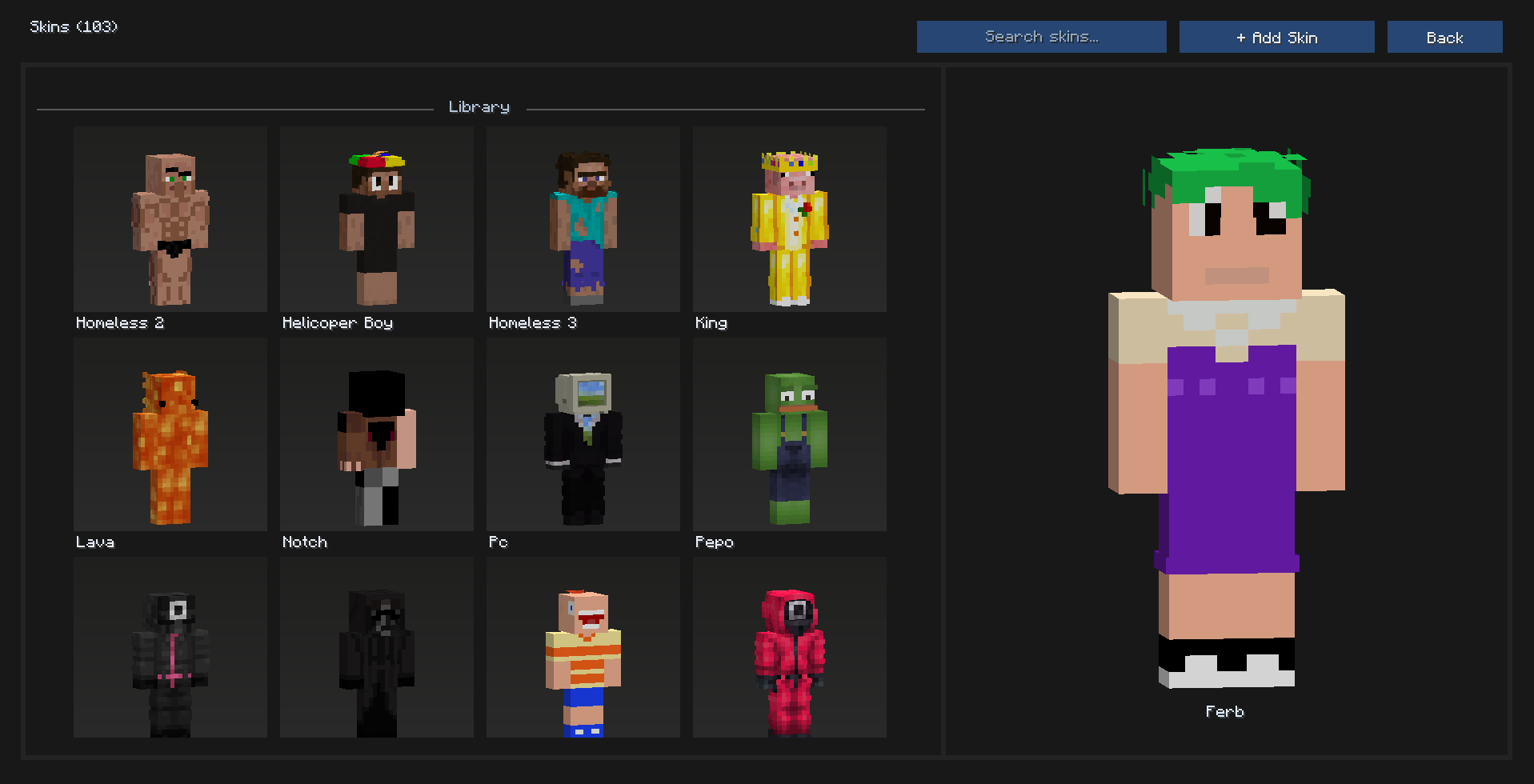
This project adds an in‑game skin library: browse/search skins, preview them, import by username or PNG (drag/drop supported), and apply a selected skin directly to your player.
截图
介绍
Skins lib
A modern, ever-growing library of roleplay and funny skins.
SkinsLib makes managing and applying Minecraft skins fast and simple. Browse a growing collection of skins, preview them live, and apply them instantly from an easy-to-use interface.
Features
Browse & Search
Quickly find skins using the built-in search bar and scroll through the skin grid.
One-Click Apply
Select any skin and apply it instantly in-game.
Live Preview
Preview skins in real time with:
Slim and wide model support
Lighting
Idle animation
Context Actions
Right-click a skin to open additional options, such as deleting it (where allowed).
Import Options
Add new skins in multiple ways:
By Minecraft username
From a local PNG file
Drag & Drop
Drag a .png file into the screen, give it a name, and import it instantly.
Usage
Open SkinsLib from your client GUI.
Use the search field to find skins.
Left-click a skin to select and apply it.
Right-click a skin to open the context menu (for example delete, where allowed).
To import skins:
Click Add Skin → Add By Username
Click Add Skin → Add From PNG
Or drag a .png file onto the screen.
Controls
Left-click — Select or apply a skin
Right-click — Open the context menu on a skin
Scroll — Navigate the skin grid
Drag preview — Click and drag inside the preview to rotate or tilt the model
Import Tips
Use 64×64 PNG skin files (standard Minecraft format).
Names are auto-suggested, but you can edit them before confirming.
Newly imported skins are not automatically selected; choose them from the grid.
Requirements
Fabric Loader (matching your Minecraft version)
Fabric API
Installation
Download the latest .jar from Modrinth.
Place the file in your mods/ folder.
Launch Minecraft using Fabric with Fabric API installed.
Compatibility
Client-side mod — does not require server installation.
Works alongside most cosmetic and GUI mods.
If you encounter conflicts, please report them.
THIS MOD WAS HIGHLY INSPIRED BY ESSENTIAL MOD. IF THE OWNER OF ESSENTIAL IS NOT OK WITH IT, PLEASE MESSAGE ME ON DISCORD. DISCORD USERNAME: Freeperr
常见问题
SkinsLib 支持哪些 Minecraft 版本?
SkinsLib 支持 Minecraft Java 版 1.21.10,可用的加载器:Fabric。下载时注意选择和你游戏版本一致的文件。
SkinsLib 怎么安装?
先用 PCL2 或 HMCL 启动器安装对应版本的 Fabric,再把下载的 .jar 文件放进游戏目录的 mods 文件夹,重新启动游戏即可。开启了版本隔离的,mods 文件夹在 versions/版本名 下面。运行环境:仅客户端。

评论
登录后评论和评分