介绍

SkinShifter
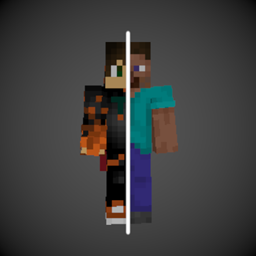
SkinShifter lets you change your Player Skin in game! (Don’t worry- you won’t change your actual skin, it just renders differently.)
Getting Started
This mod is intended to be used in modpacks or as library for other mods. You can change your skin by using the command /skinshifter set @s xyz, where xyz is the name or uuid of the player you want to morph into.
If you’re a coder, you can use the following methods:
SkinShifter.setSkin(serverPlayer, playerUuidForSkin); // Sets the current skin
SkinShifter.getCurrentSkin(serverPlayer); // returns the UUID of owner of the current skin. Might be the own UUID!
To change config values, you can do the following:
class Test {
    public static void initialize() {
        SkinShifter.CONFIG.changeCape = true;
        SkinShifter.CONFIG.changeNameTag = true;
        // required to save the changes into the config file
        SkinShifter.CONFIG.save();
        // when changing the config after the first player has joined, use:
        // SkinShifter.CONFIG.sendToAllPlayers(serverLevel);
    }
}
If you’d like to support me and the development of my mods, I recommend trying out BisectHosting. Use the code “woodwalkers” to get 25% off your first month of a gaming server for new customers. They offer 24/7 support and lightning-fast response times, ensuring you’re in great hands and providing exceptional assistance for all your gaming needs.

License
SkinShifter is licensed under Apache 2.0.
常见问题
SkinShifter 支持哪些 Minecraft 版本?
SkinShifter 支持 Minecraft Java 版 1.18.2–26.3,共 20 个版本,可用的加载器:Fabric / Forge / NeoForge / Quilt。下载时注意选择和你游戏版本一致的文件。
SkinShifter 怎么安装?
先用 PCL2 或 HMCL 启动器安装对应版本的 Fabric / Forge / NeoForge / Quilt,再把下载的 .jar 文件放进游戏目录的 mods 文件夹,重新启动游戏即可。开启了版本隔离的,mods 文件夹在 versions/版本名 下面。


评论
登录后评论和评分