
截图


介绍
This mod allows you to block other players’ skins or usernames.
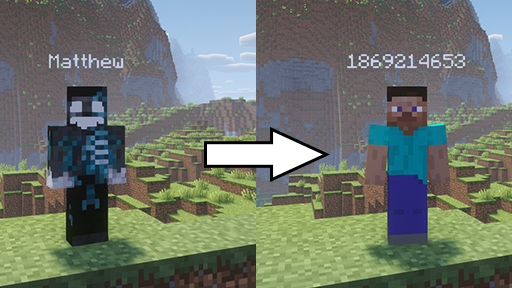
If you block someone’s skin, their skin will become a Steve skin to you.
If you block someone’s username, their username will become a hashcode.
Username blocking uses regex matching so for example you can block the word “Mustard” and if someone has the username “MangoMustard”, it will display as “Mango1413021610”.
Or you can use any sort of regex patterns, such as:

Which will block the date and server’s id display on scoreboard on Hypixel. If you block like a bunch or random characters, it may crash and you’ll have to edit the config file manually so be careful. The mod doesn’t directly replace players’ info when it comes to blocking usernames, it just restricts what strings get rendered in the Font class so you can block any word on the screen.
The syntax is /sblock [type]. The possible types are:
- skin (default): blocks skin by its texture url
- uuid: blocks skin by the player’s uuid so you won’t see their skin even if they change it
- username: blocks the player’s username
You can also setup a keybind in controls for each type
常见问题
SkinBlocker 支持哪些 Minecraft 版本?
SkinBlocker 支持 Minecraft Java 版 1.21.4,可用的加载器:Fabric。下载时注意选择和你游戏版本一致的文件。
SkinBlocker 怎么安装?
先用 PCL2 或 HMCL 启动器安装对应版本的 Fabric,再把下载的 .jar 文件放进游戏目录的 mods 文件夹,重新启动游戏即可。开启了版本隔离的,mods 文件夹在 versions/版本名 下面。运行环境:仅客户端。
评论
登录后评论和评分