
Skin Manager
An in-game skin management mod that allows players to save, switch, and synchronize skins from Mojang, Ely․by, or direct URLs without restarting the game.
截图


介绍
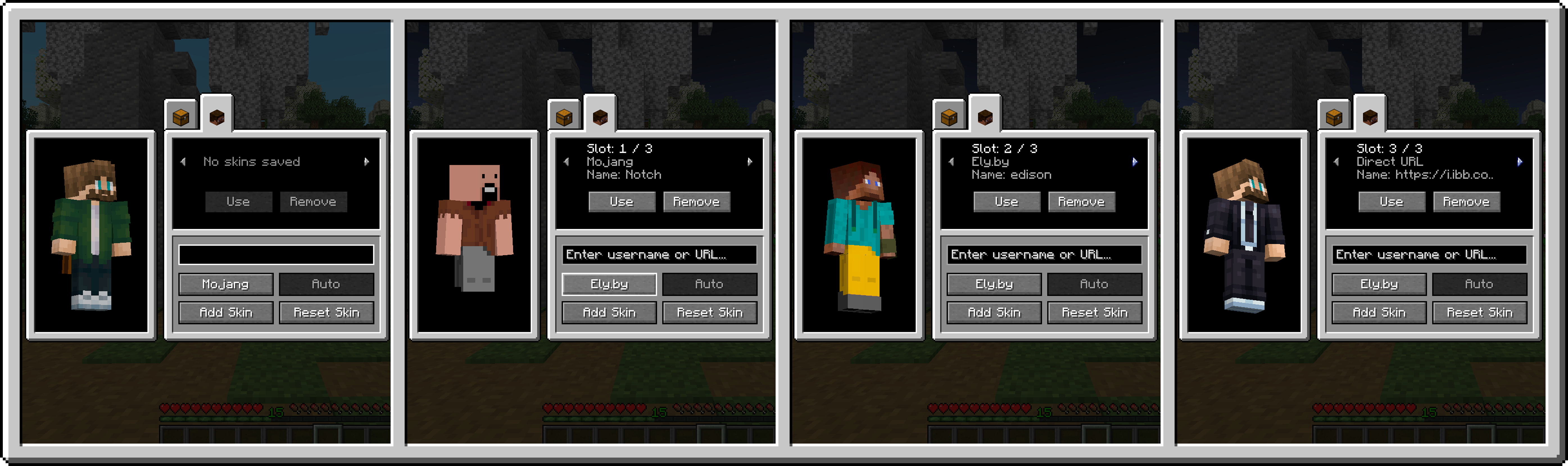
SkinManager is a utility mod for Minecraft that enables players to manage and change their character skins directly inside the game. It provides an in-game interface integrated into the player inventory, persistent skin storage, and server-side synchronization so that changes are visible to other players in multiplayer.
Features
- Inventory Integration: Adds a tab directly inside the player inventory to open the skin management interface.
- Skin Library: Allows storing up to 15 skins per player. The library is saved to player data on the server and persists across reconnects and respawns.
- Supported Skin Sources:
- Mojang: Fetches skins by official Minecraft username. Player model type (Classic/Wide or Slim) is detected automatically.
- Ely.by: Fetches skins by Ely.by username with automatic model detection.
- Direct URL: Loads skins from any direct .png link, with manual selection between Wide (Steve) and Slim (Alex) models.
- Live 3D Preview: Displays a rotatable 3D model preview of the selected skin before applying it.
- Multiplayer Synchronization: Synchronizes skin changes across all players on the server in real time.
- Legacy Skin Support: Automatically converts legacy 64×32 skin textures to the modern 64×64 format.
- Asynchronous Loading: Skin textures download in the background without causing client stutter or freezing.
常见问题
Skin Manager 支持哪些 Minecraft 版本?
Skin Manager 支持 Minecraft Java 版 1.21.1,可用的加载器:Fabric / NeoForge。下载时注意选择和你游戏版本一致的文件。
Skin Manager 怎么安装?
先用 PCL2 或 HMCL 启动器安装对应版本的 Fabric / NeoForge,再把下载的 .jar 文件放进游戏目录的 mods 文件夹,重新启动游戏即可。开启了版本隔离的,mods 文件夹在 versions/版本名 下面。运行环境:客户端和服务端都要装。
Azuban 的其他作品
查看全部 →
Origins Legacy: NeoForged
Fork of Origins Legacy, what fork of Origins

Origins Legacy: NeoForged
Fork of Origins Legacy, what fork of Origins

LFGM (Legacy Female Gender M.)
Unofficial 1.12.2 Forge port of Female Gender Mod. Adds female player model customization and breast physics.

Cripple Player
A limb damage and prosthetic mechanics mod . Adds functional biological limb loss upon lethal damage, physical movement and interaction penalties.
评论
登录后评论和评分