
SimplesorterR
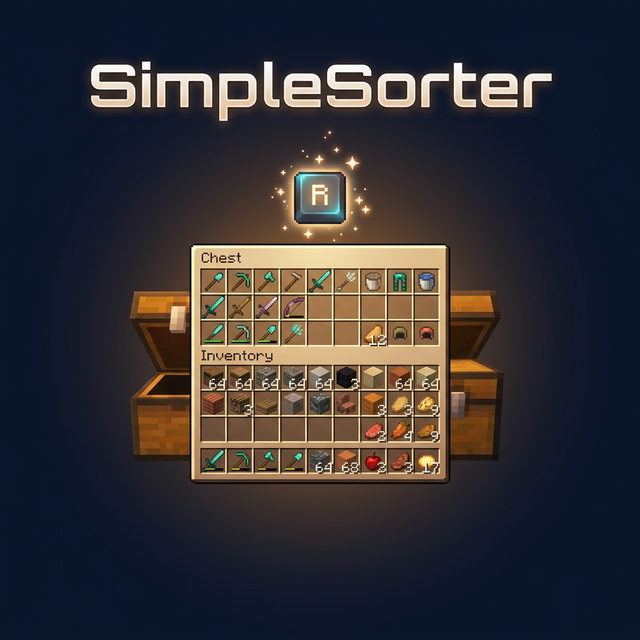
A lightweight client-side mod for effortless inventory management in Minecraft.
截图
介绍
SimpleSorterR
A lightweight client-side inventory sorting mod.
Features
One-Key Smart Sorting
Open an inventory or container and press R to sort items.
- Auto Stack Merging — Automatically consolidates partial stacks of the same item into full stacks, freeing up valuable slots
- Creative Tab Native Sorting — Items are arranged using Minecraft’s Creative Mode tab order and support modded items
- Custom Sort Order — Adjust
tabOrderin the config file to change tab priority - Pinned Items — Configure
pinnedItemsto keep specific items always sorted first - Dynamic Container Blacklist — All storage containers are sortable by default (including modded containers like Reinforced Chests). Functional containers are excluded by exact class names in
blockedContainers; you can also press B while a container is open to toggle it automatically - No-Screen Main Inventory Sorting — Enable
sortInventoryWhenNoScreento sort the player main inventory with R while no screen is open - Config Hot-Reload — Edit
simplesorter.jsondirectly, changes take effect on the next R-key sort without restarting the game - Pure Client-Side — Sorting is performed by simulated clicks, so the server does not need the mod
Mouse Tweaks
Shift + Drag to Quick-Move
Hold Shift and left-click drag across multiple slots — every slot you pass over will be instantly quick-moved to the opposite inventory.
Useful when moving many slots at once.
Shift + Double-Click to Move All Same Items
While holding an item on your cursor, Shift + Double-Click on a matching item to instantly quick-move all identical items from that inventory to the other side.
Useful for pulling all matching items out of a chest.
Space + Double-Click to Move Everything
Hold Space and Double-Click any slot in a container to instantly quick-move every single item from that inventory to the opposite side.
Useful for quickly emptying a chest.
V + Double-Click to Deposit Matching Items
Hold V and Double-Click any filled slot in a container to quick-move matching items from the player main inventory into the container, but only when that item already exists in the container.
- Does not move hotbar slots
- Does not move locked slots
- Does not move items that are not already present in the container
- Does not trigger while an item is held on the cursor
Useful for topping up a sorted chest from your main inventory.
Slot Locking
Hold Alt and click any slot to lock it — locked slots display an overlay.
- Locked slots are never moved when sorting with R
- Locked hotbar slots are protected from Q-key drops (prevents accidental discarding)
- Lock state is automatically saved and independent per save file
- Alt + click again to unlock
- Hold Alt + left-click drag to lock or unlock multiple slots in one sweep. The first slot decides whether the drag locks or unlocks
- Overlay color can be customized with
lockOverlayColor, supporting both#RRGGBBand#AARRGGBB
Color values use Hex color codes. Both #RRGGBB and #AARRGGBB are supported. The 8-digit format uses ARGB order: AA opacity, RR red, GG green, BB blue. It is not RGBA.
Common AA values: 40 very transparent, 80 half transparent, C0 mostly opaque, FF fully opaque. Examples: #80FF0000 half-transparent red, #8000FF00 half-transparent green, #800000FF half-transparent blue.
Useful for keeping tools in fixed slots and reducing accidental drops.
Auto Replacer
- Tool Break Replacement — When a held tool breaks, automatically equips a replacement of the same type from your inventory
- Stackable Item Refill — When a held stackable item runs out (e.g. placing blocks), automatically refills from your inventory
- Can be toggled on/off in the settings screen
Useful when building or mining with repeated item replacement.
Caps Lock + Double-Click to Batch Drop
Hold Caps Lock and double-click any slot to drop all identical items in that inventory (using the Q-key drop action).
Useful for clearing large quantities of one item.
In-Game Configuration
Press Z + I (default combo) to open a graphical settings panel in-game:
- Tab Sort Order (tabOrder) — Customize the priority of Creative Mode tabs
- Pinned Items (pinnedItems) — Specify item IDs that always sort to the front
- Container Blacklist (blockedContainers) — Add container class names to exclude from sorting, or press B while a container is open to write the current class name automatically
- Lock Overlay Color (lockOverlayColor) — Customize locked-slot overlay color, for example
#80FF0000 - No-Screen Sort (sortInventoryWhenNoScreen) — Allow R to sort the player main inventory while no screen is open
- Z-Key Guard Toggle — Disable the Z-key requirement to open settings with just I
- Auto Replacer Toggle — Enable/disable automatic tool and item replacement
- Localized UI — Settings interface automatically adapts to your game language (English / Chinese)
Also accessible from Mod Menu if installed.
Advanced settings can be edited directly in
config/simplesorter.json. Changes take effect on the next R-key sort.
⚠️
blockedContainersuses exact class-name matching, not fuzzy matching. Depending on mappings and Minecraft version, class names may look likeGenericContainerScreenHandlerinstead ofChestMenu; the safest workflow is opening the target container and pressing B so the mod writes the correct name for you.
Requirements
| Dependency | Required? | Notes |
|—|—|—|
| Fabric Loader ≥ 0.16.5 | ✅ Required | Mod loader |
| Fabric API | ✅ Required | Core API library |
| Fabric Language Kotlin | ✅ Required | Kotlin runtime support |
| Cloth Config API | ❌ Bundled | Config screen framework (already included in the mod jar) |
| Mod Menu | ❌ Optional | Adds a settings entry in the mod list |
Installation
- Install Fabric Loader and Fabric API
- Download Fabric Language Kotlin and place it in your
modsfolder - Pick the jar matching your Minecraft version and drop it into your
modsfolder - Launch the game
Keybind Reference
All keybinds appear under the SimpleSorterR category in Minecraft’s Controls screen and can be changed there.
| Key | Action | Context |
|:—:|—|—|
| R | Sort & organize inventory | While a container is open; can also sort the main inventory with no screen if enabled |
| Alt + Click | Lock / Unlock slot | Prevents that slot from being sorted |
| Alt + Left-Drag | Batch lock / unlock slots | Drag across multiple slots |
| B | Toggle current container blacklist | When the current container should not be sorted |
| Caps Lock + Double-Click | Batch drop identical items | Quickly clear large stacks |
| Shift + Drag | Quick-move multiple slots | Drag across slots while holding Shift |
| Shift + Double-Click | Move all identical items | While holding an item on cursor |
| Space + Double-Click | Move all items from container | Empty an entire inventory at once |
| V + Double-Click | Deposit matching items | Move only items already present in the container from main inventory |
| Z + I | Open settings screen | Available anytime |
SimpleSorterR
A simple Minecraft inventory sorting tool.
常见问题
SimplesorterR 支持哪些 Minecraft 版本?
SimplesorterR 支持 Minecraft Java 版 1.20.1–26.3,共 13 个版本,可用的加载器:Fabric / Forge / NeoForge。下载时注意选择和你游戏版本一致的文件。
SimplesorterR 怎么安装?
先用 PCL2 或 HMCL 启动器安装对应版本的 Fabric / Forge / NeoForge,再把下载的 .jar 文件放进游戏目录的 mods 文件夹,重新启动游戏即可。开启了版本隔离的,mods 文件夹在 versions/版本名 下面。运行环境:仅客户端。
Zzai 的其他作品
查看全部 →
FriendLink
FriendLink is an experimental Fabric client mod that backports Minecraft's official Friends / P2P multiplayer flow to Minecraft 26.1.2.

ink-wash-shaderpack
is an Iris shader pack for Minecraft, inspired by traditional Chinese ink wash painting art. Using post-processing shader technology, it transforms the game's visuals into a real-time ink painting style—featuring natural gradations of ink tones, varied bru

ZzaiClear
This mod provides entity cleaning function

quizsurvival
Quiz Survival turns every action in Minecraft into a knowledge challenge. Chop, mine, fight, jump — answer a question first.Every action requires a quiz. Custom question banks — swap in math, physics, or any subject. Play and learn.
评论
登录后评论和评分