截图
介绍
_Information_
Simple Essentials is a client based minecraft mod that displays not so important, but could be important stuff, It displays the simple essentials!
_Features_
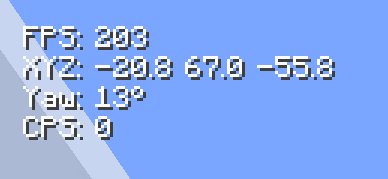
Most of the features are on the top left side of your screen.
It goes like this:
FPS:
XYZ:
Yaw:
CPS:
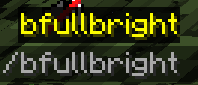
Theres also one external feature alongside this that barely gives much effects but still works.
/bfullbright – Makes caves brighter, It’s not very strong, to make it still feel vanilla
_Why download?_
You should download this mod because it’s very good if you’re a content creator or just a standalone person that wants to see how well your pc runs in minecraft, or maybe you just want a glance at your coordinates to master singleplayer words? It all works, and its right here, just a few clicks away from you.
_Installation_
If you dont know how to install mods or you’re just new in general, here’s how to install it.
- Download to mod from here, more versions might come in the future
- locate your “.minecraft” folder and find “mods”. There are plenty of tutorials online on how to find this.
- Drag the mod named “simpleessentials-X.X.X.jar” and drag it into that folder
- Download fabric api from modrinth and drag that into your mod folder aswell
- Then make sure your on fabric!
- Lastly launch your minecraft with fabric and hop on a singleplayer world to test it out!
Now you have it running! Excellent work
常见问题
Simple Essentials 支持哪些 Minecraft 版本?
Simple Essentials 支持 Minecraft Java 版 1.21.4,可用的加载器:Fabric。下载时注意选择和你游戏版本一致的文件。
Simple Essentials 怎么安装?
先用 PCL2 或 HMCL 启动器安装对应版本的 Fabric,再把下载的 .jar 文件放进游戏目录的 mods 文件夹,重新启动游戏即可。开启了版本隔离的,mods 文件夹在 versions/版本名 下面。运行环境:仅客户端。
评论
登录后评论和评分