
截图


介绍
New mod with alot more transports hud:s at https://modrinth.com/mod/simple-transport-hud
Elytra hud
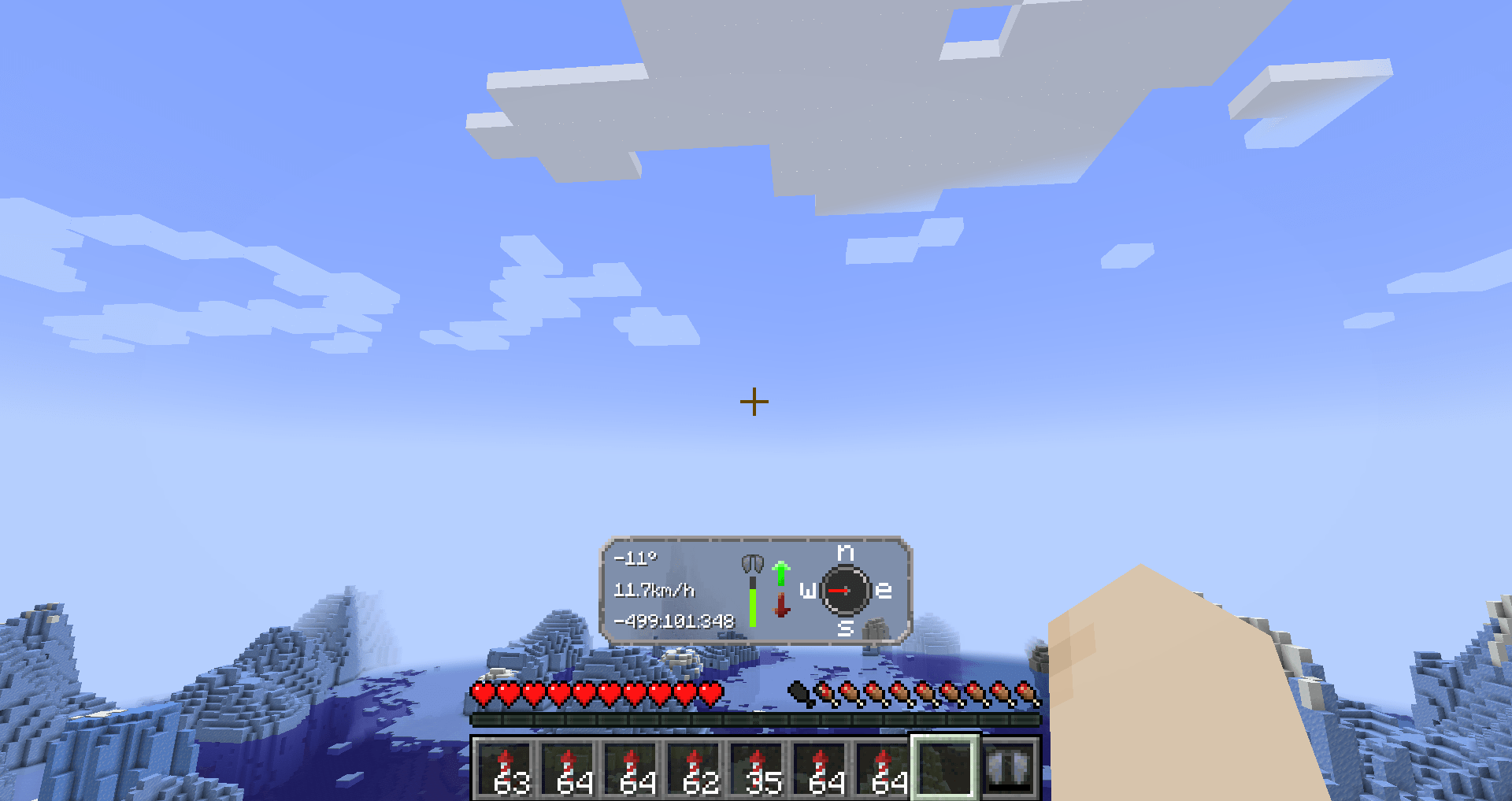
Information
Elytra Hud add in a new way to fly with your elytra.
It adds important information on the screen while flying.
Use this mod for your long flights to get the most out of the trip
HUD:s features
Left side
We have three text fields, in order they are
- Your pitch angle.
- Speed in km/h
- Coordinates (Will scale to how many numbers that are up)
Middle
In the middle, you have the status of your Elytra.
To the right of that you have up and down arrows.
If you are flying up, it will light upp; that’s the same for going down.
Right side
On the right side you have a compass. This is not a normal compass, because it will always point towards the direction you are going
Config
The mod requires YetAnotherConfigLib and modmenu.
To be able to edit the config, you need thees mods.
Config Options
They are in order in the config menu.
- Hud’s visibility — If you want to turn of the HUD’s visibility
- Hud’s delay — The time it takes for the hud to appear.
- Elytra status — You can turn of the damage level for elytra in the HUD
- Elyta coordinates — If you want, you can disable coordinates in the HUD
- Speed measurement — There is km/h (default), m/s or mph available
Looking for a server?
Get BisectHosting and save 25% off for new customers using code Lukas at checkout.
Thanks for your support — it helps me develop this and other mods I make!
#ad

How to download?
With launcher (recommended)
- Download Modrinth launcher (more user-friendly) or Prism launcher (A lot more options but harder to use for someone new)
- Create a profile for the minecraft version you want and make sure its fabric. Check so the mod has compatibility with that version first.
- You can download the mod in the launcher
- (Modrinth launcher) In your profile in the right corner, press “Add content” and search up “Simple Elytra Hud” and press “install.”
- (Prism launcher) Go in to the profile by pressing “edit” and then you want and press “Mods” and then “Download mods”. Under the Modrinth tab write “Simple Elytra Hud”. Mark for download and then press confirm.
- You need modmenu and YetAnotherConfigLib. Download it in the same way!
- Now you can start your profile and enjoy!
Without launcher
- You can download the mod here on Modrinth or Github
- You also need to download Fabric API
- You also need Mod Menu and YetAnotherConfigLib (Versions bellow and 1.6 use and its optional cloth config)
- You also need fabric and this will automatically create a profile for you
- Put the mods in %appdata%/.minecraft/mods
- Now you can play Minecraft
Open source
Nearly all my mods are opensource and under MIT.
Feel free to use however you want.
If you want to help the development, check out the GitHub!
If you found a bug, please report it here!
Inspiration and credit
- The mod is inspired by Boat HUD
- Lukasabbe has coded
- Lemonixi made the graphics.
- Smurre came up with the idea
Thank you all for downloading the mod!
常见问题
Simple Elytra Hud 支持哪些 Minecraft 版本?
Simple Elytra Hud 支持 Minecraft Java 版 1.20.4–1.21.11,共 15 个版本,可用的加载器:Fabric。下载时注意选择和你游戏版本一致的文件。
Simple Elytra Hud 怎么安装?
先用 PCL2 或 HMCL 启动器安装对应版本的 Fabric,再把下载的 .jar 文件放进游戏目录的 mods 文件夹,重新启动游戏即可。开启了版本隔离的,mods 文件夹在 versions/版本名 下面。运行环境:仅客户端。
lukasabbe 的其他作品
查看全部 →
Bookshelf Inspector
查看雕纹书架中的任意一本书。

Simple Voice Chat No Mic
Adds a way to message a whole group if you don't have a microphone. When you are in a group you can now use /msgvc
Closes recipe book
The recipe book menu closes after you have used it.

Copper Grates Bubble
This mod allows soul sand and magma blocks effects to go thru copper grates
评论
登录后评论和评分