
SIMPLE Time Controller
Control Minecraft's game speed with a simple WATCH. Speed up or slow down your world for testing, building, experiments, farms, and more.
截图
介绍
Time Controller is a simple Minecraft mod that adds a special watch that lets you control the speed of the game directly in your world.
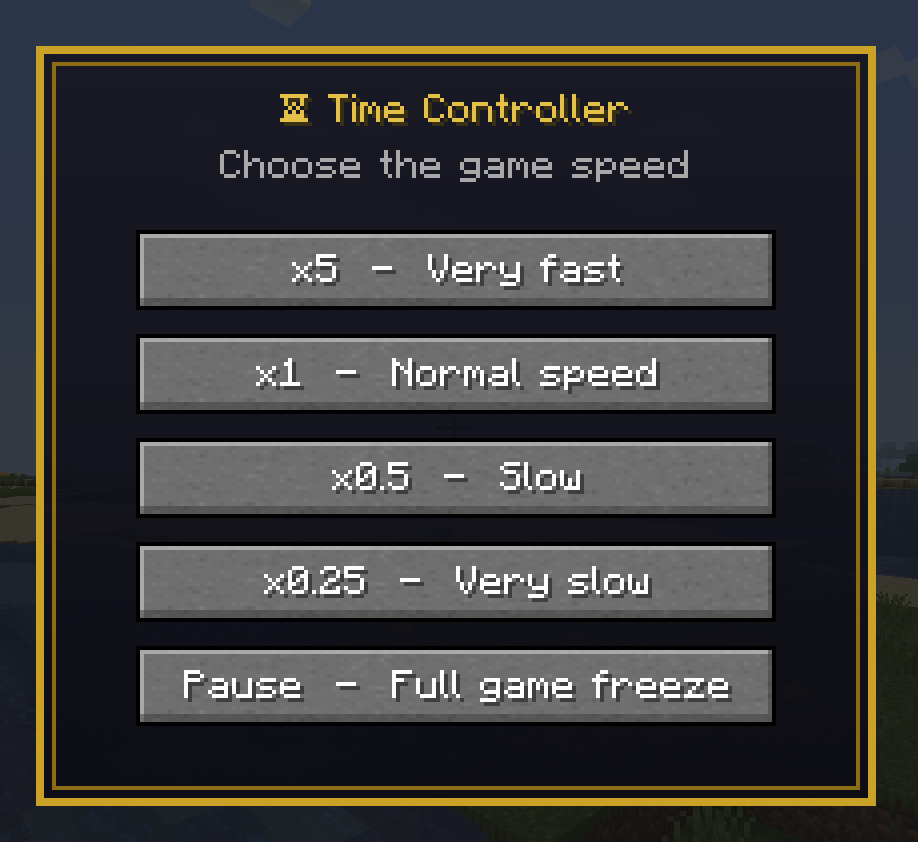
The Time Controller watch is designed to make changing the game speed quick and easy. Instead of relying on complicated commands, you can use the watch to increase or decrease the speed of Minecraft whenever you want.
Want to speed things up? Use the watch to make the game run faster. Need more time to build, test something, or set up a mechanism? Slow the game down and take your time. The watch gives you a simple way to experiment with different game speeds without leaving your world.
Time Controller can be useful for many different situations. You can use it while testing farms and redstone machines, experimenting with game mechanics, creating cinematic scenes, testing mods, building, or simply having fun with different speeds.
The mod focuses on one main feature: giving players an easy and intuitive way to control time in Minecraft. The watch is the central tool, keeping the experience simple without adding unnecessary features or complicated interfaces.
Time Controller is designed to be lightweight and easy to use. Whether you are experimenting with Minecraft mechanics or simply want to change the pace of your gameplay, the Time Controller watch puts control of the game speed directly in your hands.
Future updates may add additional controls and improvements based on player feedback. Try different speeds, experiment with your world, and discover new ways to use the Time Controller.
常见问题
SIMPLE Time Controller 支持哪些 Minecraft 版本?
SIMPLE Time Controller 支持 Minecraft Java 版 1.18–26.3,共 32 个版本,可用的加载器:Fabric / Forge / NeoForge。下载时注意选择和你游戏版本一致的文件。
SIMPLE Time Controller 怎么安装?
先用 PCL2 或 HMCL 启动器安装对应版本的 Fabric / Forge / NeoForge,再把下载的 .jar 文件放进游戏目录的 mods 文件夹,重新启动游戏即可。开启了版本隔离的,mods 文件夹在 versions/版本名 下面。
ilcocowarrior 的其他作品
查看全部 →
FPS UP
Adds +200 FPS to the top-left FPS counter. Purely visual, no real performance boost. FAKE

FPS BOOST -Fake-
A simple FPS counter in the top-left corner. It adds +100 to the number, so it's fake: a joke mod that does not boost your real performance.

Ultimate FPS -FAKE-
Ultimate FPS double or triple your FPS and get you low PING -FAKE-

ESP Entity
ESP Entity makes all mobs, animals, and players around you glow, even through walls.
评论
登录后评论和评分