
截图
介绍
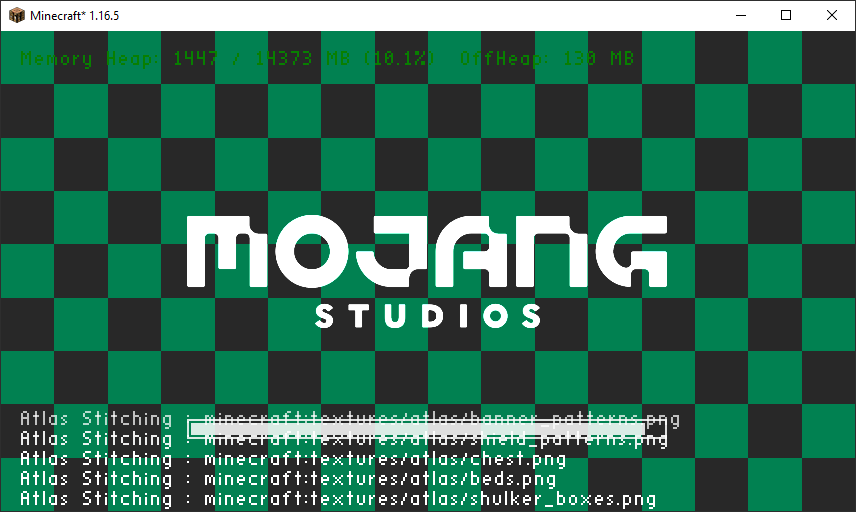
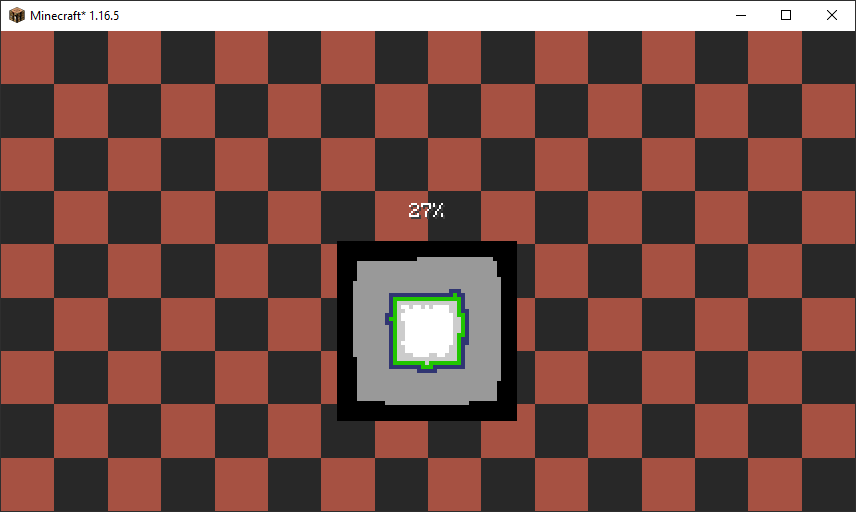
This mod allows you to easily customize the background image of loading screens in the game. For example you can set a new background image for the game loading screen or world loading screens. Your custom images are loaded from resource packs and can be any resolution as long as it’s a PNG. We recommend 1920×1080 or a 16:9 aspect for the best results.
How it works?
When you run the game with the mod installed a simplescreens.json configuration file will be generated in the config folder. You can edit this file to add new load screen backgrounds or keep the default. You can also define more than one background which will cause the mod to randomly pick one. The textures are loaded using Minecraft’s resource pack system, so the entry simplescreens:/textures/gui/title/load_screen_background.png will load a texture from assets/simplescreens/textures/gui/title/load_screen_background.png from a resource pack. Modpacks may need an additional mod to automatically enable resource packs, we recommend Open Loader for this.
Examples
Below is an example configuration file that will have different random logos for the different types of loading screens. In this example we are loading the background images from the assets/my_pack/textures/gui/loading_screens folder in a resource pack.
{
"game_load_screen_textures": [

"mypack:textures/gui/loading_screens/game_one.png",

"mypack:textures/gui/loading_screens/game_two.png",

"mypack:textures/gui/loading_screens/game_three.png"

],

"world_load_screen_textures": [

"mypack:textures/gui/loading_screens/world_one.png",

"mypack:textures/gui/loading_screens/world_two.png",

"mypack:textures/gui/loading_screens/world_three.png"

]

}
FaQ
Q: I get purple and black squares instead of my texture? This means that the game can not find the image that you specified. This can be caused by a typo in your configuration file, or by the resource pack with your image has not been correctly loaded. This mod will not load resource packs for you! You must load them yourself or use a mod like Open Loader to load them for you automatically!
Q: How do random textures work? When more than one texture is specified the mod will pick one at random. Each entry has the same probability of being selected, however you can add duplicate entries if you want to make a specific texture more or less common. Random textures are completely optional, and the mod will work perfectly fine with just one.
Q: When I start the game I still see the red loading screen for a bit? Unfortunately this screen is displayed before mods are loaded, meaning we can not run any of our code yet. This limitation is shared by other mods that also modify the loading screen so we don’t believe it is realistic to fix this issue. If anyone knows of a solution please let us know.
Credits
This mod was developed by Jaredlll08 and Darkhax for Kehaan but other projects can use it as well. The logo for this project was created by Delapouite and is licensed under CC BY 3.0.

This project is sponsored by Nodecraft. Use code DARKHAX for 30% off your first month of service!
常见问题
Simple Screens 支持哪些 Minecraft 版本?
Simple Screens 支持 Minecraft Java 版 1.16.5,可用的加载器:Forge。下载时注意选择和你游戏版本一致的文件。
Simple Screens 怎么安装?
先用 PCL2 或 HMCL 启动器安装对应版本的 Forge,再把下载的 .jar 文件放进游戏目录的 mods 文件夹,重新启动游戏即可。开启了版本隔离的,mods 文件夹在 versions/版本名 下面。运行环境:仅客户端。
jaredlll08 的其他作品
查看全部 →
Controlling
为按键绑定菜单添加搜索栏

Clumps
将经验球聚合成团以减少卡顿
CraftTweaker
CraftTweaker 允许整合包和服务器自定义游戏内容。使用 CraftTweaker,你可以修改配方、编写事件脚本、添加新命令,甚至修改物品属性!

Searchables
Searchables 是一个前置库模组,提供了一些辅助方法,可以基于组件对元素进行搜索和过滤,并内置了自动补全功能。
评论
登录后评论和评分