
Simple Player Badges
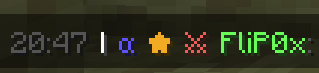
A simple Mod that allows you to create, assign and display Badges next to player names in Chat.
截图

介绍
Simple Player Badges is a mod that enhances your in-game chat by allowing custom player badges to appear next to player names. This mod lets you assign various badges to players and adds a timestamp feature for better chat readability.
The timestamp functionality was inspired by Beautified Chat by Serilum. Thanks to Serilum for the inspiration, as some of their features were recreated into this mod.
Configuration:
To configure the badges, you’ll need to create a “badgenames.json` file in the `config“ folder of your Minecraft Server. The JSON configuration contains two primary sections:
players: This is where you assign badges to specific players by name.
badges: Here you define the properties of each badge, including its symbol, color, and hover text.
Here’s an example configuration:
{
    "players": [
        {
            "name": "Player1",
            "badges": ["badge1", "badge2", "badge3"]
        },
        {
            "name": "Player2",
            "badges": ["badge2"]
        }
    ],
    "badges": {
        "badge1": {
            "symbol": "★",
            "color": "gold",
            "hover": "Badge1 Title"
        },
        "badge2": {
            "symbol": "α",
            "color": "blue",
            "hover": "Badge2 Title"
        },
        "badge3": {
            "symbol": "⚔",
            "color": "red",
            "hover": "Badge3 Title"
        }
    }
}
The configuration file should be saved in UTF-8 format to ensure special characters display correctly.
Operators can use “/badges reload` on runtime to update any changes made to `badgenames.json“.
Explanation of Fields:
Spoiler
players:
- name: The Minecraft username of the player.
- badges: A list of badge names assigned to the player. Each badge name refers to a badge defined in the badges section.
badges:
- symbol: The symbol or text that will be displayed as the badge next to the player’s name in chat. This can include text and symbols.
- color: The color of the badge symbol. Use standard Minecraft color names (like gold, blue, red, etc.).
- hover: The text that appears when you hover over the badge in chat.
To-Do:
- Automatic Config Generation if Config doesn’t already exist
- Creating and assigning badges with commands
- Option to enable and disable certain features
常见问题
Simple Player Badges 支持哪些 Minecraft 版本?
Simple Player Badges 支持 Minecraft Java 版 1.21.3,可用的加载器:Fabric。下载时注意选择和你游戏版本一致的文件。
Simple Player Badges 怎么安装?
先用 PCL2 或 HMCL 启动器安装对应版本的 Fabric,再把下载的 .jar 文件放进游戏目录的 mods 文件夹,重新启动游戏即可。开启了版本隔离的,mods 文件夹在 versions/版本名 下面。运行环境:仅服务端。
评论
登录后评论和评分