
介绍
介绍由机器翻译自 CurseForge 原页面,仅供参考。


什么是 SDRP?
SDRP 是一个简单的 Minecraft Discord Rich Presence 客户端,允许你在 Discord 上显示当前的 Minecraft 状态。
如何使用 SDRP?
- 只需从 CurseForge 下载该模组并将其放入你的 mods 文件夹即可。这是一个仅客户端模组,因此你无需在服务器上安装它。
- 然后你需要在 Discord 上创建一个应用程序。你可以前往 Discord 开发者门户 并点击“New Application”来完成。给它起个名字并点击“Create”。
- 在
General Information标签页中为你的应用附加一张图片。这将是当状态不是正在游玩 Minecraft 时在 Discord 上显示的图片。 - 前往
Rich Presence标签页并添加一张新图片。这将是当状态是正在游玩 Minecraft 时在 Discord 上显示的图片。
- 在
- 创建好应用程序后,你需要附加具有正确名称的图片,模组才能正常工作。
- 我们在
images文件夹中附带了示例图片。这些图片具有正确的名称,模组开箱即用。 - 正确的配置看起来像这样:
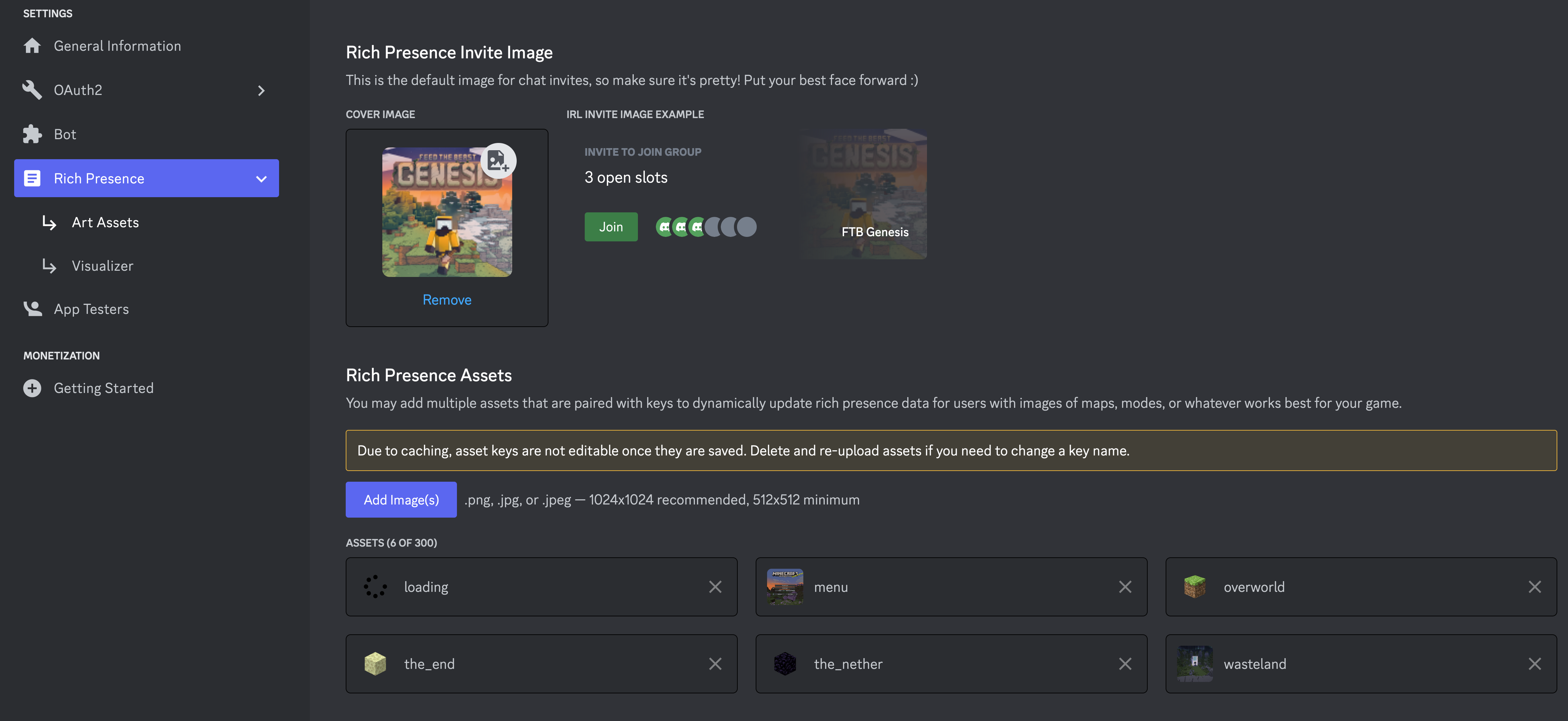
- 如果你想设置自己的图片,可以按照下一节进行操作。
- 我们在
注意事项
我们始终会尝试使用名为 loading 的图片和名为 menu 的图片,分别用于游戏加载时和主菜单时。如果你没有这些图片,模组将无法在这些状态下显示图片。
menu当主菜单显示时loading当游戏加载时
使用自定义图片
如果你不使用 KubeJS 集成,则需要遵循我们的图片和语言键命名约定。约定如下:
- 名称:
sdrp.[DIMENSION_NAME](语言键) - 图片键:
sdrp.[DIMENSION_NAME].in - 图片名称:
[DIMESNION_NAME]
因此,要使其正常工作,你需要在 Discord 应用的 Rich Presence 设置中添加一张以你想要支持的维度命名的图片。
例如,如果我想支持末地和主世界。它们的名称如下:minecraft:overworld、minecraft:the_end。我们忽略 minecraft: 部分,并将图片命名为 the_end 和 overworld。然后,我们在语言 Json 中为 Image Key 和 Name 添加语言键:
{
  "sdrp.overworld": "Overworld",
  "sdrp.overworld.in": "In the Overworld"
}
开箱即用支持的内容
维度
我们会从维度名称中省略 modid,改用 name。因此,minecraft:overworld 会变成 overworld。
overworldthe_netherthe_endcompact_worlddungeonspatial_storageothersideparadise_lostmining
这些维度并非全部都在 images 文件夹中提供了示例图片
语言
{
  "sdrp.logo": "Pack Logo",
  "sdrp.mainmenu": "Main Menu",
  "sdrp.overworld.in": "In Overworld",
  "sdrp.overworld": "Overworld",
  "sdrp.the_nether.in": "In Nether",
  "sdrp.the_nether": "Nether",
  "sdrp.the_end.in": "In The End",
  "sdrp.the_end": "The End",
  "sdrp.compact_world.in": "In Compact World",
  "sdrp.compact_world": "Compact World",
  "sdrp.dungeon.in": "In Dungeon World",
  "sdrp.dungeon": "Dungeon World",
  "sdrp.spatial_storage.in": "In Spatial Storage",
  "sdrp.spatial_storage": "Spatial Storage",
  "sdrp.otherside.in": "In Otherside",
  "sdrp.otherside": "Otherside",
  "sdrp.paradise_lost.in": "In Paradise Lost",
  "sdrp.paradise_lost": "Paradise Lost",
  "sdrp.mining": "Mining Dimension",
  "sdrp.mining.in": "In Mining dimension"
}
配置
{
  "clientId": 1000000000,   // Your Discord application ID
  "enabled": true,          // Whether or not the mod is enabled
  "screenEvent": false,     // Disables the `menu` and `loading` images
  "clientJoinEvent": false, // Disables the level join events which will prevent the mod from showing the level you are in
  "logState": false,        // Enables developer logging of the state json being sent to Discord
}
Sunekaer 的其他作品
查看全部 →
Yeetus Experimentus
by Nanite, Sunekaer 等
禁用创建或加载世界时出现的实验性设置弹窗。
1.2亿
1 个月前
Modrinth · CurseForge

Flat Bedrock (Forge / Fabric)
by Sunekaer
让世界生成平整的基岩层
1661万
1 个月前
CurseForge

Tool Kit
by Sunekaer
添加实用命令并改进原版结构方块 - ToolKit
1439万
1 个月前
CurseForge

Structure Expansion
by Sunekaer, ErrorMikey
一个小型模组,提高了结构方块和 /fill 命令的大小限制
1356万
1 个月前
CurseForge
评论
登录后评论和评分