
截图

介绍
SignalLoss
Get notified whenever your server connection gets interrupted
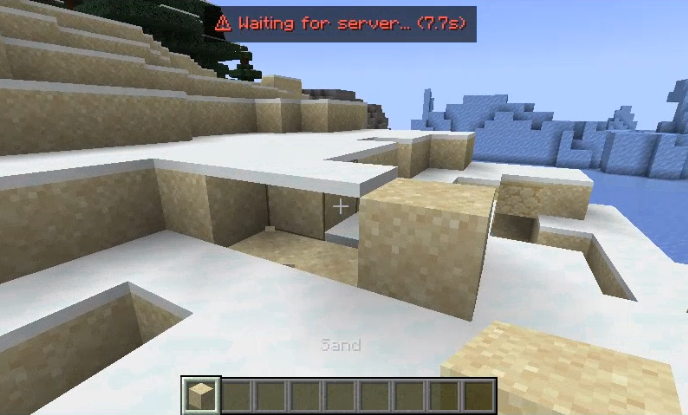
SignalLoss is a lightweight, configurable, client-side Fabric mod that displays a simple toast notification when your connection to a Minecraft server is interrupted.

Configuration
You can configure the mod in-game using commands or by editing /config/signalloss.json.
Commands:
/signalloss config <option> <value>– sets a config value/signalloss config reset– resets the config file to default settings/signalloss reload– reloads the config fromsignalloss.json
Options:
| Option | Command | Default | Description |
|:————————| :— |:————|:————————————————————————————————————————————————————————–|
| Enabled | enabled | true | Enable the SignalLoss mod |
| Timeout Threshold | timeoutThreshold | 2000 (2s) | How long to wait since the last packet was successfully received, before displaying the toast notification. |
| Min Warning Time | minWarningTime | 2000 (2s) | Minimum time the toast stays on screen after being triggered, to prevent flickering. |
| Linger Time | lingerTime | 1000 (1s) | How long the toast stays on screen after recovery (shows final lag duration). |
| Draw Background | drawBackground | true | Should a background for the toast be rendered |
| Singleplayer | showInSingleplayer| false | Enable the SignalLoss mod for the Singleplayer internal server |
| Position | position | CENTER | Screen position (LEFT, CENTER, RIGHT). |
| Text Color | textColor | #FFFF5555 | ARGB Hex color for the warning text. |
| Background Color | backgroundColor | #A0000000 | ARGB Hex color for the background box. |
| Toast Notification | toastMessage | ⚠ Waiting for server... | The message displayed in the toast notification when a connection interruption is detected.
常见问题
SignalLoss 支持哪些 Minecraft 版本?
SignalLoss 支持 Minecraft Java 版 1.21.1–26.3,共 16 个版本,可用的加载器:Fabric。下载时注意选择和你游戏版本一致的文件。
SignalLoss 怎么安装?
先用 PCL2 或 HMCL 启动器安装对应版本的 Fabric,再把下载的 .jar 文件放进游戏目录的 mods 文件夹,重新启动游戏即可。开启了版本隔离的,mods 文件夹在 versions/版本名 下面。运行环境:仅客户端。


评论
登录后评论和评分