
截图

介绍
中文介绍正在准备中,下面暂时显示原文。

Sign Clipboard
Easy way of copying and pasting text between signs.
Usage
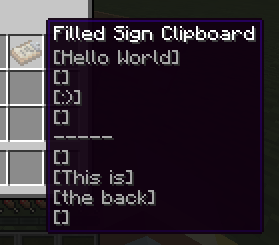
Simply craft a Sign Clipboard and Sneak Right Click on a sign to copy it. This will give you a Filled Sign Clipboard.
Filled Sign Clipboard stores the text that you can then Sneak Right Click on other signs to paste.
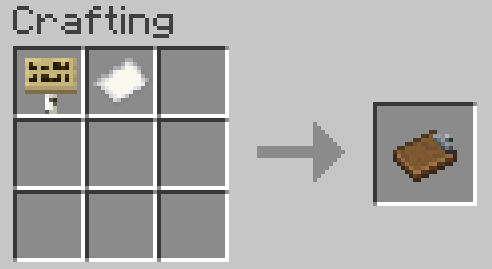
Recipe
Recipe takes any kind of sign.

常见问题
Sign Clipboard 支持哪些 Minecraft 版本?
Sign Clipboard 支持 Minecraft Java 版 1.20.1,可用的加载器:Forge。下载时注意选择和你游戏版本一致的文件。
Sign Clipboard 怎么安装?
先用 PCL2 或 HMCL 启动器安装对应版本的 Forge,再把下载的 .jar 文件放进游戏目录的 mods 文件夹,重新启动游戏即可。开启了版本隔离的,mods 文件夹在 versions/版本名 下面。运行环境:客户端和服务端都要装。
Quarris 的其他作品
查看全部 →
Pretty Pipes: Fluids
by Quarris
Pretty Pipes 附属模组,新增流体管道,方便输送各种流体!
558.9万
1 年前
Modrinth · CurseForge

Enigmatic Graves
by Quarris, Mute_Tiefling 等
直观且持久的墓碑
345.9万
3 年前
CurseForge

Rebirth of the Mobs
by Quarris, SandwichHorror
Making monsters terrifying again. Made for Rebirth of the Night (RotN).
102.9万
5 年前
CurseForge

Eidolon Data Recipes
by Quarris
Adds data-packable recipes to Eidolon
77万
4 年前
CurseForge
评论
登录后评论和评分