
Showcase
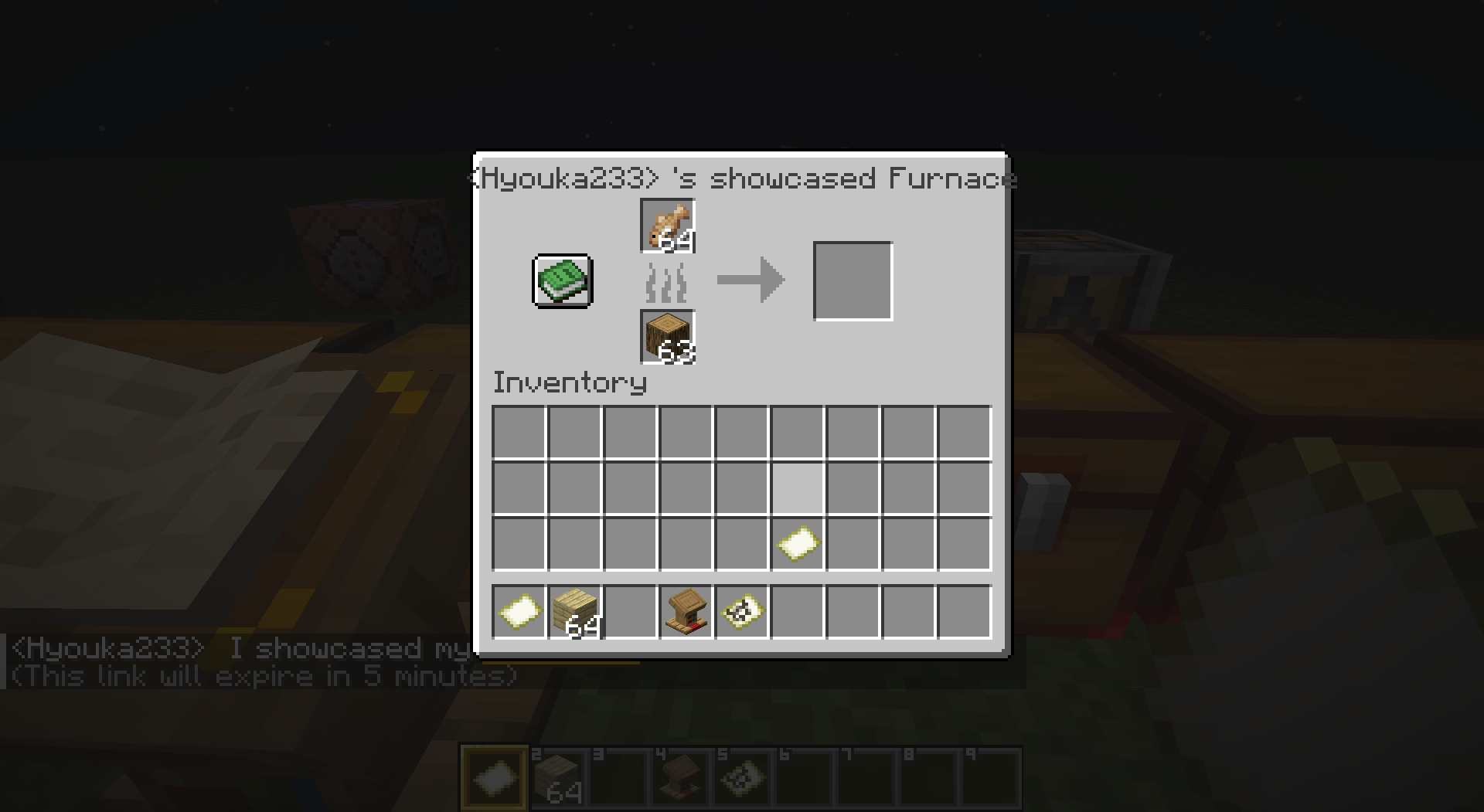
A server-side mod that allows players to share links in chat to showcase items, inventories, containers, villager trades, and statistics through commands or chat keywords.
截图

介绍
Showcase Mod
The current description is for V2. For V1, please click here.
A server-side Minecraft mod that allows players to share links in chat to showcase items, inventories, containers, villager trades, and statistics through commands or chat keywords.
✨ Features
- Comprehensive Sharing: Items, inventories, containers, and villager trades
- Server-Side: No client installation required
- Interactive Previews: Auto-unpack containers, view books and maps
- Multi-Language: Support for 17+ languages
- Persistent Storage: Shares saved until expiration
- Permission System: LuckPerms integration
- Configurable Chat Keywords: Customizable trigger words for quick sharing
- Statistics Tracking: Player statistics with detailed categorization
- Developer Placeholders: PlaceholderAPI integration for other plugins
- Chat Item Icons: Customizable item icons in chat messages (Experimental)
About Chat Item Icons (Experimental)
Displays item icons in chat messages for shared items.
Why Resource Pack? As a server-side mod, we use Minecraft’s custom font system to render icons.
Setup:
- Generate resource pack at IconifyCraft
- Host the pack on a web server
- Enable in
config/showcase/config.yml:itemIcons.enabled = true - Add to
server.properties:
   resource-pack=<your-hosted-pack-url>
   resource-pack-sha1=<pack-sha1-hash>
   require-resource-pack=true
Config Options:
itemIcons:
  enabled: false                    # Enable/disable icons
  fontNamespace: "iconifycraft"     # Resource pack namespace
  includeInItemNames: true          # Show icons in item names
⚠Warning: Experimental feature. Current support for displaying blocks, including chests and ender chests, is incomplete.
⌨️ Commands
💡 View detailed command reference with examples and permissions
Player Commands
/showcase <type> [player] [duration] [description]Types: item, inventory, hotbar, enderchest, container, merchant, stats
Duration formats: 30s, 5m, 1h, 1h30m or raw seconds (e.g. 300)
Other Commands:
/showcase cancel <id>– Cancel your share/showcase-view <id>– View shared content
Admin Commands
/admin-showcase <type> <player> [receiver] [duration] [description]
/showcase-manage <action> [args]Actions: reload, list [page], cancel <id|player>
Chat Keywords
Players can type keywords in square brackets to quickly share content:
Default Keywords (configurable in config.yml):
[item]or[i]– Share held item[inventory]or[inv]– Share inventory[hotbar]or[hb]– Share hotbar[ender_chest]or[ec]– Share ender chest[stats]or[stat]– Share statistics
Example: Check out my [item]! → automatically replaced with clickable share link
🔌 Developer API
🔗 Full API Documentation – Integration guides and examples
PlaceholdersAPI Integration
Basic Sharing:
%showcase:item%        - Share held item
%showcase:inventory%   - Share inventory
%showcase:hotbar%      - Share hotbar
%showcase:ender_chest% - Share ender chest
%showcase:stats%       - Share statistics
Essential Statistics:
%showcase:shares_count% - Number of active shares
%showcase:total_views%  - Total views received
%showcase:can_share_item% - Permission check (true/false)
%showcase:has_admin_perms% - Admin check (true/false)⚙️ Configuration
⚙️ Configuration Reference – Complete settings guide
Main configuration file: config/showcase/config.yml (YAML format)
Key Settings:
- Share cooldowns and permissions
- Chat keywords and triggers
- Statistics tracking options
- Performance optimization
- Multi-language support
📖 View example config | 🔐 Permission setup
📚 Documentation & Resources
- Complete Documentation – Full feature documentation
- Getting Started – Installation and setup guide
- Command Reference – All commands with examples
- Configuration Guide – Settings and customization
- Developer API – PlaceholderAPI integration
- FAQ & Troubleshooting – Common issues and solutions
📝 License
常见问题
Showcase 支持哪些 Minecraft 版本?
Showcase 支持 Minecraft Java 版 1.20.5–26.3,共 19 个版本,可用的加载器:Fabric / Quilt。下载时注意选择和你游戏版本一致的文件。
Showcase 怎么安装?
先用 PCL2 或 HMCL 启动器安装对应版本的 Fabric / Quilt,再把下载的 .jar 文件放进游戏目录的 mods 文件夹,重新启动游戏即可。开启了版本隔离的,mods 文件夹在 versions/版本名 下面。运行环境:仅服务端。
Hyouka 的其他作品
查看全部 →
kiss
A lightweight server-side mod that spawns heart particles above the player who rapidly crouches near others — a simple gesture of friendliness.

Signfinder
Finds and highlights signs based on content, with configurable search patterns.

Let Me Peek
A server-side fabric mod that lets you see what your friends and other players are doing through simple command requests, without needing to teleport to them.

birthday-fabric
A birthday celebration mod designed for Minecraft servers, allowing each player to set their birthday and receive gifts and warm wishes from others on their special day!
评论
登录后评论和评分