
Show me the delay
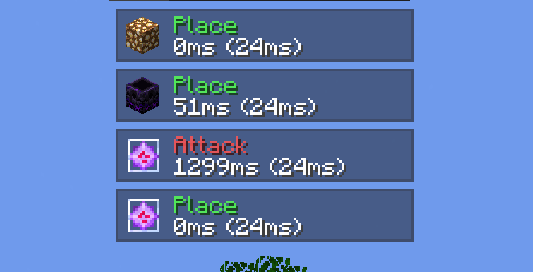
Client-side Fabric HUD that tracks and displays your action latency, item-switch delay, and network ping in real time. Perfect for PvP and competitive play to measure mechanical delay and input timing.
截图
介绍
Show Me The Delay is a lightweight, fully client-side Fabric mod that visualizes your mechanical action delay and server latency directly on your screen.
Features
- Action Timing: Tracks delay when placing blocks, breaking blocks, attacking entities, and using items.
- Display Modes: Toggle between item-switch delay, network ping, or a combined view (e.g.,
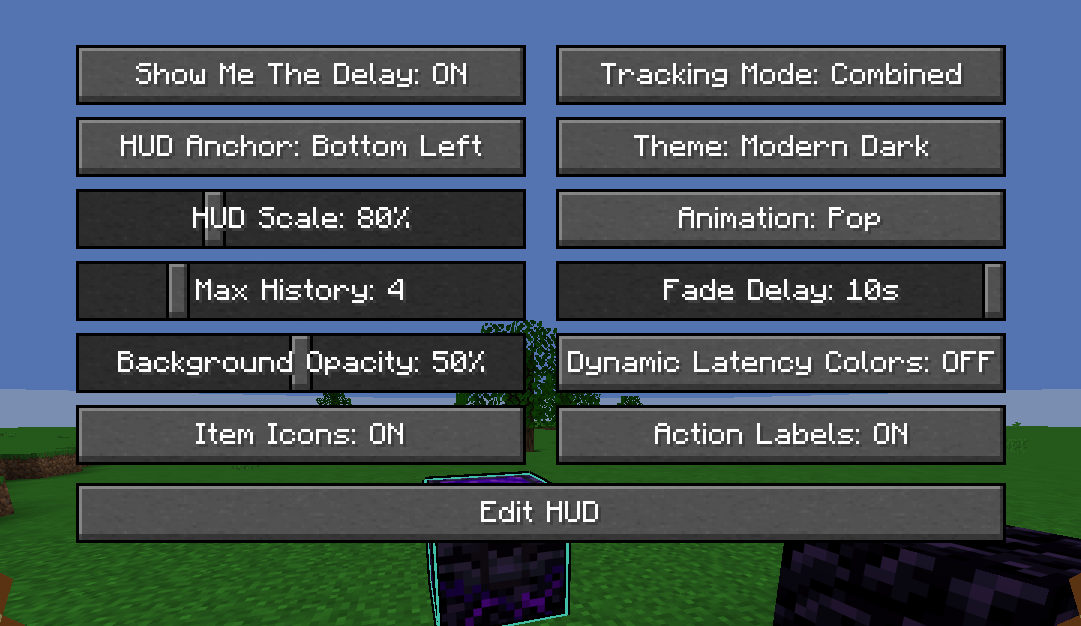
45ms (28ms)). - Customizable HUD: Multiple themes (Modern Dark, Translucent, Slate Outline, Minimal) with smooth animations (Slide, Pop, Fade, Instant).
- In-Game Editor: Move and resize the overlay live with a drag-and-drop screen.
- Dynamic Color Coding: Instantly see latency ranges with green, yellow, orange, and red indicators.
Usage & Controls
- Press
Oor type/delayconfigto open the settings menu. - Click Edit HUD to drag the overlay or scroll with your mouse wheel to adjust scale.
常见问题
Show me the delay 支持哪些 Minecraft 版本?
Show me the delay 支持 Minecraft Java 版 1.21.11,可用的加载器:Fabric。下载时注意选择和你游戏版本一致的文件。
Show me the delay 怎么安装?
先用 PCL2 或 HMCL 启动器安装对应版本的 Fabric,再把下载的 .jar 文件放进游戏目录的 mods 文件夹,重新启动游戏即可。开启了版本隔离的,mods 文件夹在 versions/版本名 下面。运行环境:仅客户端。
xKzuto 的其他作品
查看全部 →
Armor Damage Tint
Adds customizable damage tint to player armor. Toggle on/off and change the tint color from mod menu.

custom view model
It gives you complete control over your first-person item and hand viewmodel position, rotation, and size, with support for hand splitting, keybind toggling, presets, and Mod Menu integration!

client side /ping
A client side mod which adds /ping command to check own and other's ping on server's.

Toggle All
This Mod Adds a Key bind to toggle everything like scoreboard chat full bright and much more
评论
登录后评论和评分