介绍
Show Everything (Forge Port)
Forge port of MinersLab/show-everything.
Show items, blocks, fluids, and entities in chat with hover details. The command logic runs on the server, and the mod declares remote clients as optional, so vanilla/Forge clients without this mod can still join.
Clients that also install this mod get enhanced /show-item rendering for very large item NBT. Clients without the mod receive a safe shortened hover instead, so oversized NBT cannot kick players through Minecraft’s chat packet string limit.
Commands
All commands are available to normal players.
| Command | Description |
| — | — |
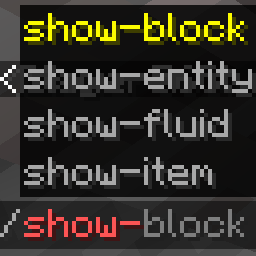
| /show-item | Shows the item in your main hand, or offhand if the main hand is empty. |
| /show-block | Shows the block you are looking at within 15 blocks. Falls back to your current position. |
| /show-block <x> <y> <z> | Shows the block at a specific position. |
| /show-fluid | Shows the fluid you are looking at within 15 blocks. Falls back to your current position. |
| /show-fluid <x> <y> <z> | Shows the fluid/block at a specific position. |
| /show-entity | Shows the entity you are looking at within 15 blocks. Falls back to yourself. |
| /show-entity <selector> | Shows a selected entity. |
Aliases without hyphens are also registered, such as /showitem and /showblock.
Client keybind (since v1.0.5)
With the client mod installed, an optional keybind (customizable in Controls, default H) shows the item under the cursor in chat. It works in any screen where an item tooltip is displayed — container screens, other mods’ GUIs, and item-list overlays such as JEI/REI/EMI — and requires the server to run the mod. The chat output is identical to /show-item.
常见问题
Show Everything (Forge port) 支持哪些 Minecraft 版本?
Show Everything (Forge port) 支持 Minecraft Java 版 1.7.10–1.21.1,共 7 个版本,可用的加载器:Forge / NeoForge。下载时注意选择和你游戏版本一致的文件。
Show Everything (Forge port) 怎么安装?
先用 PCL2 或 HMCL 启动器安装对应版本的 Forge / NeoForge,再把下载的 .jar 文件放进游戏目录的 mods 文件夹,重新启动游戏即可。开启了版本隔离的,mods 文件夹在 versions/版本名 下面。运行环境:客户端 / 服务端。
xxtg666 的其他作品
查看全部 →
Xaero’s Map Server Utils
允许服务器管理员便捷地禁用 Xaero's 地图系列模组中的实体雷达、小地图等功能,让竞技玩法更加公平。
Xaero’s Map Server Utils (Mod Version)
允许服务器管理员方便地禁用Xaero的地图系列模组的实体雷达、小地图等功能,让竞技玩法更加公平

Show Everything
Showcase your items, blocks, and even entities in chat.
评论
登录后评论和评分