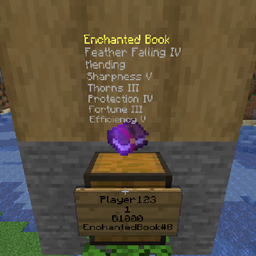
Shop Visualizer – [FABRIC/FORGE]
Client Side Mod for seeing what a shop is selling on Fabric/Bukkit servers
介绍
What is this?
Shop Visualizer is a client side mod meant to be used in conjunction with either the bukkit plugin Shop Visualizer, or the fabric (if using fabric) mod Gunpowder Sign Shops. by itself it will not do anything, and if you aren’t playing on a server with it installed, it also will not do anything.
Supports
Chestshop – Bukkit Plugin
Quickshop Reremake – Bukkit Plugin
Gunpowder SignShop – Fabric Serverside Mod
It can be easily made to support other bukkit shop plugins.
Downloads
Release jars support FABRIC
Beta jars support FORGE
they are all releases, but this makes them visually distinct.
How to use
To use the visualizer, you will make a shop as you normally would and the text display will appear when hovering over the sign. Gunpowder signs will work out of the box but Chestshops will need to be remade if the bukkit plugin is installed as the plugin puts some data onto the sign that gets sent to the client when the chunk loads.

Inspiration
Many servers, mostly bukkit, do not have any form of shop visualization due to the performance issues it causes on the server itself. If the rendering could be moved to the client, the burden on the server would be lifted, allowing players to see information that can be valuable. Enchantments on swords, lore and names would all be displayed on the client with very minimal impact.
常见问题
Shop Visualizer – [FABRIC/FORGE] 支持哪些 Minecraft 版本?
Shop Visualizer – [FABRIC/FORGE] 支持 Minecraft Java 版 1.16.4–1.17,共 3 个版本,可用的加载器:Fabric / Forge。下载时注意选择和你游戏版本一致的文件。
Shop Visualizer – [FABRIC/FORGE] 怎么安装?
先用 PCL2 或 HMCL 启动器安装对应版本的 Fabric / Forge,再把下载的 .jar 文件放进游戏目录的 mods 文件夹,重新启动游戏即可。开启了版本隔离的,mods 文件夹在 versions/版本名 下面。
thethonk 的其他作品
查看全部 →
EpheroLib
Fabric/Forge 前置库模组,让为两个平台开发模组稍微容易一些

作物拓展 Croptopia
Croptopia——一个农业模组,新增超过250种食物、58种作物和26种果树![Fabric/NeoForge/Forge]
Server Browser – In Game Server Listings
服务器浏览器是一个在多人游戏界面添加服务器列表的模组,如果配合整合包进行配置,可以让你更轻松地找到带模组的服务器游玩![Fabric/Forge/NeoForge]

Server Browser
在游戏内就能找到模组服务器,让寻找变得更轻松!
评论
登录后评论和评分