
截图
介绍
Shoot Screen
=======
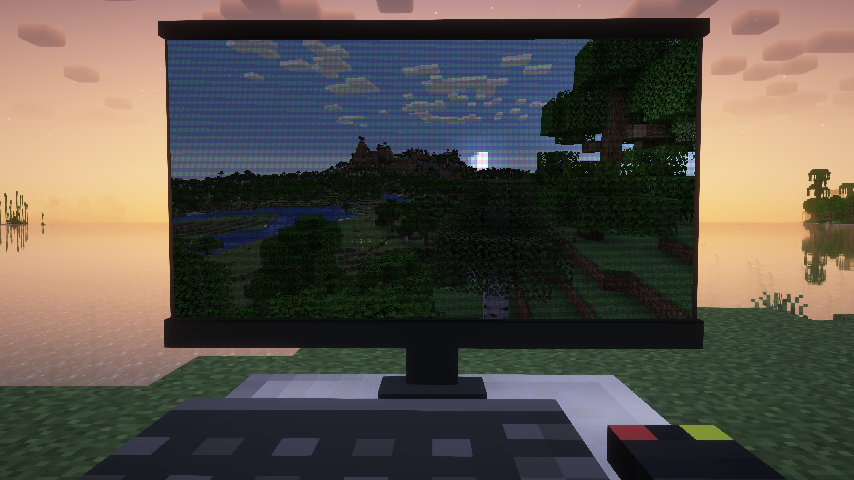
Make your game screen look like a screenshot.
Press ‘Z’ to toggle of screenshot like rendering.
Supprt custom background image and many other params.
Custom Background
Put following files in a resource pack.
├───assets
│   └───<namespace>
│       └───custom_background
│           └─── <image_name>.json //background config
│       └───texutres
│           └───custom_background
│               └─── <image_name>.png
If there is more than one background, will apply a random one.
//A background config example.
{
  "name": "example_background", //the image name.
    "screenRect": {				//define the sreen corners in background.
        "leftDown": [			//Percentage[0-1] form left down corner of iamge.
          0.106,
          0.249
        ],
        "leftUp": [
          0.0879,
          0.876
        ],
        "rightDown": [
          0.952,
          0.256
        ],
        "rightUp": [
          0.951,
          0.92
        ]
  },
  "moireStrength": 0.6,	//Strength of Moiré pattern.Range[0,1]. 0 means no Moiré pattern.
  "lightColor": [		//Following are the light parameters
    1.0,
    1.0,
    1.0
  ],
  "lightPos": [
    1.7,
    1.0,
    2.0
  ],
    "viewPos": [
    0.6,
    0.5,
    1.0
  ]
  "ambientStrength": 0.2,
  "specularStrength": 5,
  "shininess": 16,
}
About light parameters: this mod use Phong Lighting Model to simulate highlighting effects. The screen mapped to a rect from (0,0,0) to (1,1,0) and towards(0,0,1).
If you just want to disable highlighing effects , set specular strength to 0.
常见问题
Shoot Screen 支持哪些 Minecraft 版本?
Shoot Screen 支持 Minecraft Java 版 1.21.1–1.21.3,共 3 个版本,可用的加载器:NeoForge。下载时注意选择和你游戏版本一致的文件。
Shoot Screen 怎么安装?
先用 PCL2 或 HMCL 启动器安装对应版本的 NeoForge,再把下载的 .jar 文件放进游戏目录的 mods 文件夹,重新启动游戏即可。开启了版本隔离的,mods 文件夹在 versions/版本名 下面。运行环境:仅客户端。
xkball 的其他作品
查看全部 →
Power Screenshot
Allows you to take high resolution normal/panoramic/skybox/gif screenshots.

xkball’s Auto Translate
Use AI or Google Translate to translate item tooltips and FTB Quest.

Create: BlueprintVoid
Similar to structure void in vanilla mc. When a schematic with blueprint void is printed, the block in accordance won't be replaced regardless of selected replace mode.

xkball’s Auto Translate
Use AI or Google Translate to translate item tooltips and FTB Quest.
评论
登录后评论和评分