
Shifty Hotbar
A utility mod that implements the hotbar shifting ability, inspired by Stardew Valley.
介绍

Shifty Hotbar





A fully client-side utility mod that implements the hotbar shifting ability, inspired by Stardew Valley.
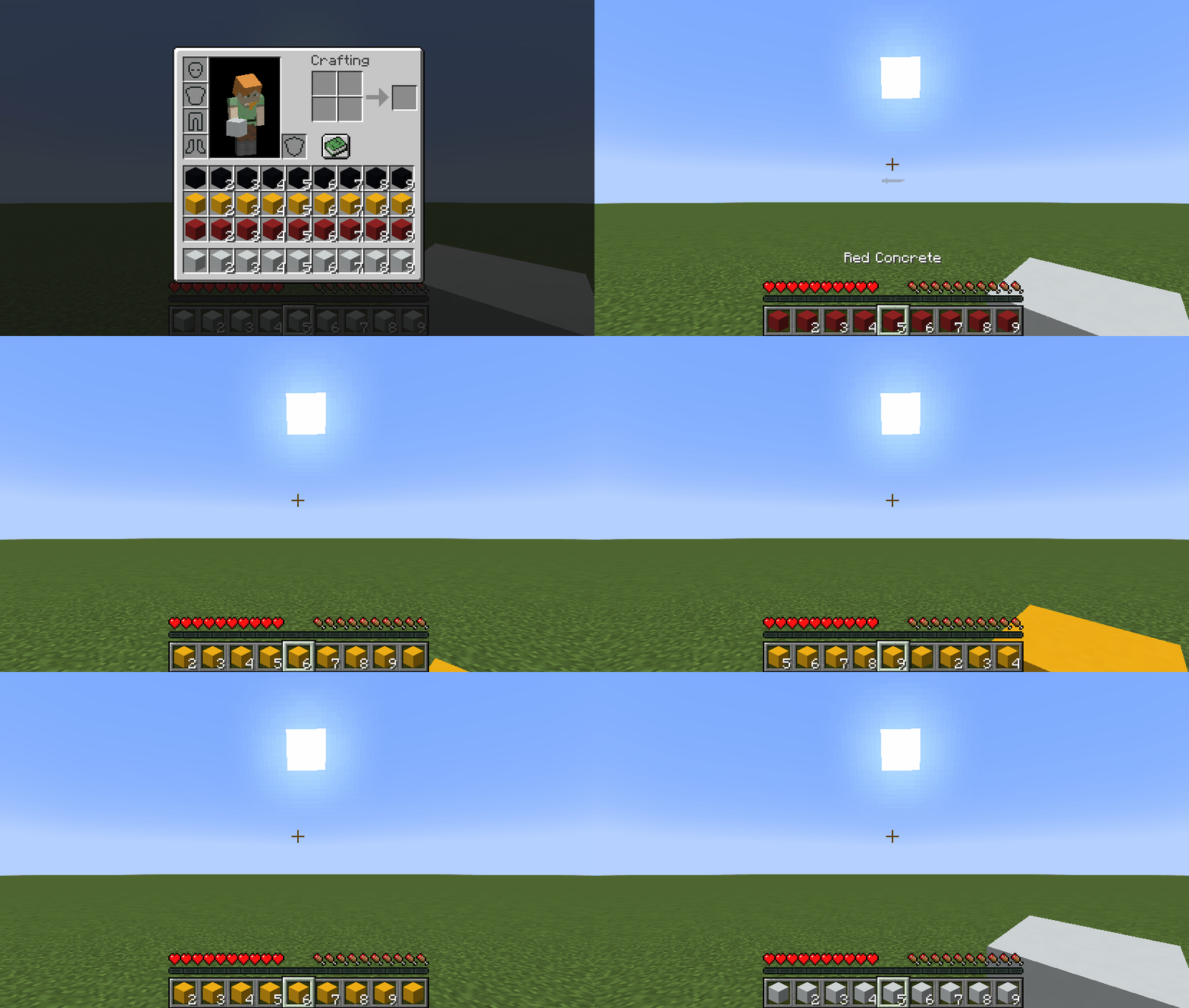
I know that there are mods like this in the wild, but none of them did suit me whatsoever. Therefore, I made the ultimate version that consists of every feature a mod like this can possibly provide:
- You can shift inventory rows in both directions (
Up ArrowandDown Arrowby default) - You can shift inventory columns in both directions (
Right ArrowandLeft Arrowby default) - You can shift slots in your hotbar in both directions
- You can shift slots in the selected column in both directions
- You can shift rows, columns and slots via mouse scroll while pressing a
modifierkey (Left Altby default) - You can quickly shift to a row, a column, or a slot via hotbar hotkeys (
1...9) while pressing amodifierkey (Left Altby default)
Key Binds
Key binds can be configured just like vanilla ones:
- Go to
Options... - Select
Controls... - Then choose
Key Binds... - Scroll down to the
Shifty Hotbarsection
| Name | Description | Default |
| —- | ———– | ————- |
| Row modifier | When pressed, it allows you to shift rows instead of choosing a slot via mouse scroll/hotkeys (1...9) | Left Alt |
| Previous row | Shifts all rows in your inventory so that the topmost row in your inventory becomes the hotbar | Down Arrow |
| Next row | Shifts all rows in your inventory so that the row above your hotbar becomes the hotbar | Up Arrow |
| Row-in-column modifier | When pressed, it allows you to shift slots in the selected column instead of choosing one via mouse scroll | |
| Previous row-in-column | Shifts all slots in the selected column so that the topmost slot in your inventory becomes the hotbar slot | |
| Next row-in-column | Shifts all slots in the selected column so that the slot above your hotbar slot becomes the hotbar slot | |
| Column modifier | When pressed, it allows you to shift columns instead of choosing a slot via mouse scroll/hotkeys (1...9) | |
| Previous column | Shifts all columns in your inventory so that the slot before your selected slot becomes the selected slot | Left Arrow |
| Next column | Shifts all columns in your inventory so that the slot after your selected slot becomes the selected slot | Right Arrow |
| Column-in-row modifier | When pressed, it allows you to shift slots in the hotbar instead of choosing one via mouse scroll | |
| Previous column-in-row | Shifts all slots in your hotbar so that the slot before your selected slot becomes the selected slot | |
| Next column-in-row | Shifts all slots in your hotbar so that the slot after your selected slot becomes the selected slot | |
Config
If you have Cloth Config installed, you can customize the behavior of the mod. A config is usually located at ./config/shifty_hotbar.json and by default looks like this:
{
  "invertRowScroll": false,
  "invertColumnScroll": false
}
| Name | Description | Default value |
| —- | ———– | ————- |
| invertRowScroll | Inverts mouse scroll when row or row-in-column modifier is pressed | false |
| invertColumnScroll | Inverts mouse scroll when column or column-in-row modifier is pressed | false |
You can edit any of these values directly in the config file or via ModMenu.
Installation
Requirements:
- Minecraft
>=1.14.x - Fabric Loader
>=0.7.0 - Fabric API
>=0.25.0
You can download the mod from:
- GitHub Releases (recommended)
- Modrinth
- CurseForge
- GitHub Actions (these builds may be unstable, but they represent the actual state of the development)
Building from sources
Requirements:
- JDK
17
Linux/MacOS
git clone https://github.com/Kir-Antipov/shifty-hotbar.git
cd shifty-hotbar

chmod +x ./gradlew
./gradlew build
cd build/libs
Windows
git clone https://github.com/Kir-Antipov/shifty-hotbar.git
cd shifty-hotbar

gradlew build
cd build/libs
常见问题
Shifty Hotbar 支持哪些 Minecraft 版本?
Shifty Hotbar 支持 Minecraft Java 版 1.14–1.20.4,共 29 个版本,可用的加载器:Fabric。下载时注意选择和你游戏版本一致的文件。
Shifty Hotbar 怎么安装?
先用 PCL2 或 HMCL 启动器安装对应版本的 Fabric,再把下载的 .jar 文件放进游戏目录的 mods 文件夹,重新启动游戏即可。开启了版本隔离的,mods 文件夹在 versions/版本名 下面。运行环境:仅客户端。
Kira-NT 的其他作品
查看全部 →
Cubes Without Borders
允许你在无边框全屏窗口中游玩 Minecraft。

Packed Inventory
Inventory management has never been so easy.

Egg Of Capitalism
Get a dragon egg for every "The End." achievement.

Nether Chest
Shared cloud storage for Minecraft.
评论
登录后评论和评分