
ShelfSight
See which bookshelves power your enchanting table, which are blocked and by what, and where the missing shelves for level 30 go.
截图
介绍
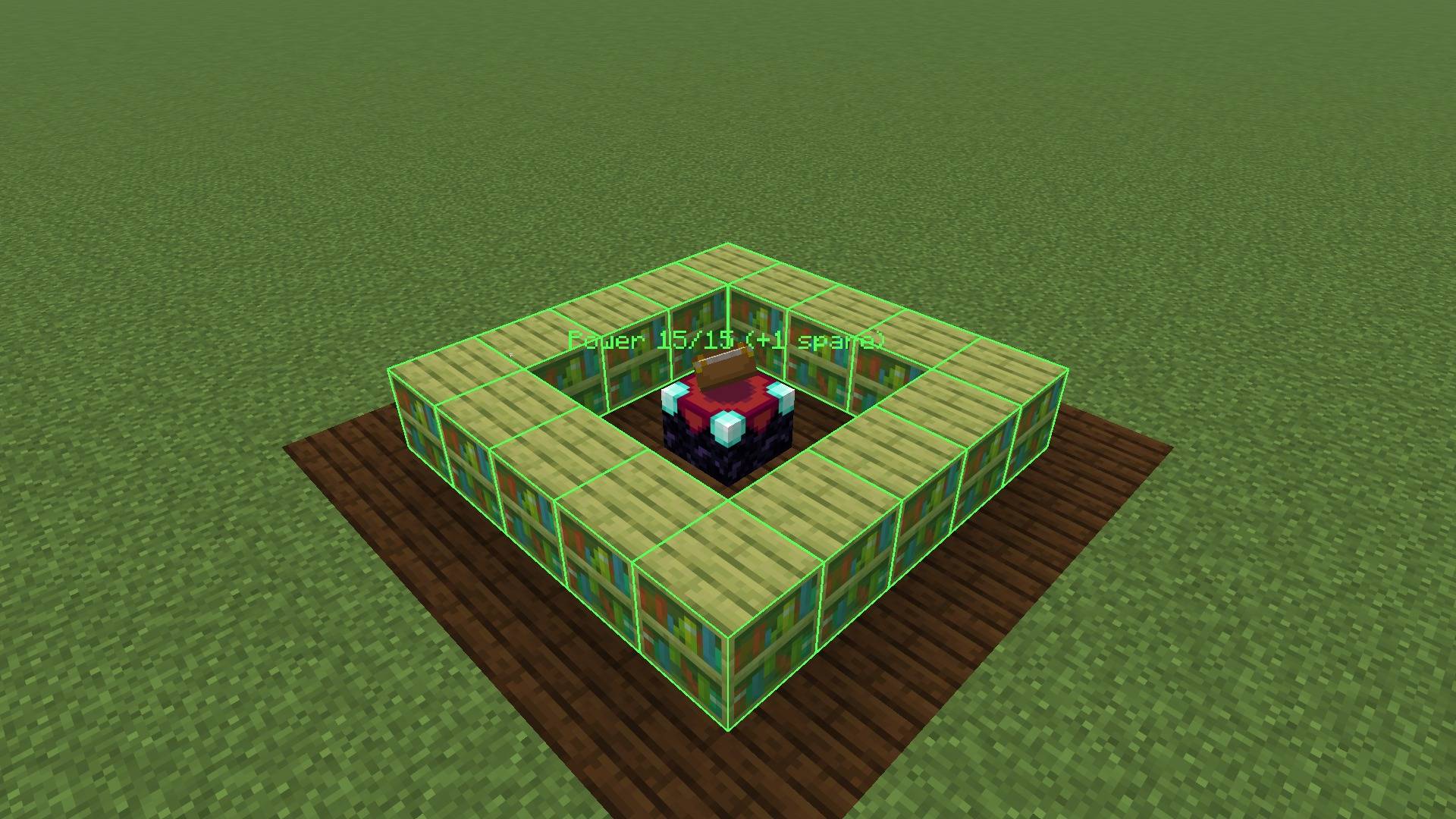
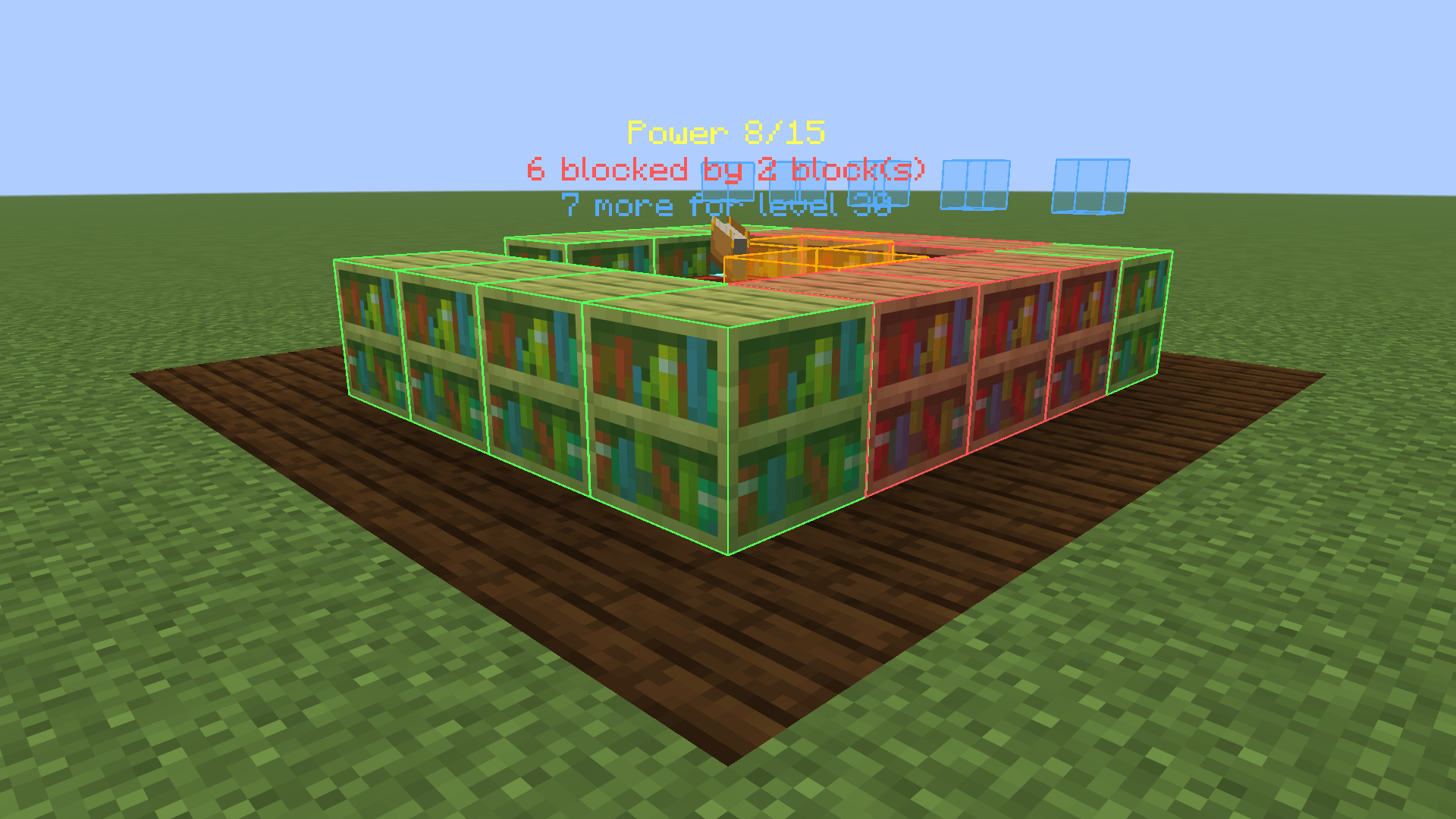
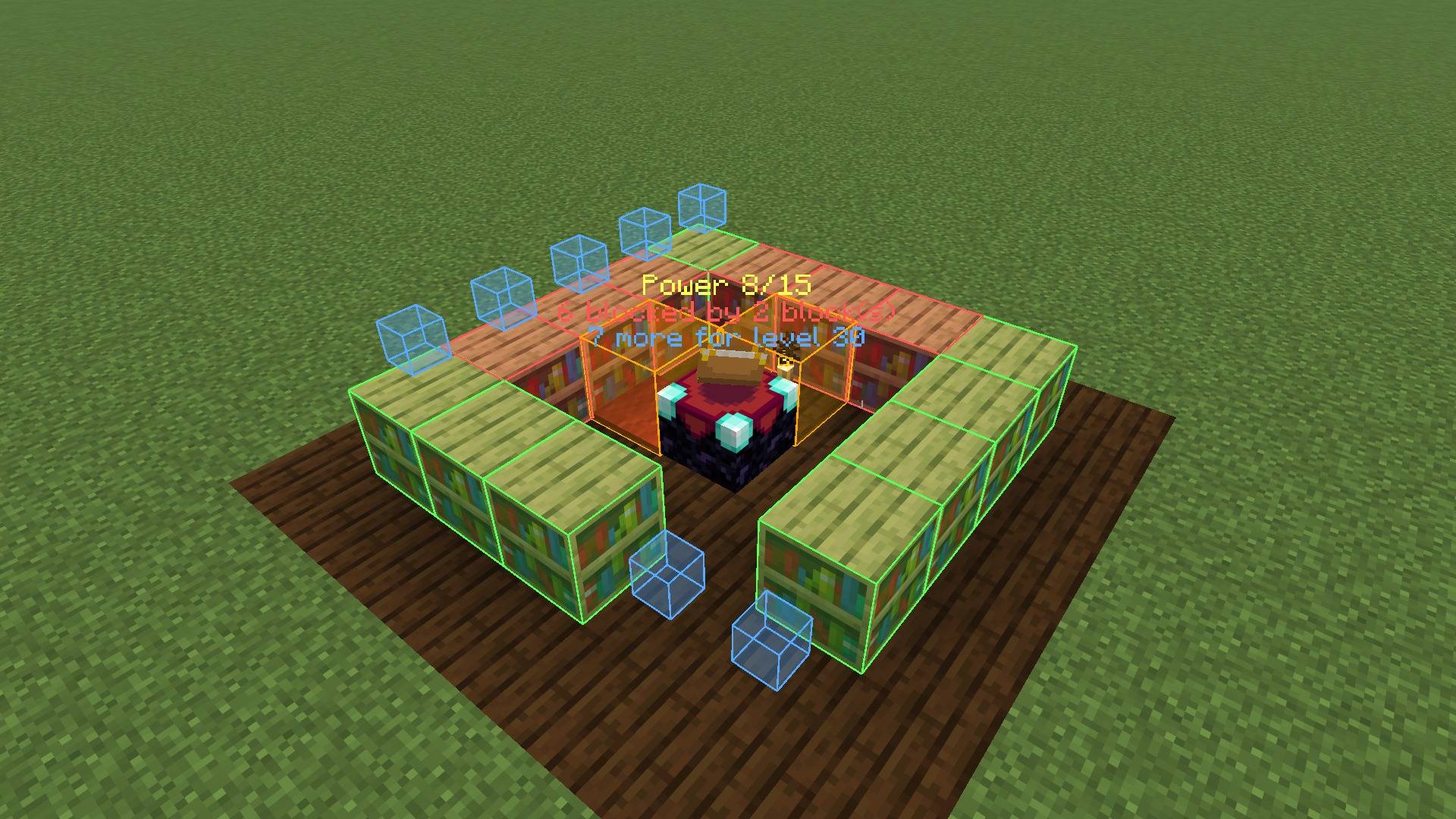
ShelfSight shows which bookshelves power your enchanting table, which ones are blocked and by what, and exactly where the missing shelves for level 30 go.
Ever built an enchanting room and only got level 24 offers? A torch, a carpet or a candle in the wrong spot silently cuts the bookshelf power, and vanilla gives you no hint which shelf is affected. ShelfSight makes the invisible rules visible.
Features
- Green outline: bookshelves that currently power the table.
- Red outline: bookshelves whose path to the table is blocked.
- Orange box: the exact block that causes the blockage (torch, carpet, candle, slab, …). Remove it and the red shelves turn green.
- Blue placement plan: small blue cubes mark the free slots where bookshelves are still missing to reach power 15 (level 30 offers). The plan only uses slots with a clear path and prefers free spots on the layer of the table, so you don’t have to dig.
- Floating counter above every table: “Power 8/15”, “6 blocked by 2 block(s)”, “7 more for level 30”. Spare shelves beyond 15 are shown too (“+1 spare”).
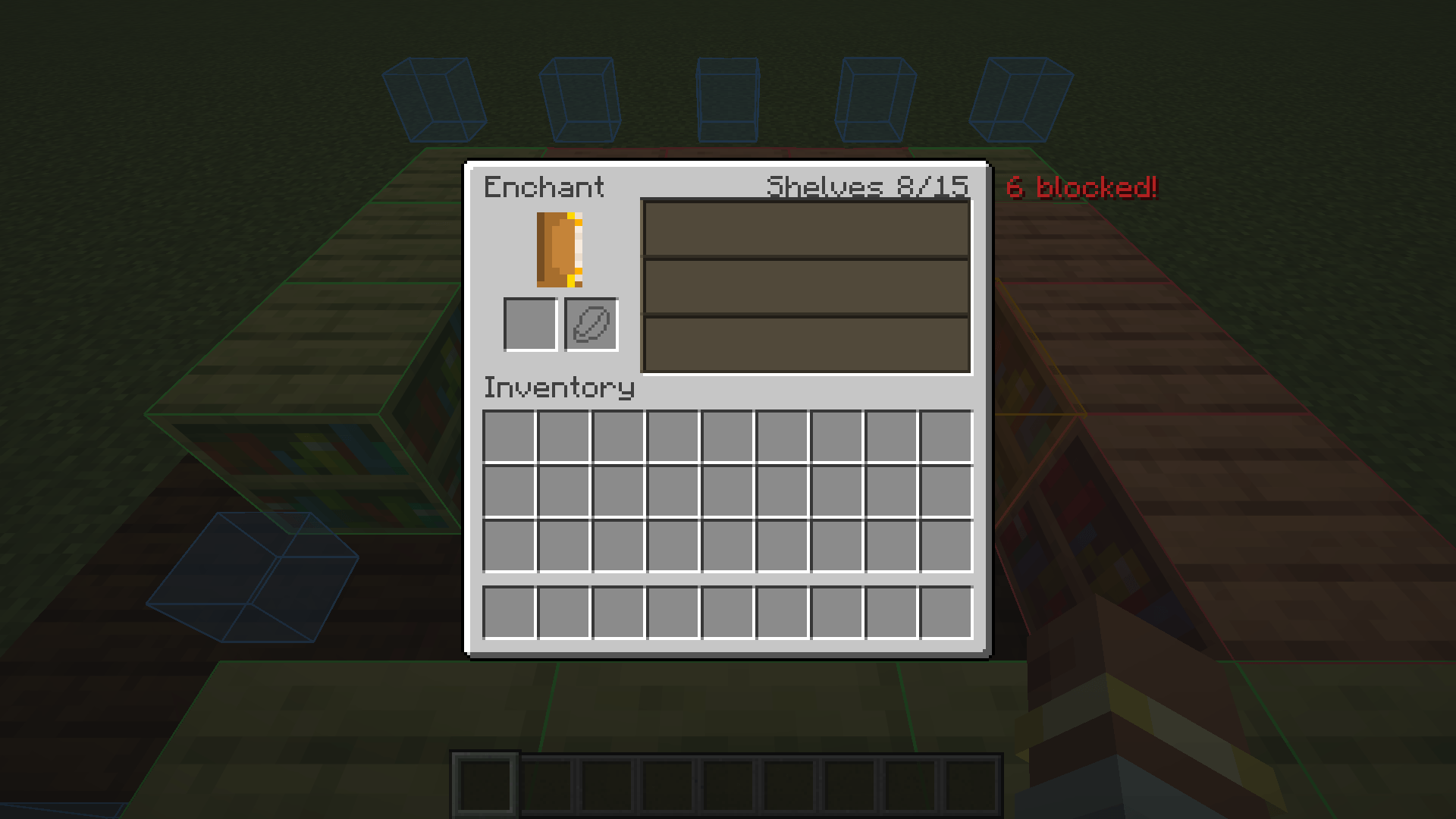
- Enchanting screen info: “Shelves 8/15” in the title row of the enchanting screen, plus a red warning when shelves are blocked.
- Toggle key: press B (rebindable under Controls > ShelfSight) to switch the overlay on or off.
- Client commands:
/shelfsight toggleand/shelfsight reload(reloads the config file). - Uses the vanilla block tags
#minecraft:enchantment_power_providerand#minecraft:enchantment_power_transmitter, so it follows exactly the same rules as the game, including datapacks and mods that change those tags. - Lightweight: tables are found through loaded block entities, and nothing is scanned when the overlay is off.
Screenshots
All screenshots are unedited in-game captures.
Compatibility
- Minecraft 26.3, Fabric Loader 0.19.5 or newer, requires Fabric API.
- Client-side only. Works on vanilla servers, Realms and modded servers. Nothing needs to be installed on the server, and installing it on a server does nothing.
- Adds no blocks, items or recipes, so it is safe to add to or remove from existing worlds and modpacks.
- Works with modded bookshelves that are added to the vanilla enchanting tags.
Configuration
The config file is config/shelfsight.json. It is created on first launch; after editing, use /shelfsight reload.
| Option | Default | Description |
|---|---|---|
enabled |
true |
Master switch (also toggled with the key) |
scanRadius |
8 |
Tables within this many blocks are analyzed (1-32) |
showPoweringShelves |
true |
Green outlines on working shelves |
showBlockedShelves |
true |
Red outlines on blocked shelves |
showObstructions |
true |
Orange boxes on the blocking blocks |
showPlacementPlan |
true |
Blue cubes where shelves are missing |
showTableLabel |
true |
Floating counter above the table |
showInEnchantingScreen |
true |
Shelf count in the enchanting screen |
seeThroughBlocks |
false |
Draw outlines through walls |
poweringColor, blockedColor, obstructionColor, planColor |
green, red, orange, blue | Colors as #AARRGGBB or #RRGGBB |
FAQ
Does this change how enchanting works?
No. ShelfSight only displays information. Enchanting stays 100% vanilla.
Is this a cheat? Is it allowed on servers?
It only shows the bookshelf layout you can already see and the counting rules the game already uses. It does not reveal enchantment offers, seeds or anything hidden.
Why is a shelf red even though there is nothing in between?
Some blocks count as obstructions although they look harmless: torches, carpets, candles, slabs, buttons, glass and so on. Only air and replaceable blocks such as grass, fern, vines or snow layers let the power through. The orange box shows exactly which block it is.
Why do I only need 15 shelves when there are 32 slots?
The game caps bookshelf power at 15. More shelves don’t help, and ShelfSight tells you how many you have to spare.
Do chiseled bookshelves count?
Not in vanilla, so ShelfSight shows them as empty slots. If a mod or datapack adds them to #minecraft:enchantment_power_provider, ShelfSight counts them automatically.
Forge/NeoForge version?
Currently Fabric only.
ShelfSight was developed with the help of AI tools. Licensed under MIT.
常见问题
ShelfSight 支持哪些 Minecraft 版本?
ShelfSight 支持 Minecraft Java 版 26.3,可用的加载器:Fabric。下载时注意选择和你游戏版本一致的文件。
ShelfSight 怎么安装?
先用 PCL2 或 HMCL 启动器安装对应版本的 Fabric,再把下载的 .jar 文件放进游戏目录的 mods 文件夹,重新启动游戏即可。开启了版本隔离的,mods 文件夹在 versions/版本名 下面。
FilipPikus12333 的其他作品
查看全部 →
VoltRide 2.0 – Advanced E-Scooters
VoltRide adds realistic, customizable electric scooters to Minecraft. Craft parts, upgrade motors and batteries, use lights and indicators, perform wheelies and drifts, and experience advanced physics, damage, and repairs.

Arcane-Machina
A magic-meets-technology modpack combining powerful machinery, arcane systems, and rich new worlds into one seamless adventure.

Compare Tooltips
See the armor, weapon or tool you have equipped right next to the item you hover, with the stat differences in green and red.

Toolwise
Automatically switches to the best hotbar tool or weapon, switches back afterwards, and stops tools from breaking.
评论
登录后评论和评分