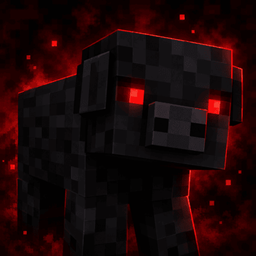
Shadow Pigs
Adds rare black pigs to Minecraft, with unique adult and baby textures and an automatic Shadow Pig name tag.
介绍
🐷 Shadow Pig
Ever wanted to discover something a little different while exploring Minecraft?
Shadow Pig adds a rare black pig variant to Minecraft, complete with custom textures for both adult and baby pigs!
✨ Features
-
Rare Black Pigs: Approximately 1 in 10 pigs are Shadow Pigs.
-
Custom Adult Texture: Adult Shadow Pigs have their own black texture.
-
Custom Baby Texture: Baby Shadow Pigs have a matching custom appearance.
-
Automatic Name Tag: Shadow Pigs display the name “Shadow Pig” above them without needing a name tag item.
-
Natural Discovery: Find them while exploring your Minecraft world, just like ordinary pigs.
-
Multiplayer-Friendly Design: The mod identifies Shadow Pigs using their entity UUID, keeping the selection consistent for a given pig.
🎮 Supported Versions
Shadow Pig has separate builds for:
-
Fabric
-
NeoForge
Choose the file that matches your Minecraft version and mod loader. The current builds are made for Minecraft 26.2.
📦 Installation
-
Install the appropriate mod loader for your Minecraft version.
-
Download the Shadow Pig file matching your loader.
-
Install the required dependencies, if applicable.
-
Place the JAR file in your Minecraft
modsfolder. -
Launch Minecraft with the matching loader.
Important: Fabric and NeoForge use separate files. Download only the version compatible with your installation.
🖤 A Small Change to Your World
Shadow Pig keeps the familiar Minecraft pig while giving you a rare new variant to discover. Whether you’re exploring, building, or expanding your animal collection, keep an eye out for a black pig!
Enjoy finding Shadow Pigs!
常见问题
Shadow Pigs 支持哪些 Minecraft 版本?
Shadow Pigs 支持 Minecraft Java 版 26.2,可用的加载器:Fabric。下载时注意选择和你游戏版本一致的文件。
Shadow Pigs 怎么安装?
先用 PCL2 或 HMCL 启动器安装对应版本的 Fabric,再把下载的 .jar 文件放进游戏目录的 mods 文件夹,重新启动游戏即可。开启了版本隔离的,mods 文件夹在 versions/版本名 下面。
评论
登录后评论和评分