
截图
介绍
Shader Fps Slider
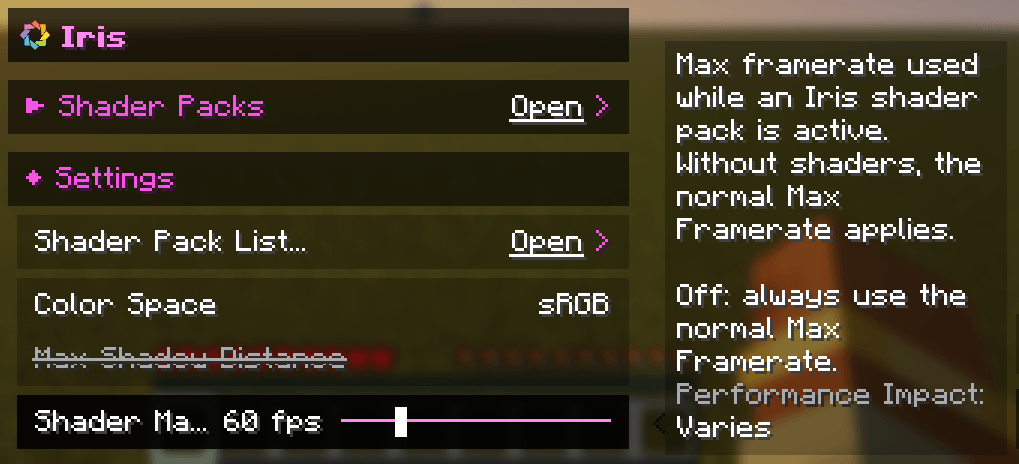
A small addition to Iris that gives you a separate Max Framerate for when a shader pack is active.
Shaders are heavy, and sometimes you just want to cap your FPS while they’re on so your GPU stays cool and quiet, but still play at full speed without them. Normally that means changing the Max Framerate every time you toggle shaders. With this addition it happens automatically: when a shader pack is active your Shader Max Framerate is used, and when it’s off you’re back to your normal one. Minecraft’s own throttling in menus, while AFK or when the window is minimized keeps working as usual.
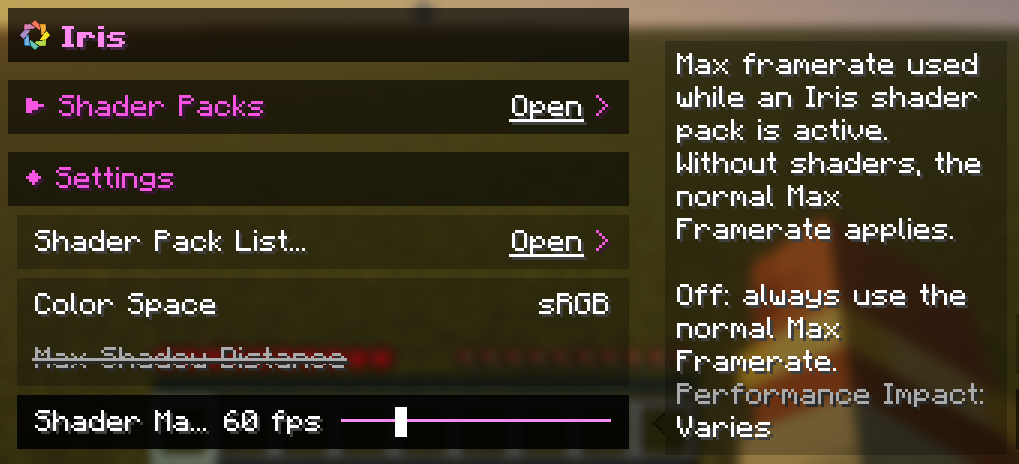
You’ll find the slider in Video Settings → Iris → Settings, right next to the other Iris options. Set it anywhere from 10 to 250 FPS, to Unlimited, or to Off if you want to use your normal Max Framerate even with shaders. It starts at 60 FPS.
This is an unofficial addition and is not affiliated with the Iris or Sodium teams.
常见问题
Shader Fps Slider 支持哪些 Minecraft 版本?
Shader Fps Slider 支持 Minecraft Java 版 26.3,可用的加载器:Fabric。下载时注意选择和你游戏版本一致的文件。
Shader Fps Slider 怎么安装?
先用 PCL2 或 HMCL 启动器安装对应版本的 Fabric,再把下载的 .jar 文件放进游戏目录的 mods 文件夹,重新启动游戏即可。开启了版本隔离的,mods 文件夹在 versions/版本名 下面。
Avie29 的其他作品
查看全部 →
Day Counter
一个简单的天数计数器数据包

TabbyLib
Avies 模组的配置前置库
Day Counter Resources
Required Resourcepack for Day Counter

Avies Waypoints
Set waypoints in your world and find your way back to them.
评论
登录后评论和评分