
截图

介绍
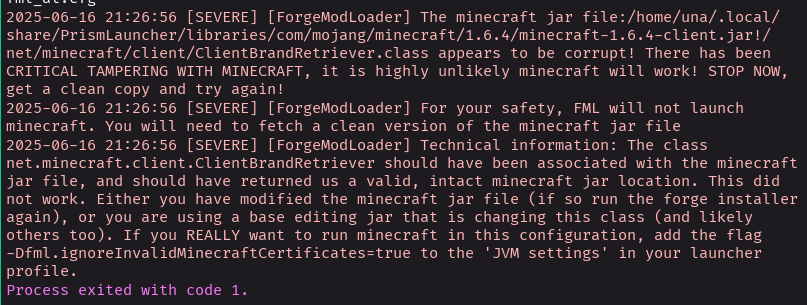
Has this ever happened to you?
[SEVERE] [ForgeModLoader] The minecraft jar file:/home/una/.local/share/PrismLauncher/libraries/com/mojang/minecraft/1.6.4/minecraft-1.6.4-client.jar!/net/minecraft/client/ClientBrandRetriever.class appears to be corrupt! There has been CRITICAL TAMPERING WITH MINECRAFT, it is highly unlikely minecraft will work! STOP NOW, get a clean copy and try again!
[SEVERE] [ForgeModLoader] For your safety, FML will not launch minecraft. You will need to fetch a clean version of the minecraft jar file
[SEVERE] [ForgeModLoader] Technical information: The class net.minecraft.client.ClientBrandRetriever should have been associated with the minecraft jar file, and should have returned us a valid, intact minecraft jar location. This did not work. Either you have modified the minecraft jar file (if so run the forge installer again), or you are using a base editing jar that is changing this class (and likely others too). If you REALLY want to run minecraft in this configuration, add the flag -Dfml.ignoreInvalidMinecraftCertificates=true to the 'JVM settings' in your launcher profile.
No? How about this:
[SEVERE] [Forestry] railcraft.common.core.Railcraft failed validation. Halting runtime for security reasons. Please replace your mods with untampered versions from the official download sites.
Process exited with code 1.
This is caused by newer Java 8 releases dropping support for SHA-1 signatures, and these older versions rely on those for ill-considered and poorly implemented “tamper detection”. (FML’s reasoning is benign, at least — it wants to warn people who have installed jar mods that it won’t work correctly.)
Rather than attempt to remove this detection and trigger god-knows-what kind of “anti-piracy” checks (Forestry for 1.2 is particularly well known for this — remember the original Technic Pack?), SHA-1 Redemption hacks into Java’s guts to re-enable SHA-1 signature trust.
This will work on any version of Minecraft, or indeed any Java program. I’ve tagged support for the versions where this problem is most frequently seen.
Warning
SHA-1 is a broken algorithm that can no longer be trusted — this is why support was removed. Adding this nilmod to a Java program now means the signing infrastructure also cannot be trusted. This is fine in the context of Minecraft modpacks, where the systems we’re bypassing are already horribly broken due to implementation mistakes.
However, in another context, where the signing is actually meaningful, this really should not be used. Consider editing your Java security policy to add a more targeted exception instead, or re-signing the affected jars if you can.
常见问题
SHA-1 Redemption 支持哪些 Minecraft 版本?
SHA-1 Redemption 支持 Minecraft Java 版 1.4.2–1.6.4,共 10 个版本。下载时注意选择和你游戏版本一致的文件。
SHA-1 Redemption 怎么安装?
先用 PCL2 或 HMCL 启动器安装对应版本的 模组加载器,再把下载的 .jar 文件放进游戏目录的 mods 文件夹,重新启动游戏即可。开启了版本隔离的,mods 文件夹在 versions/版本名 下面。运行环境:客户端 / 服务端。
exaptations 的其他作品
查看全部 →
EMI
功能丰富且易于上手的物品与配方查看器

Trinkets
一个数据驱动的饰品模组

Forgery
大量原版微调与小功能的合集。三叉戟改进、漏洞修复、熔炉矿车改动、音符盒增强、旧版岩浆、旧版徽标,应有尽有!

Portable Crafting
直接从物品栏使用工作台、锻造台、铁砧、切石机等制作站。
评论
登录后评论和评分