
Settings Hotkey
Fabric mod for Minecraft 26.1.2: bind hotkeys to instantly set client settings (render distance, FOV, and more) to chosen values, configured via Mod Menu.
截图
介绍
DESCRIPTION:
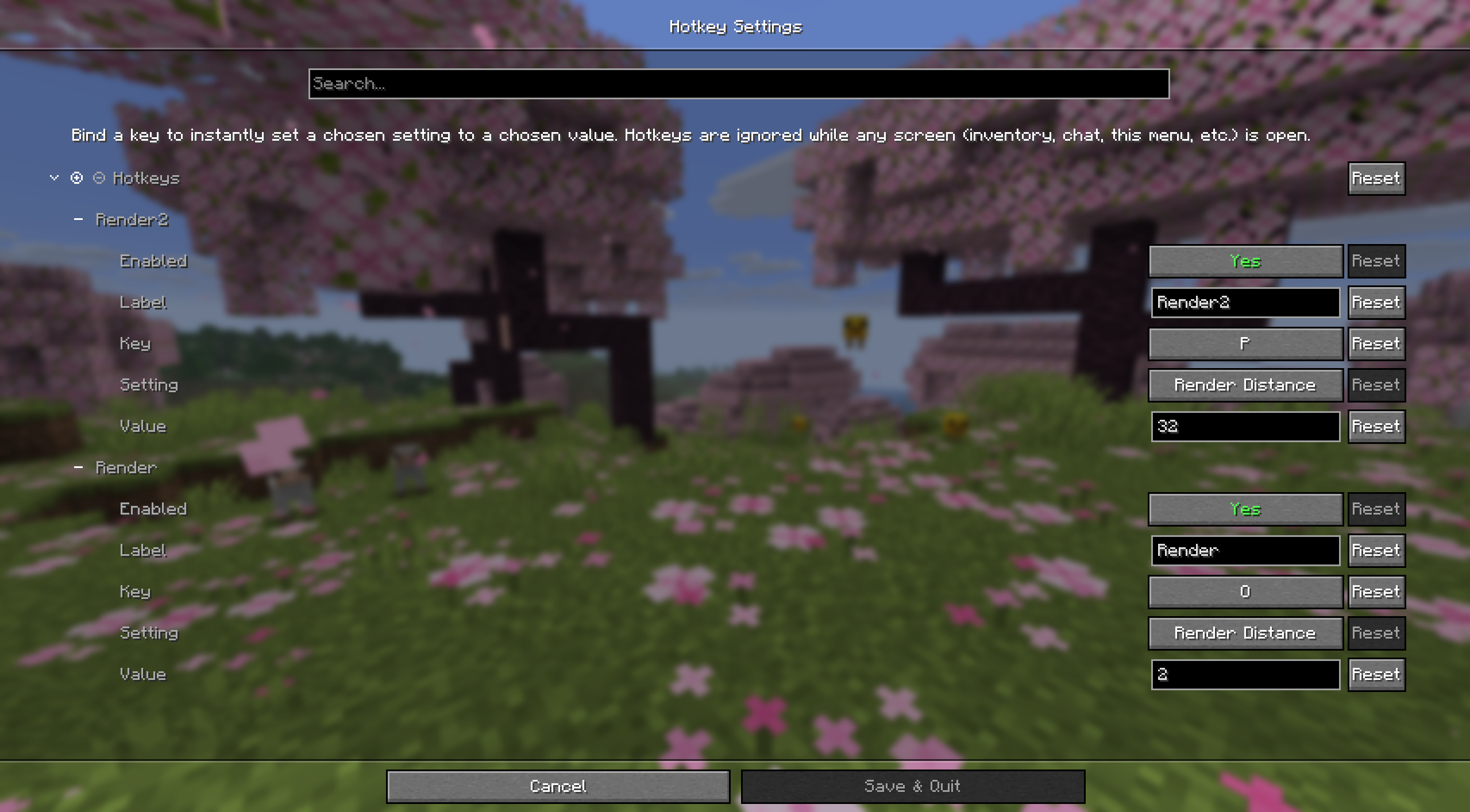
A Fabric mod for Minecraft 26.1.2 that lets you bind keys to instantly set a chosen client setting to a chosen value – e.g. press 9 to set render distance to 32, press 0 to drop it back to 2.
Everything is configured in-game through Mod Menu (the screen is built with Cloth Config).
Supported settings: Render Distance, Simulation Distance, Field of View, Brightness, GUI Scale, Max Framerate, Particles.
This mod can be used for basehunting on servers like DonutSMP, making use of the render distance exploit.
REQUIREMENTS:
- Fabric API for 26.1.2
- Mod Menu 18.0.0+ for 26.1.2
- Cloth Config API 26.1.154+fabric
USAGE:
1: Launch the game with the mods installed, open Mods (Mod Menu replaces the vanilla screen), find Hotkey Settings, and click the config gear.
2: There’s always a blank hotkey waiting at the bottom of the list. Fill it in:
- Enabled – turn it on/off without deleting it
- Label – just for your own reference in the list
- Key – click and press the key (or mouse button) you want to bind
- Setting – which option this hotkey controls
- Value – the value to set it to (see the tooltip on that field for the valid range per setting)
- Chat Feedback – show a chat message with what changed each time this hotkey fires
3: Click Save. Hotkeys are live immediately and are ignored whenever any screen is open (inventory, chat, this config screen, etc.) so they never fire while you’re typing.
(Config is stored at config/hotkeysettings.json.)
常见问题
Settings Hotkey 支持哪些 Minecraft 版本?
Settings Hotkey 支持 Minecraft Java 版 26.1.2,可用的加载器:Fabric。下载时注意选择和你游戏版本一致的文件。
Settings Hotkey 怎么安装?
先用 PCL2 或 HMCL 启动器安装对应版本的 Fabric,再把下载的 .jar 文件放进游戏目录的 mods 文件夹,重新启动游戏即可。开启了版本隔离的,mods 文件夹在 versions/版本名 下面。运行环境:仅客户端。
评论
登录后评论和评分