
ServerStop
A small server-side Minecraft mod that auto-shutdowns a server at a certain time on a certain day. Supports 33 Languages.
截图
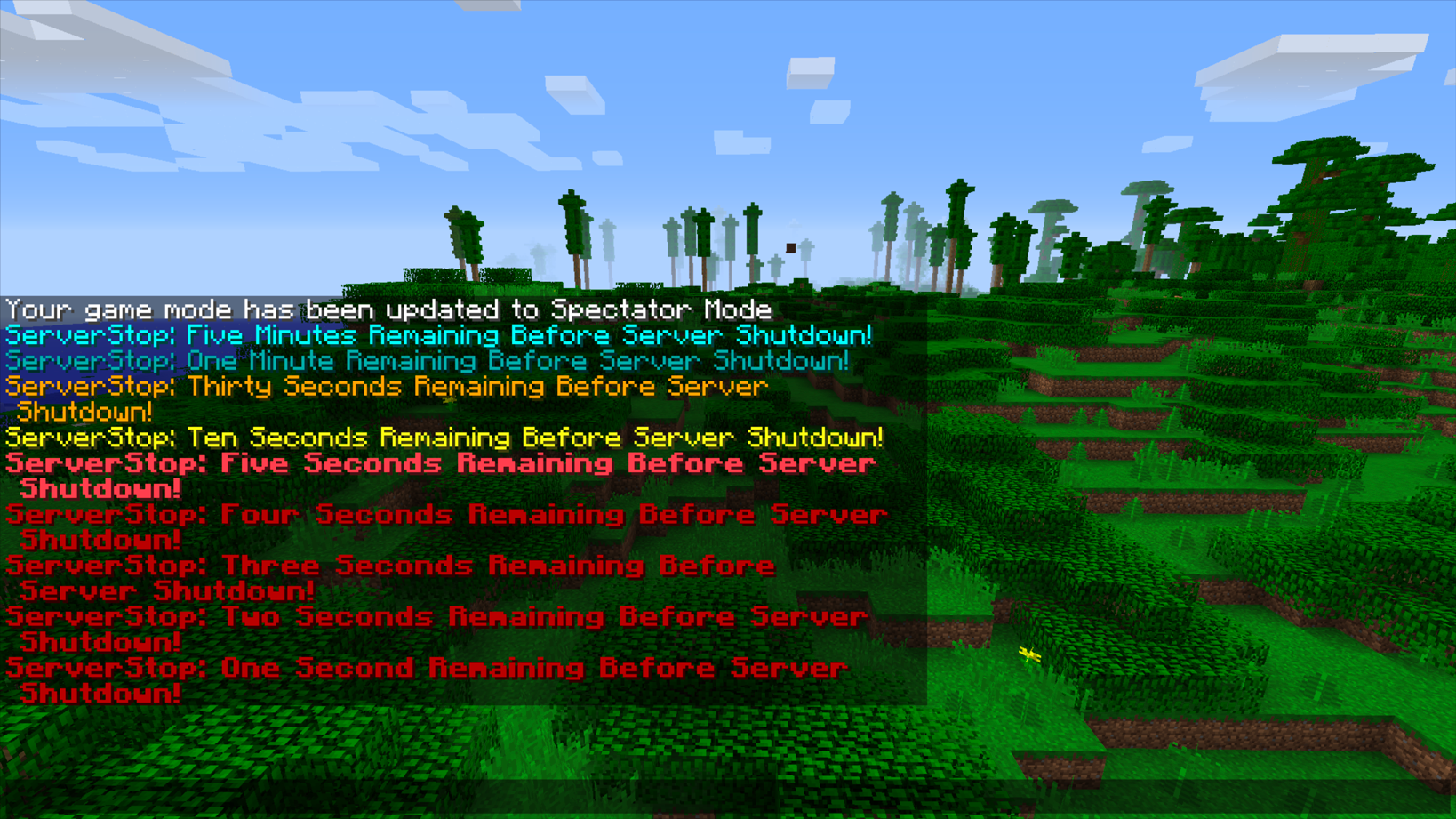
介绍

ServerStop Overview:
ServerStop is intended to be a small mod that automatically stops a server at a specific time on a certain day. This can useful for server maintenance, scheduled backups, or parental controls. Originally created for personal use, coolsim decided to release ServerStop in case anyone else was looking for a similar server utility mod.
ServerStop Community:
Myself, along with other players of ServerStop, can found at our Discord here. There is also a Guilded server for those who prefer to join it instead of Discord.
ServerStop Requirements:
ServerStop is Server-Side only adding it to the client will do nothing. The Fabric Version can be found here.
Main Features:
- Shutdown Server at a certain hour, minute and second.
- Built-in-Update Checker
- Command to Cancel Auto Shutdown
- Option to Abort Shutdown if Players are Online
- Option to Shutdown Multiple Times a Day
- 33 Languages Supported Including English Variations
Default Config: (1.7.10-1.12.2)
# Configuration file
friday {
# If this is enabled, at a time specified below the server will auto-shutdown.
B:”Enable Friday Server Stop”=true
# On Friday this is the hour the server will auto-shutdown. It uses 24-hour time.
I:”Friday Server Shutdown Hour” <
12
>
# On Friday this is the minute the server will auto-shutdown.
I:”Friday Server Shutdown Minute” <
0
>
}
lang {
# Server language codes are based off the Minecraft .lang files. See https://minecraft.gamepedia.com/Language for list.
S:”Default Server language”=en_us
}
monday {
# If this is enabled, at a time specified below the server will auto-shutdown.
B:”Enable Monday Server Stop”=true
# On Monday this is the hour the server will auto-shutdown. It uses 24-hour time.
I:”Monday Server Shutdown Hour” <
12
>
# On Monday this is the minute the server will auto-shutdown.
I:”Monday Server Shutdown Minute”<
0
>
}
saturday {
# If this is enabled, at a time specified below the server will auto-shutdown.
B:”Enable Saturday Server Stop”=true
# On Saturday this is the hour the server will auto-shutdown. It uses 24-hour time.
I:”Saturday Server Shutdown Hour” <
12
>
# On Saturday this is the minute the server will auto-shutdown.
I:”Saturday Server Shutdown Minute”<
0
>
}
sunday {
# If this is enabled, at a time specified below the server will auto-shutdown.
B:”Enable Sunday Server Stop”=true
# On Sunday this is the hour the server will auto-shutdown. It uses 24-hour time.
I:”Sunday Server Shutdown Hour” <
12
>
# On Sunday this is the minute the server will auto-shutdown.
I:”Sunday Server Shutdown Minute”<
0
>
}
thursday {
# If this is enabled, at a time specified below the server will auto-shutdown.
B:”Enable Thursday Server Stop”=true
# On Thursday this is the hour the server will auto-shutdown. It uses 24-hour time.
I:”Thursday Server Shutdown Hour” <
12
>
# On Thursday this is the minute the server will auto-shutdown.
I:”Thursday Server Shutdown Minute”<
0
>
}
tuesday {
# If this is enabled, at a time specified below the server will auto-shutdown.
B:”Enable Tuesday Server Stop”=true
# On Tuesday this is the hour the server will auto-shutdown. It uses 24-hour time.
I:”Tuesday Server Shutdown Hour” <
12
>
# On Tuesday this is the minute the server will auto-shutdown.
I:”Tuesday Server Shutdown Minute”<
0
>
}
util {
B:”Disable ServerStop Update Checker Message”=false
}
wednesday {
# If this is enabled, at a time specified below the server will auto-shutdown.
B:”Enable Wednesday Server Stop”=true
# On Wednesday this is the hour the server will auto-shutdown. It uses 24-hour time.
I:”Wednesday Server Shutdown Hour” <
12
>
# On Wednesday this is the minute the server will auto-shutdown.
I:”Wednesday Server Shutdown Minute”<
0
>
}
Recommended Mods
SurvivalPlus – SurvivalPlus enhances the vanilla survival experience of Minecraft whilst interacting with other mods to create seamless gameplay
More Than A Pickaxe – Adds a multi-tool called an Adze which is a pickaxe, axe, sword, hoe, and shovel
SurvivalPlus Lightsabers – Adds Lightsabers from Star Wars with Industrial Craft and Galacticraft Integration
Minecraft Version:
Please do not ask for ServerStop to be ported to an older version of Minecraft. coolsim intends to maintain all current Minecraft versions (1.6.4+) and is willing to backport when the associated RetroGradle updates are out. coolsim will begin to update ServerStop to 1.20 as soon as the corresponding Forge version is released, so please don’t ask.
License and Modpacks:
Please feel free to use ServerStop in any server modpack whilst making sure to give credit to coolsim. Do not redistribute ServerStop in any form.
常见问题
ServerStop 支持哪些 Minecraft 版本?
ServerStop 支持 Minecraft Java 版 1.6.4–1.19.4,共 24 个版本,可用的加载器:Forge。下载时注意选择和你游戏版本一致的文件。
ServerStop 怎么安装?
先用 PCL2 或 HMCL 启动器安装对应版本的 Forge,再把下载的 .jar 文件放进游戏目录的 mods 文件夹,重新启动游戏即可。开启了版本隔离的,mods 文件夹在 versions/版本名 下面。
coolsimulations 的其他作品
查看全部 →
SurvivalPlus
SurvivalPlus 增强了 Minecraft 的原版生存体验,同时与其他模组联动,打造无缝衔接的游戏体验。

Infinity Water Bucket
允许通过铁砧为水桶附加无限附魔,让你拥有可随身携带的无限水源。熔岩、牛奶和细雪桶也适用。

EffectsLeft
EffectsLeft 会将物品栏界面中的药水效果显示在左侧,而不是右侧,让它恢复到 1.18 之前的位置。

More Than A Pickaxe
一款集镐、斧、剑、锄和铲于一体的 Minecraft 多功能工具模组。
评论
登录后评论和评分