
Server Master
Your complete server management solution! From homes and warps, to auto-messagers and chat tools, this mod gives you everything you need for both single and multiplayer worlds.
截图


介绍

Your complete server management solution! From homes and warps, to auto-messagers and chat tools, this mod gives you everything you need for both single and multiplayer worlds.
🚧 Current Status
This mod is a work in progress, which means some features are not yet available. I’m actively developing and will be adding more content and improvements in future updates. You can find a list of available content below.
⚙️ Configuration
All configuration files are saved in JSON format. You can find the documentation on how to set it up on the Wiki Page.
🌟 Features
✅ Welcome Message
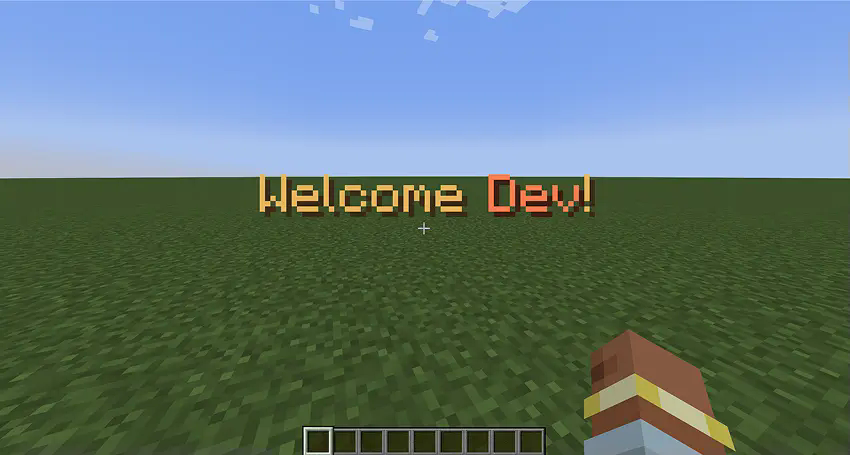
Customize the welcome message and sound that plays when players join the game.
✅ MOTD (Message of the Day)

Customize the messages displayed to players when they join the server.
✅ Rules Command
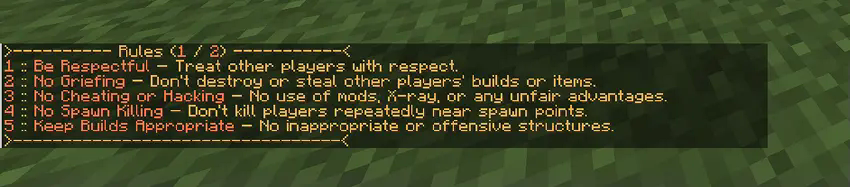
Customize the rules that players see when using the /rules command.
✅ Auto Messenger

Automatically sends messages in the chat at specified intervals.
✅ Customize Join and Leave Messages

Set up custom messages that are displayed when players join or leave the server.
✅ Message Variables
You can use variables within messages to dynamically display information.
✅ Custom Variables
You can define custom variables to be used within your messages. These variables can be linked to actions like opening URLs or running commands.

Server Master is still in development, and I’d love to hear your feedback!
If you find any bugs or have suggestions, please report them in the comments.
Your input will help make the mod even better!
常见问题
Server Master 支持哪些 Minecraft 版本?
Server Master 支持 Minecraft Java 版 1.21.1,可用的加载器:NeoForge。下载时注意选择和你游戏版本一致的文件。
Server Master 怎么安装?
先用 PCL2 或 HMCL 启动器安装对应版本的 NeoForge,再把下载的 .jar 文件放进游戏目录的 mods 文件夹,重新启动游戏即可。开启了版本隔离的,mods 文件夹在 versions/版本名 下面。运行环境:客户端和服务端都要装。
Maciej916 的其他作品
查看全部 →
Ma Enchants
新增超过 25 种附魔和诅咒!

Ma Essentials
Useful commands, homes, kits, warps, server utilities and more...

Ma Chat
Chat manage tools, automessager, custom join messages and more...

Industrial Reborn
Industrial Reborn is a mod which adds many electrical machines, blocks, and items.
评论
登录后评论和评分