
截图
介绍
SelectiveBounds
src=”https://img.shields.io/badge/Modrinth-NA?style=for-the-badge&logo=modrinth&logoColor=000000&color=00AF5C”>
src=”https://img.shields.io/badge/CurseForge-NA?style=for-the-badge&logo=curseforge&logoColor=000000&color=F16436″>
src=”https://img.shields.io/badge/Discord-NA?style=for-the-badge&logo=discord&logoColor=000000&color=5865F2″>
src=”https://img.shields.io/badge/Github-NA?style=for-the-badge&logo=github&color=181717″>
<img alt="Translate via Crowdin"
src=”https://img.shields.io/badge/Crowdin-NA?style=for-the-badge&logo=crowdin&color=2E3340″>
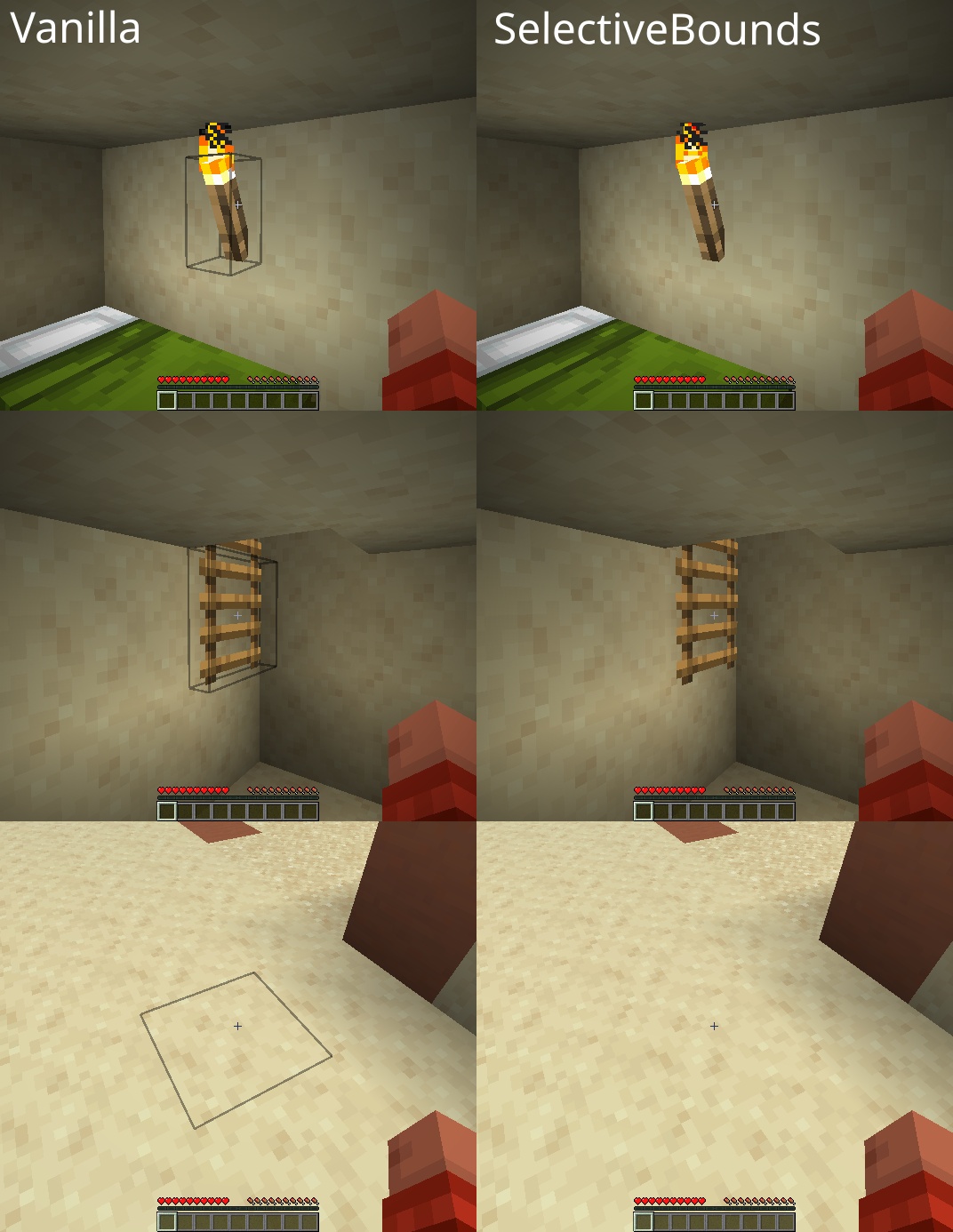
Hides the ugly block selection outline when not relevant, especially on foliage and non-solid blocks.
The outline is smartly hidden when the wrong tool is equipped, or the tool cannot mine at all.
Sneaking or building/destroying blocks temporarily shows it again.
Behavior is fully configurable in configs/selectivebounds.json.
<img width="872"
src=”https://cdn.conczin.net/cdn-cgi/image/fit=scale-down,w=872,f=jpeg,q=90/https://cdn.conczin.net/selectivebounds/screenshots/screen.jpg”
alt=”Screenshot”/>
Immersive Collection
src=”https://api-rk.conczin.net/embed?title=Immersive%20Armors&description=A%20lot%20of%20unique%20and%20vanilla-faithful%20armor%20sets.&icon_url=https%3A//cdn.conczin.net/immersive-armors/icon.png&width=275&height=100&background_color=16181c”
alt=”Immersive Armors”/>
src=”https://api-rk.conczin.net/embed?title=Immersive%20Aircraft&description=A%20bunch%20of%20rustic%20aircraft%20to%20travel%2C%20transport%2C%20and%20explore%21&icon_url=https%3A//cdn.conczin.net/immersive-aircraft/icon.png&width=275&height=100&background_color=16181c”
alt=”Immersive Aircraft”/>
src=”https://api-rk.conczin.net/embed?title=Immersive%20Melodies&description=Play%20custom%20melodies%20on%20various%20instruments%20and%20annoy%20your%20friends%21&icon_url=https%3A//cdn.conczin.net/immersive-melodies/icon.png&width=275&height=100&background_color=16181c”
alt=”Immersive Melodies”/>
src=”https://api-rk.conczin.net/embed?title=Immersive%20Paintings&description=Drag%20and%20drop%2C%20pixelate%20and%20hang%20up%20beautiful%20art.&icon_url=https%3A//cdn.conczin.net/immersive-paintings/icon.png&width=275&height=100&background_color=16181c”
alt=”Immersive Paintings”/>
src=”https://api-rk.conczin.net/embed?title=Immersive%20Optimization&description=A%20lightweight%20entity-tick-scheduler%20for%20doubling%20your%20TPS.&icon_url=https%3A//cdn.conczin.net/immersive-optimization/icon.png&width=275&height=100&background_color=16181c”
alt=”Immersive Optimization”/>
src=”https://api-rk.conczin.net/embed?title=Man%20of%20Many%20Planes&description=A%20set%20of%20additional%20aircraft%20for%20Immersive%20Aircraft%20with%20Create%20support%20in%20mind.&icon_url=https%3A//cdn.conczin.net/man-of-many-planes/icon.png&width=275&height=100&background_color=16181c”
alt=”Man of Many Planes”/>
src=”https://api-rk.conczin.net/embed?title=Immersive%20Machinery&description=A%20bunch%20of%20rustic%20machinery%20to%20transport%2C%20mine%2C%20and%20automate%20things.&icon_url=https%3A//cdn.conczin.net/immersive-machinery/icon.png&width=275&height=100&background_color=16181c”
alt=”Immersive Machinery”/>
src=”https://api-rk.conczin.net/embed?title=Immersive%20Furniture&description=Create%20custom%20and%20fancy%20furniture%20in-game%20or%20choose%20from%20a%20vast%20online%20library.&icon_url=https%3A//cdn.conczin.net/immersive-furniture/icon.png&width=275&height=100&background_color=16181c”
alt=”Immersive Furniture”/>
src=”https://api-rk.conczin.net/embed?title=Immersive%20Gateways&description=Mysterious%2C%20long-forgotten%20portals%20scattered%20across%20the%20Overworld.&icon_url=https%3A//cdn.conczin.net/immersive-gateways/icon.png&width=275&height=100&background_color=16181c”
alt=”Immersive Gateways”/>
src=”https://api-rk.conczin.net/embed?title=Immersive%20Pillagers&description=Pillager%20hordes%2C%20hostile%20camps%2C%20illager%20research%2C%20and%20more.&icon_url=https%3A//cdn.conczin.net/immersive-pillagers/icon.png&width=275&height=100&background_color=16181c”
alt=”Immersive Pillagers”/>
src=”https://api-rk.conczin.net/embed?title=Immersive%20Worldmap&description=A%20client-side%203D%20world%20map%20of%20the%20chunks%20you%20explore.&icon_url=https%3A//cdn.conczin.net/immersive-worldmap/icon.png&width=275&height=100&background_color=16181c”
alt=”Immersive Worldmap”/>
<img width="872" src="https://cdn.conczin.net/selectivebounds/dathost-872.png"
alt=”DatHost”/>

常见问题
SelectiveBounds 支持哪些 Minecraft 版本?
SelectiveBounds 支持 Minecraft Java 版 1.20.1–26.2,共 5 个版本,可用的加载器:Fabric / Forge / NeoForge。下载时注意选择和你游戏版本一致的文件。
SelectiveBounds 怎么安装?
先用 PCL2 或 HMCL 启动器安装对应版本的 Fabric / Forge / NeoForge,再把下载的 .jar 文件放进游戏目录的 mods 文件夹,重新启动游戏即可。开启了版本隔离的,mods 文件夹在 versions/版本名 下面。运行环境:仅客户端。
Luke100000 的其他作品
查看全部 →
Immersive Aircraft
一堆乡村风格的飞行器,用于旅行、运输和探索!

Immersive Armors
大量独特且忠于原版的盔甲套装。

Immersive Melodies
在各种乐器上演奏自定义旋律,烦死你的朋友!

Immersive Paintings
拖放、像素化并挂起精美画作,服务器上也能使用。
评论
登录后评论和评分