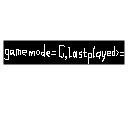
SearchWorldEnhance
Add a “Search World” box for MC pre-1.13 || Enhance the searching behaviour
介绍
Mod Synopsis
This is a lightweight mod run on client-side, which brings a “Search World” box to world selection screens(prior MC 1.13) and enhance the searching behaviour by using key-value pair arguments.
How to Use This Mod
This mod adds a “Search World” box to the world select screen(prior MC 1.13), and the searching behaviour is now like this:
worlddirname-=foo – Search for worlds whose directory names contain foo, case-sensitive
worldname/="^New World$" – Search for worlds whose names exactly are New World, case-insensitive
gamemode=S,commands=true – Search for worlds whose default game modes are Survival and commands are enabled
Format of Arguments
Each two key-value pairs are separated by ,(which means &&(and), and trailing , is allowed once). In contrast, a key-value pair is like this: <key_name><relationship_symbol><value>.
For regex keys, available relationship symbols are:
=– left contains right, case-insensitive!=– left does not contain right, case-insensitive-=– left contains right, case-sensitive!-=– left does not contain right, case-sensitive/=– left matches right, case-insensitive!/=– left does not match right, case-insensitive/-=– left matches right, case-sensitive!/-=– left does not match right, case-sensitive
Values are strings like this:
foo– resolved asfoo"Foo Bar"– resolved asFoo Bar"One says \"\\s are useful\""– resolved asOne says "\s are useful"
For long keys, available relationship symbols are:
=and==– left equals right<– left is less than right<=– left is less than or equal to right>– left is greater than right>=– left is greater than or equal to right!=– left does not equal right
Values are long integers like this:
01234567-98765432109999
For enum keys, available relationship symbols are:
=– left is right!=– left is not right
Values are all enums defined by the enum class and null.
For boolean keys, there is only one available relationship symbol =(means left is right).
Values are like this:
true,t,yes,y,1– for truefalse,f,no,n,0– for false
If the format of arguments is valid, expected search result will be shown. Note that results of original search behaviour will be shown together, e.g. if there is a world named gamemode=C whose default gamemode is Survival, when you type gamemode=C in the box, this world will still be shown as a part of the result. If you want to avoid this, you can type worldname!="gamemode=C",gamemode=C in the box.
All Key-value Pair Parameters Added by This Mod
worldname(Regex) – Match world names
worlddirname(Regex) – Match world directory names
lastplayed(Long) – Match last played time
gamemode(Enum made up by S, C, A, SP) – Match default game modes
commands(Boolean) – Match commands enabling statuses
hardcore(Boolean) – Match whether the worlds are hardcore
I Want to Add My Key-value Pair Parameters!
There is a class rege.rege.minecraftmod.searchworldenhance.util.SearchKeyRegistry in this mod, you should register yours using this class’s static methods. All valid keys are non-empty strings without -, , =, !, >, <, ,, /, ", \. An example is in the static block of rege.rege.minecraftmod.searchworldenhance.SearchWorldEnhanceMain‘s source code.
常见问题
SearchWorldEnhance 支持哪些 Minecraft 版本?
SearchWorldEnhance 支持 Minecraft Java 版 1.7.10–1.12.2,共 15 个版本。下载时注意选择和你游戏版本一致的文件。
SearchWorldEnhance 怎么安装?
先用 PCL2 或 HMCL 启动器安装对应版本的 模组加载器,再把下载的 .jar 文件放进游戏目录的 mods 文件夹,重新启动游戏即可。开启了版本隔离的,mods 文件夹在 versions/版本名 下面。运行环境:仅客户端。
IAmREGE 的其他作品
查看全部 →
CustomSaveDirs
A client-side mod allows you use custom directories for reading and saving singleplayer worlds.
JavaProgArgOverride
Enable you to override the target main class's Java Program arguments with arbitrary arguments using Mixin (by SpongePowered). And without changing cmdlines(in Task Manager or Htop)!
CraftDen1al
A plugin run on server-side, which allows you to refuse some crafting operations from client-side.

CrNOBr
Make creeper explosions not break blocks (unless you want)
评论
登录后评论和评分