Searchable Containers
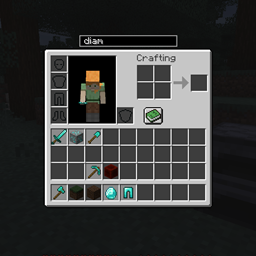
Searchable containers is small client side gui mod that adds a search bar just above the players open container.
介绍
Searchable Containers
Searchable containers is small client side gui mod that adds a search bar just above the players open container.

While in a container, players can use the search bar to filter certain items.

Right clicking the search bar will clear it and select it for searching.
Player’s can quickly move "selected" items between inventories using the arrow buttons to the right of the search bar.
By default, button tooltips are enabled, but can be disabled in the config.
Searching by default, will only search the item’s display name. Changing the config option "searchTooltips" to true, will also search the items tooltips.
The search bar can be hidden by pressing Ctrl + H while in a container. The key can be changed in options, but Ctrl will still need to be pressed.
The padding between the search bar, and the gui can be changed by editing "verticalPadding" in the config.
常见问题
Searchable Containers 支持哪些 Minecraft 版本?
Searchable Containers 支持 Minecraft Java 版 1.17–1.18.1,共 4 个版本,可用的加载器:Fabric。下载时注意选择和你游戏版本一致的文件。
Searchable Containers 怎么安装?
先用 PCL2 或 HMCL 启动器安装对应版本的 Fabric,再把下载的 .jar 文件放进游戏目录的 mods 文件夹,重新启动游戏即可。开启了版本隔离的,mods 文件夹在 versions/版本名 下面。
Areuthreateningme 的其他作品
查看全部 →
Inventory Hotswap
Hotswap 是一个客户端模组,允许玩家将当前选中的物品与其上方物品栏列中的物品进行交换。

Armor Hotswap
手持盔甲右键即可与当前穿戴的盔甲快速交换。
Oxidized Forge
Oxidized aims to provide more uses for vanilla copper.
Death Coords
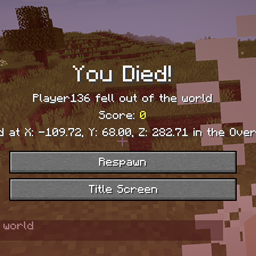
Death Coords is a simple client side mod that displays your death coordinates on the respawn screen.
评论
登录后评论和评分