
Search KeyBinds
Adds a search bar to the Controls screen that instantly filters your keybinds by name or category, vanilla or modded.
截图
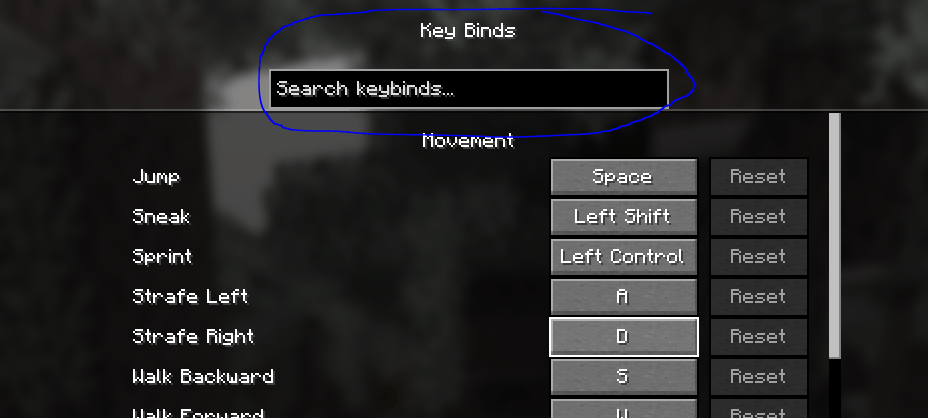
介绍
Ever gone into Controls to rebind one key and ended up scrolling through the entire list just to find it? That’s the whole reason I made this.
Search Keybinds adds a search box to the top of the Key Binds screen. Type into it and the list narrows down as you go. It looks at both the name of the keybind and the category it’s under, so typing “inventory” brings up everything in that group, and typing “jump” takes you straight to it. Delete what you typed and the full list comes right back.
It covers vanilla keybinds and any added by other mods, so whatever you have installed shows up in the same search.
The mod is client side only. It doesn’t touch servers and the only screen it changes is Controls, so it’s safe to run pretty much anywhere.
常见问题
Search KeyBinds 支持哪些 Minecraft 版本?
Search KeyBinds 支持 Minecraft Java 版 1.21.4–1.21.11,共 3 个版本,可用的加载器:Fabric。下载时注意选择和你游戏版本一致的文件。
Search KeyBinds 怎么安装?
先用 PCL2 或 HMCL 启动器安装对应版本的 Fabric,再把下载的 .jar 文件放进游戏目录的 mods 文件夹,重新启动游戏即可。开启了版本隔离的,mods 文件夹在 versions/版本名 下面。
auths 的其他作品
查看全部 →
NoDelay
Ping Optimizer, Very basic and simple. Made for all server's.

Better Freecam
This is a simple free cam mod to help you get the best shots for videos or screen shots!

Gambler Plus
Client-side DonutSMP gambling tracker with sessions, per-player rakeback, a live HUD, and yes/no confirmation before > large /pay commands.
评论
登录后评论和评分