
ScreenshotUtility
A client-side Fabric mod that adds an in-game gallery, 4K high-res capture, and automatic metadata embedding (like coordinates) to your screenshots.
截图
介绍
ScreenshotUtility
ScreenshotUtility is a client-side Fabric mod that enhances the capturing and management of screenshots in Minecraft.
Key Features
1. In-Game Gallery (Picture Browser)
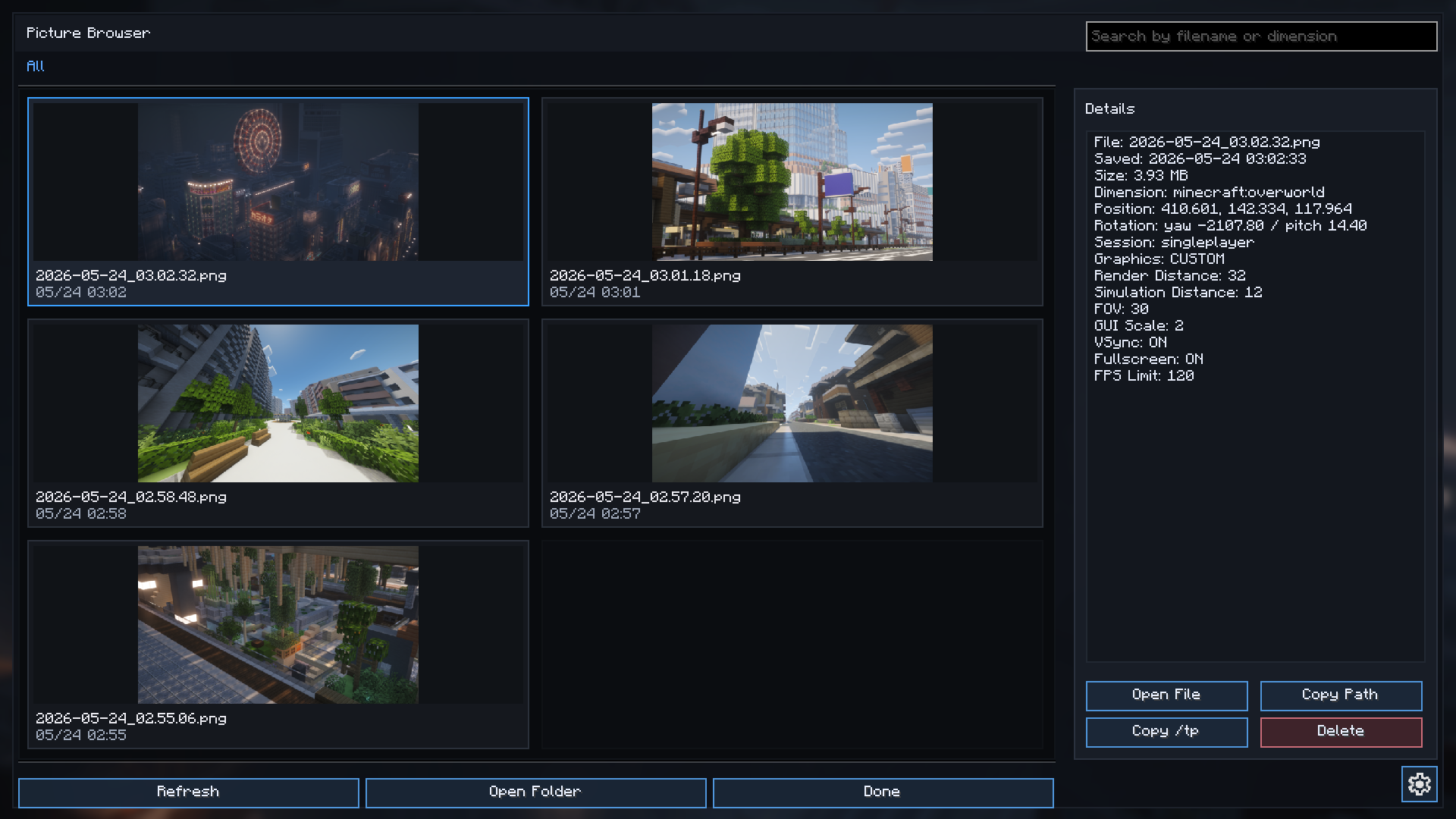
Adds an in-game gallery screen that allows you to browse and manage your screenshots.
- How to open: Press the
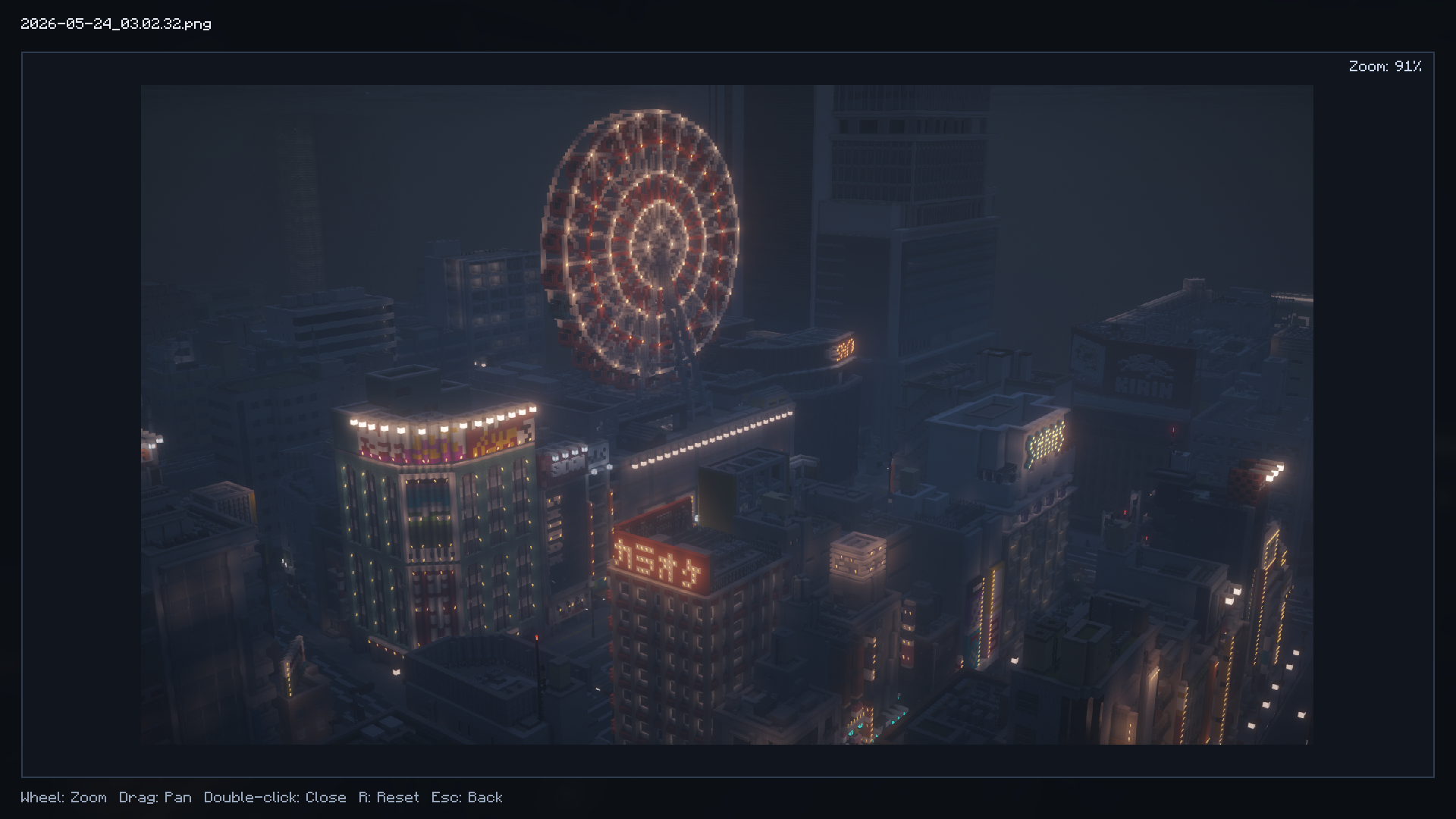
F8key (by default) to open the gallery. - Viewer controls: Scroll the mouse wheel to zoom, drag to pan the image, press
Rto reset the view, and double-click or pressEscto close the viewer. - Search & Filter: Search for specific screenshots by file name or the name of the dimension they were taken in.
- File operations: Perform actions directly from the gallery screen, such as “Open folder”, “Open image”, “Copy path”, and “Delete”.
2. Automatic Metadata Embedding
When you take a screenshot, detailed in-game environment data is automatically embedded and saved within custom chunks of the image file (PNG). You can view this data at any time from the “Details” section in the gallery.
- Recorded information includes:
- Coordinates (X, Y, Z) and player rotation (Yaw, Pitch)
- Dimension name
- Session info (Singleplayer/Multiplayer, server address)
- Save date, time, and file size
- Game settings at the time of capture (Render distance, Simulation distance, FOV, GUI scale, Graphics preset, VSync, Framerate limit, etc.)
3. Copy `/tp` Command
Using the coordinate data saved in the screenshot’s metadata, you can copy a `/tp` command directly to your clipboard from the gallery menu. This allows you to easily return to the exact location where the picture was taken.
4. 4K Screenshot Capture
Even if you are playing at a standard resolution (like 1080p), this feature temporarily scales the rendering resolution up to 4K (3840×2160) just for the screenshot capture.
- Note: If the 4K capture process fails for any reason, the mod will automatically fall back to taking the screenshot at your normal resolution.
5. Auto-Copy to Clipboard
When enabled in the settings, screenshots will automatically be copied to your system clipboard immediately after they are taken.
Settings
- Press the
F7key (by default) to open the ScreenshotUtility settings screen. - From the settings menu, you can toggle “Enable 4K Capture” and “Auto-Copy to Clipboard”.
Requirements & Environment
- Fabric Client environment (This is a client-side only mod).
- Note: The mod internally relies on
SimpleGuiAPI(for features like keybinding registration).
常见问题
ScreenshotUtility 支持哪些 Minecraft 版本?
ScreenshotUtility 支持 Minecraft Java 版 1.21–26.3,共 17 个版本,可用的加载器:Fabric / Forge / NeoForge。下载时注意选择和你游戏版本一致的文件。
ScreenshotUtility 怎么安装?
先用 PCL2 或 HMCL 启动器安装对应版本的 Fabric / Forge / NeoForge,再把下载的 .jar 文件放进游戏目录的 mods 文件夹,重新启动游戏即可。开启了版本隔离的,mods 文件夹在 versions/版本名 下面。运行环境:仅客户端。
ProjectMichi 的其他作品
查看全部 →
Simple GUI API
This is a GUI API dedicated to my own project.

DarkGUI
This is a resource pack that is a little darker without changing the look of vanilla

Trajectorys
Display the trajectory of the launch section.

Crops
We'll make it easy to see which vegetables are ready to harvest.
评论
登录后评论和评分