SCP: Labels Editor
It lets you create custom labels by loading images into the mod folder.
截图
介绍

Labels Creator
Minecraft Forge 1.12.2 / 1.20.1 / 1.21.1 / 26.3 – forge, neoforge, fabric
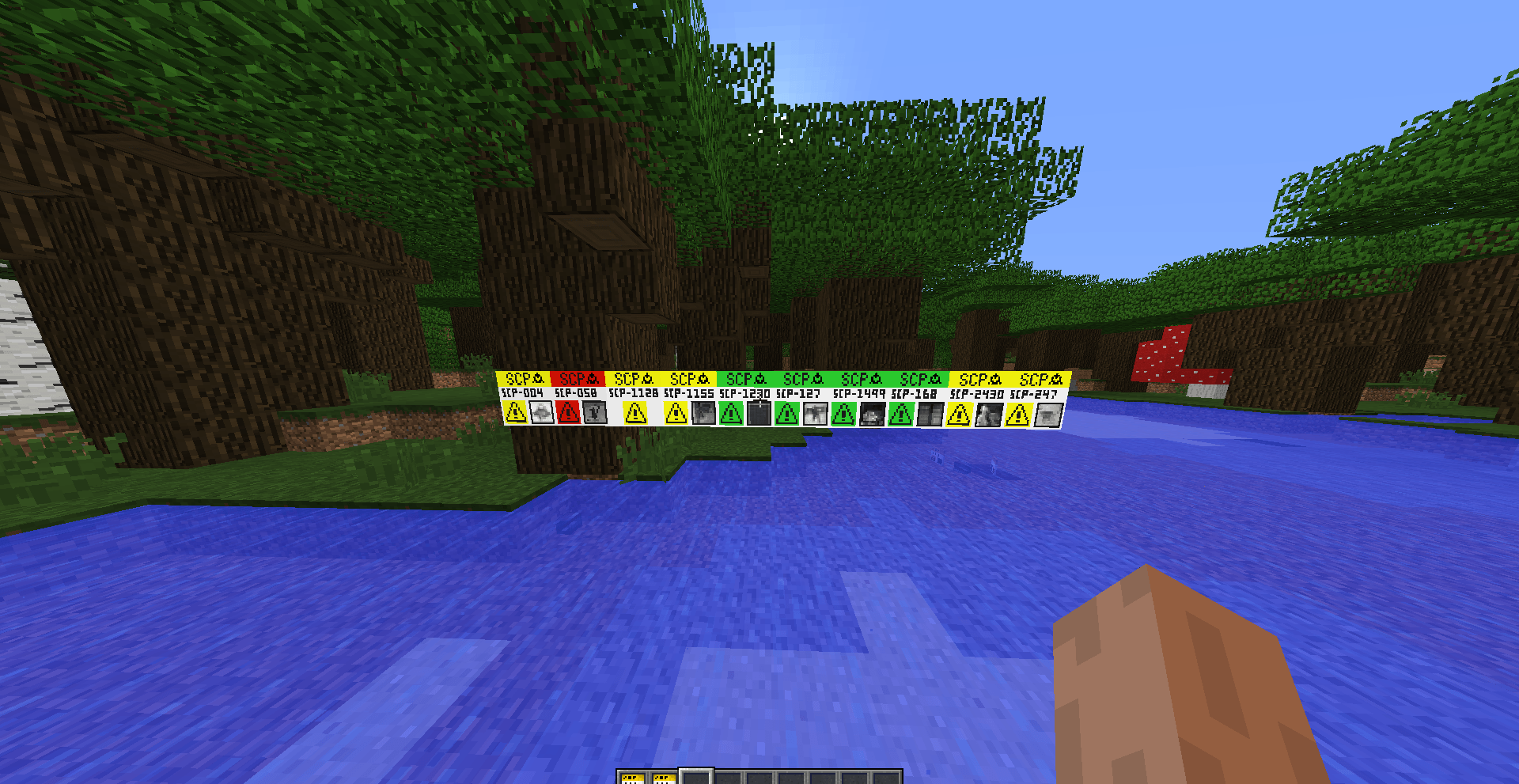
Place custom image labels on walls. Each label can show a picture from a local folder, with a chosen name and resolution. Unconfigured or missing images stay as a white/blank label base so you can tell something is wrong.
NOTE: This mod was created to generate default SCP labels, but it can also be used to create images for your world, or things like that.
Features
- Wall labels only — place on sides of blocks, not floor or ceiling
- Custom images — load PNG/JPG (and similar) from a folder next to the game
- Label Editor GUI — set name, photo, and resolution (2–1024/4096)
- Dynamic overlay — your image is drawn on the label face (and edges)
- White base — default look when no image is set or the file is missing
- Named items — break or middle-click a configured label to get an item named like “Label SCP-440” with the same data (is an example SCP-440)
- Copy / place again — NBT keeps name, image, and resolution
- /labelsfolder — opens the image folder and prints its path in chat (changed)
How to use
1. Image folder
Put your images here:
- Normal launcher: .minecraft/uploadcustomlabels/ (or type the command in the chat /labelsfolder)
Supported formats: .png, .jpg, .jpeg, .gif, .bmp
Example: uploadcustomlabels/tormentor.png
2. Place a label
- Take a Label from the Decorations tab (or your creative tab).
- Right-click a wall.
- The Label Editor opens if the label is not configured yet.
3. Configure
| Field | Meaning |
|---|---|
| NAME | Display name (also used on the item when broken) |
| PHOTO | File from uploadcustomlabels (< > to cycle) |
| RESOLUTION | Texture size (e.g. 64×64, 256×256) |
| Confirm | Save and apply the image |
| Cancel | Close without saving |
4. Edit again
Right-click an existing label to open the editor again.
5. Copy a label
- Break it → item keeps name + image data
- Middle-click (creative) → same
Place that item to get the same label again.
6. Open the folder in-game
/labelsfolderOpens the folder in your file manager and shows the full path in chat.
Tips
- If the label stays White, the file is missing, the name is wrong, or the folder path is not the one the game uses (check /labelsfolder).
- Images are client-side (each player needs the same files in their folder for multiplayer).
- Higher resolution = sharper image, more memory.
Technical (short)
- Forge 1.12.2, 1.20.1 – neoforge, forge, fabric
- Block + tile entity + overlay
- Client command /labelsfolder
- Network packet to save label data on the server
常见问题
SCP: Labels Editor 支持哪些 Minecraft 版本?
SCP: Labels Editor 支持 Minecraft Java 版 1.12.2–26.3,共 4 个版本,可用的加载器:Fabric / Forge / NeoForge。下载时注意选择和你游戏版本一致的文件。
SCP: Labels Editor 怎么安装?
先用 PCL2 或 HMCL 启动器安装对应版本的 Fabric / Forge / NeoForge,再把下载的 .jar 文件放进游戏目录的 mods 文件夹,重新启动游戏即可。开启了版本隔离的,mods 文件夹在 versions/版本名 下面。
DesmonZ 的其他作品
查看全部 →
SCP-169, Leviathan
添加传说中的利维坦 SCP-169。

SCP-2158, The Gun That Never Misses
A revolver that never misses a shot.

SCP-099, The Portrait
adds a portrait that can hypnotize you.

SCP-865, The Gentleman’s Lash
adds SCP-865 to minecraft, The Gentleman's Lash.
评论
登录后评论和评分