截图


介绍
A handheld scanner that shows you what you’re looking at — but only when you’re actually holding it.
Scanner is a lightweight add-on for Jade that gates Jade’s “what am I looking at” overlay behind a craftable item. No more info overlay cluttering your screen at all times — pull out the Scanner when you want to identify a block, entity, or item, and put it away when you don’t.
How it works
- Hold the Scanner in either hand and look at something — Jade’s full overlay (name, mod, block/entity data, container contents, everything Jade normally shows) appears right on the scanner’s screen.
- Put it away, and the overlay disappears completely — Jade stays fully installed and configured, it just won’t show anything unless you’re holding the Scanner.
- The info is displayed without a background panel, styled to look like it’s actually rendering on the device’s screen rather than floating as a HUD element.
This is not a fork or reimplementation of Jade — Scanner requires Jade and hooks into its public plugin API. Every feature, every addon, every config option Jade supports keeps working exactly as it does today; Scanner just decides when it’s visible.
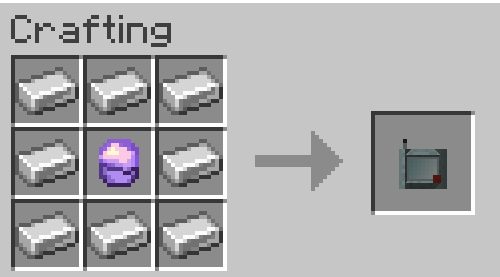
Crafting
Lens — 4 Amethyst Shards around a Heart of the Sea
Scanner — a Lens in an Iron casing
Requirements
- Jade (required, client-side)
- Minecraft Forge 1.20.1
My mods:

https://www.curseforge.com/minecraft/mc-mods/mobonocle
A vanilla-friendly monocle item for inspecting hp, active status effects, and mod origins on sight.
常见问题
Scanner (Jade addon) 支持哪些 Minecraft 版本?
Scanner (Jade addon) 支持 Minecraft Java 版 1.20.1,可用的加载器:Forge。下载时注意选择和你游戏版本一致的文件。
Scanner (Jade addon) 怎么安装?
先用 PCL2 或 HMCL 启动器安装对应版本的 Forge,再把下载的 .jar 文件放进游戏目录的 mods 文件夹,重新启动游戏即可。开启了版本隔离的,mods 文件夹在 versions/版本名 下面。
TaranTajka 的其他作品
查看全部 →
Mobonocle
A vanilla-friendly monocle item for inspecting hp, active status effects, and mod origins on sight.

Dungeon Gates
Find ancient gates in ruins across the world and fight escalating waves of monsters, vanilla or modded, that adapt to how you play, for treasure bags of loot.
评论
登录后评论和评分