
Saros Worldborder Customizer
Fully customize your world border with RGB colors, opacity settings, and animated pulse effects. Works instantly in multiplayer and saves all settings automatically.
截图
介绍
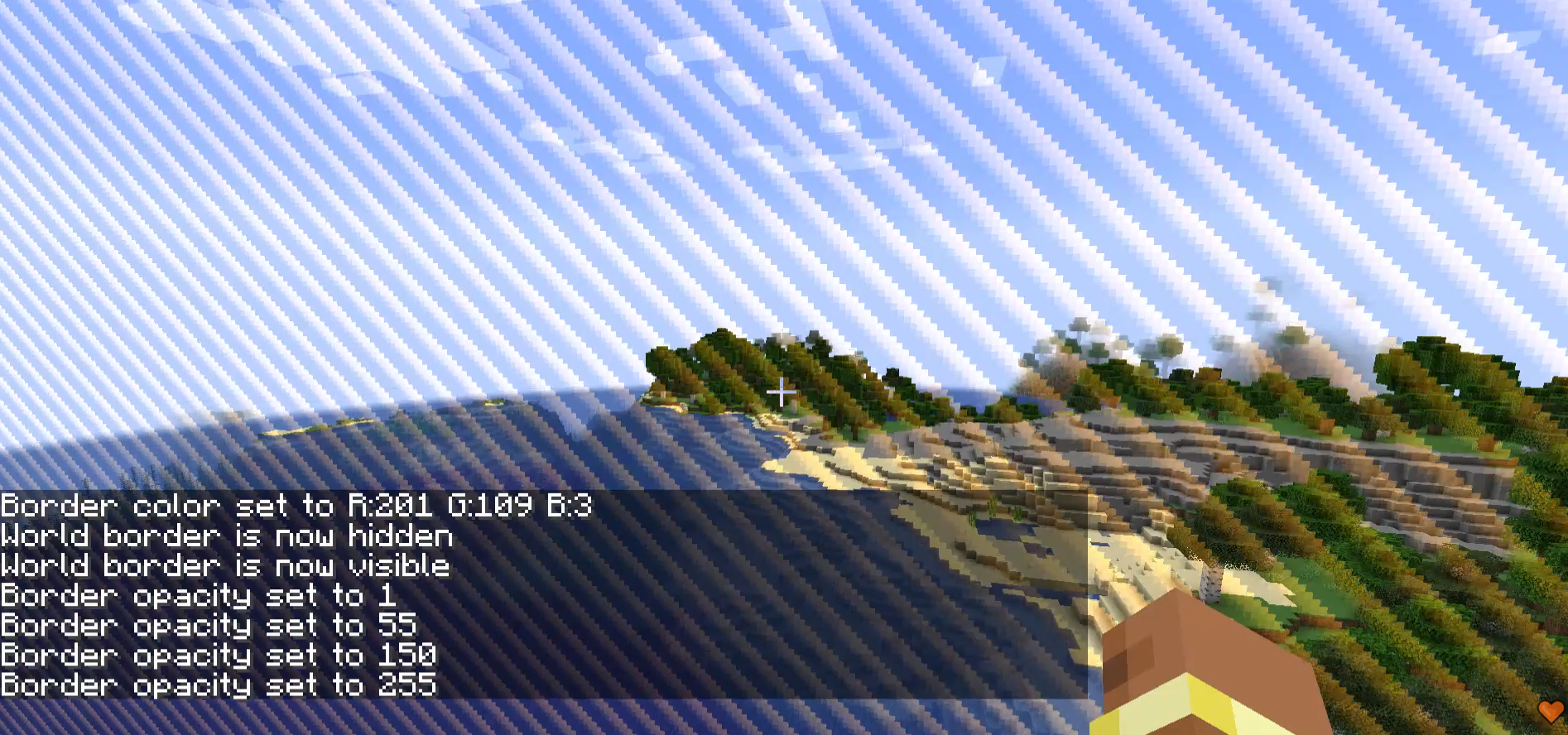
Saros Worldborder Customizer gives server admins and singleplayer users full control over the look of the Minecraft world border. Change its color, make it invisible, adjust transparency, set a custom warning color, or let it pulse with animated flair — all in real time, synced instantly to every connected player, and saved across server restarts.

- Custom Border Color 🎨
- Set any color using RGB values (0–255 per channel).
/saros_worldborder color <r> <g> <b>- Example:
/saros_worldborder color 255 128 0→ orange border.
- Hide / Show 👻
- Make the world border completely invisible with a single command.
/saros_worldborder hide— border disappears entirely./saros_worldborder show— border becomes visible again.
- Opacity Control 🔆
- Adjust the transparency of the border independently of its color.
/saros_worldborder opacity <0-255>— 0 = fully transparent, 255 = fully opaque.
- Warning Color ⚠️
- Define a separate color that activates automatically when a player steps inside the border’s warning distance.
/saros_worldborder warningcolor <r> <g> <b>- Works alongside Minecraft’s built-in warning distance setting.
- Pulse Animation 💫
- Animate the border so it smoothly pulses between the main color and a secondary color.
/saros_worldborder pulse <r> <g> <b> <speed 1-10>— speed 1 is slow, 10 is fast./saros_worldborder pulse off— disables the animation.
- Instant Multiplayer Sync 🌐
- Every change is broadcast to all online players the moment the command is executed.
- Newly joining players automatically receive the current state.
- Persistent Storage 🔄
- All settings are saved to the world folder (
wbcustomizer_state.json) and restored after every server restart. - Per-world: different worlds can have different border configurations.
- Permission System 🔒
- On multiplayer servers: OP level 2 required.
- In singleplayer: all commands are available by default.

| Command | Description |
|—|—|
| /saros_worldborder | Show all available commands (EN + DE) |
| /saros_worldborder color <r> <g> <b> | Set border color (RGB 0–255 each) |
| /saros_worldborder opacity <0-255> | Set border transparency |
| /saros_worldborder warningcolor <r> <g> <b> | Set color shown near border edge |
| /saros_worldborder pulse <r> <g> <b> <speed> | Enable pulsing animation (speed 1–10) |
| /saros_worldborder pulse off | Disable pulsing animation |
| /saros_worldborder hide | Make border completely invisible |
| /saros_worldborder show | Restore border visibility |
| /saros_worldborder reset | Reset everything to default blue |

Currently Supported ✅
- Forge 1.20.1
- Fabric 1.20.1
- Forge 1.21.1
- NeoForge 1.21.1
- Fabric 1.21.1
- Forge 26.1
- NeoForge 26.1
- Fabric 26.1
- Forge 26.1.2
- NeoForge 26.1.2
- Fabric 26.1.2

For requests, suggestions, or bug reports, join the Discord and become part of the Saro’s Mod community!

常见问题
Saros Worldborder Customizer 支持哪些 Minecraft 版本?
Saros Worldborder Customizer 支持 Minecraft Java 版 1.20.1–26.3,共 12 个版本,可用的加载器:Fabric / Forge / NeoForge。下载时注意选择和你游戏版本一致的文件。
Saros Worldborder Customizer 怎么安装?
先用 PCL2 或 HMCL 启动器安装对应版本的 Fabric / Forge / NeoForge,再把下载的 .jar 文件放进游戏目录的 mods 文件夹,重新启动游戏即可。开启了版本隔离的,mods 文件夹在 versions/版本名 下面。运行环境:客户端和服务端都要装。
Sarocesch 的其他作品
查看全部 →
Saro´s Money
Adds physical coins (1€–2€), banknotes (5€–500€), ATMs, and bank accounts for a complete multiplayer economy — with /pay, /eco commands, sign shops, and a leaderboard.

Saro´s Road Signs
Adds functional traffic lights, speed signs, stop signs, and custom sign packs with 3D models and sounds. Pairs with Saro's Road Blocks for complete road infrastructure.

Saro´s Road Blocks
Adds asphalt with slope/stair variants, crash barriers, street lights, and road marking tools for building realistic roads, highways, and on-ramps.

Saro´s Construction
Adds construction barriers, cones, scaffolding, and interactive site equipment for building realistic construction zones.
评论
登录后评论和评分