
Saro’s Easy Lang Switcher
Switch the in-game language instantly with a hotkey. Set up multiple toggles between your favorite languages and swap in one keypress. Client-side only.
截图

介绍
Saro’s Easy Lang Switcher is a lightweight, client-side mod that lets you switch the in-game language instantly with a hotkey. Set up one or more toggles between your favorite languages and swap in a single keypress — no more digging through the options menu every time!

- Instant Language Toggle 🌐
- Press a key and the game language flips instantly (e.g. German ⇄ English) — the resource packs reload on the spot.
- Multiple Toggle Slots 🎚️
- Set up several independent hotkeys, each switching between its own pair of languages.
- Searchable Language Picker 🔍
- Choose from every installed language through a search menu — just start typing to filter, no endless clicking.
- Simple Config GUI 🖥️
- Open it with the G key or the “Lang Switcher” button in the Options screen. Pick your languages and bind your keys all in one place.
- Client-Side Only 💻
- Install it only on your client. Works on any server — vanilla, modded, singleplayer or multiplayer — without the server needing the mod.
- Settings Saved 💾
- Your toggles and hotkeys are stored in a config file and persist across restarts.

- Hotkey-driven language switching with instant resource reload
- Multiple independent toggle slots, each with its own key and language pair
- Search-as-you-type language picker covering every installed language
- Config GUI via the G key or the Options screen button
- Client-side only — no server install required
- Settings persist across restarts
- Forge, NeoForge and Fabric

- Install Forge, NeoForge or Fabric for your Minecraft version.
- (Fabric only) also add Fabric API.
- Drop the Saros Easy Lang Switcher
.jarinto yourmodsfolder. - Launch the game.
How to use it
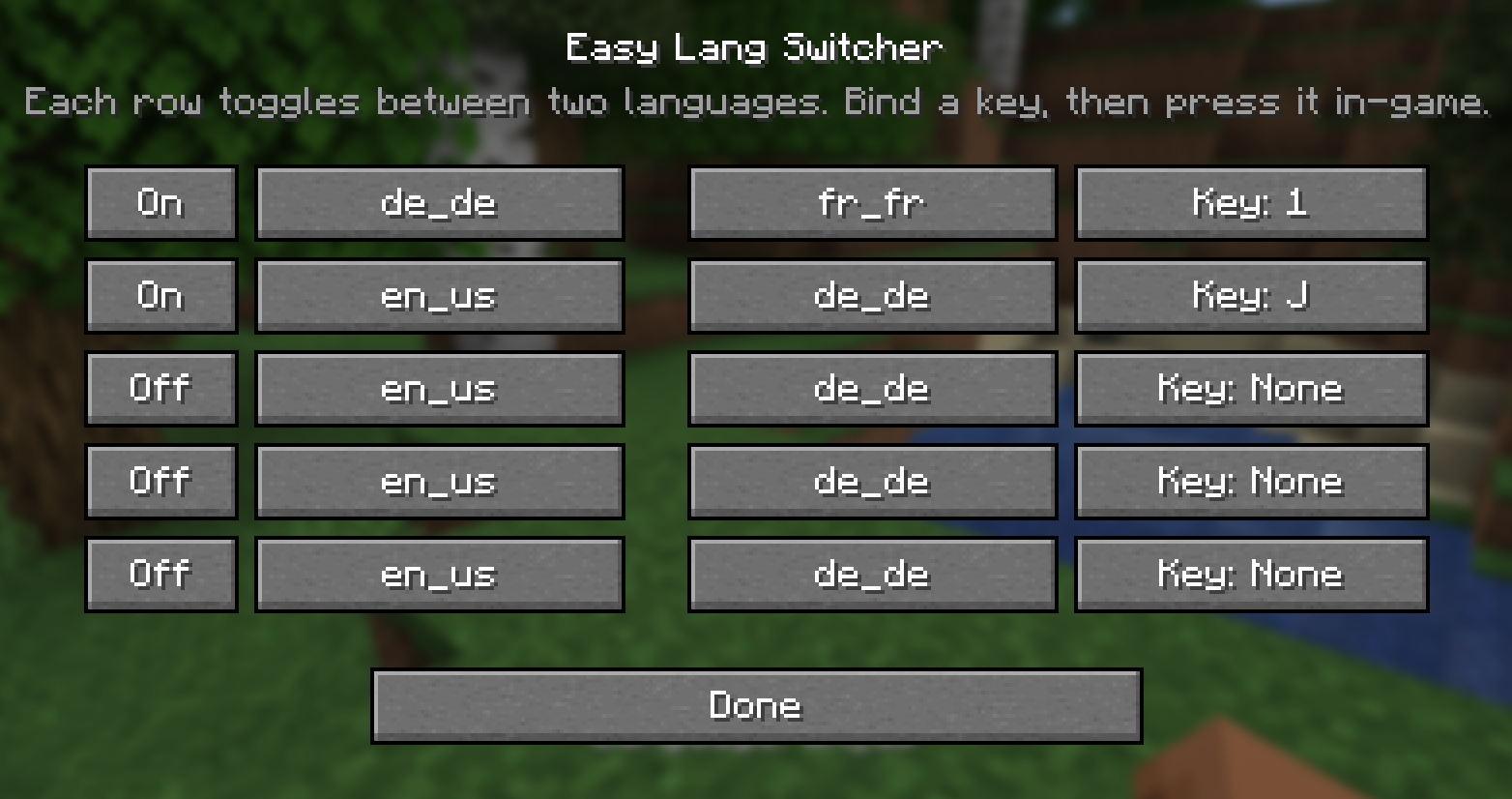
- Open the menu — press G in-game, or click the Lang Switcher button in the Options screen.
- Enable a slot — flip a row to On.
- Pick two languages — click a language button, then type to search and select the language you want (do the same for the second one).
- Bind a key — click the Key: … button and press the key you want to use.
- Switch! — close the menu and press your key in-game. The language flips instantly, and again to switch back.
Tip: give one slot German ⇄ English, another French ⇄ English — each on its own key.


Do I need it on the server?
No — it’s client-side only. You can use it on any server, vanilla or modded.
Which languages can I pick?
Every language installed in your game, including ones added by resource packs. The picker has a search box, so just type the name.
Can I have more than one toggle?
Yes — set up as many slots as you like, each with its own key and its own pair of languages.
How do I open the settings?
Press G in-game, or use the Lang Switcher button in the Options screen.
Are my settings saved?
Yes — your slots and hotkeys are written to a config file and restored on the next start.
Currently Supported
- 1.20.1 — Forge, Fabric
- 1.21.1 — Forge, NeoForge, Fabric
- 26.2 — Forge, NeoForge, Fabric
_Port wishes welcome_

Join our community on Discord to give feedback and suggestions or report any bugs you find!

常见问题
Saro’s Easy Lang Switcher 支持哪些 Minecraft 版本?
Saro’s Easy Lang Switcher 支持 Minecraft Java 版 1.20.1–26.3,共 4 个版本,可用的加载器:Fabric / Forge / NeoForge。下载时注意选择和你游戏版本一致的文件。
Saro’s Easy Lang Switcher 怎么安装?
先用 PCL2 或 HMCL 启动器安装对应版本的 Fabric / Forge / NeoForge,再把下载的 .jar 文件放进游戏目录的 mods 文件夹,重新启动游戏即可。开启了版本隔离的,mods 文件夹在 versions/版本名 下面。运行环境:仅客户端。
Sarocesch 的其他作品
查看全部 →
Saro´s Money
新增实体硬币(1 欧元至 2 欧元)、纸币(5 欧元至 500 欧元)、ATM 和银行账户,打造完整的多人经济系统;支持 /pay、/eco 指令、告示牌商店和排行榜。

Saro´s Road Signs
添加功能性红绿灯、限速标志、停车标志,以及带3D模型和音效的自定义标志包。搭配Saro's Road Blocks即可构建完整的道路基础设施。

Saro´s Road Blocks
新增沥青及斜坡、楼梯变体,还有防撞护栏、路灯和道路标线工具,可建造逼真的公路、高速公路和匝道。

Saro´s Construction
添加施工围挡、路锥、脚手架和可互动的工地设备,打造逼真的施工区域。
评论
登录后评论和评分