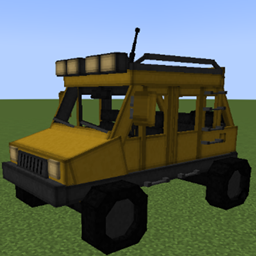
Sable Cars
Adds driveable, physics-simulated cars to Minecraft using the Sable physics engine and GeckoLib for animations.
介绍
Sable Cars
A NeoForge 1.21.1 mod that adds driveable, physics-simulated cars to Minecraft using the Sable physics engine and GeckoLib for animations.
Cars handle like real vehicles on Minecraft’s terrain — they grip the road, slide on ice, bog down in sand, climb curbs, and drift when you provoke them. And with the built-in Car Studio, you can design your own cars — model, handling, and all — and share them as resource packs, without writing any code.
Finding a Car
Abandoned Garages generate naturally across most biomes. Each one contains a car. You can also place a Car Spawner Block, or use the Car Spawner item — right-click in the air to pick any car type, then right-click a surface to spawn it.
Controls
| Action | Key |
|---|---|
| Sit in driver seat | Right-click the seat |
| Start / stop engine | Right-click the dashboard |
| Accelerate | W |
| Reverse | S |
| Steer | A / D |
| Brake | Space |
| Handbrake (drift) | X |
| Exit vehicle | Sneak |
Dismounting does not turn the engine off. The car continues running until you turn it off via the dashboard.
While airborne, W and S pitch the nose down and up so you can line up a landing.
Driving & Physics
Cars are wheel-driven, not floaty — power only reaches the ground through wheels that are actually touching it, so there’s no accelerating mid-jump, and traction ramps in from a standstill like a real launch. Speed builds and tops out naturally through engine falloff, air drag, and rolling resistance, and the engine note rises and falls with your speed.
The ground surface matters. Every block under your wheels is read at its true height, so slabs, paths, and snow layers behave correctly instead of jolting you. The material changes how you drive:
| Surface | Feel |
|---|---|
| Roads (concrete, smooth/polished stone, dirt paths) | Extra grip, low resistance — hold more speed through corners |
| Ice | Barely any grip — braking and steering become genuinely dangerous |
| Sand, gravel, mud, snow | High drag — you bog down and slow |
Grip is limited, so handling is honest. Push a corner too hard and the tyres break loose into a slide. Tap the handbrake (X) to kill rear grip and kick the back end out — flick, counter-steer, and hold a drift, kicking up surface-coloured dust as you go. Moving cars pop up single-block curbs automatically.
Water brings buoyancy and heavy drag — the car bobs rather than sinking — and if the centre block goes under, the engine drowns and you’ll have to restart it once you’re back on dry land.
A speedometer sits above the fuel gauge, and the view widens a little as you approach top speed.
Doors
Right-click any door to open or close it. The collision hitbox updates with the door state — closed doors block passage, open doors allow it.
Fuel
Cars run on Fuel Canisters. Right-click any car panel while holding a canister to refuel.
Each canister has 4 charges. One full canister fills the tank completely. Partial refuels consume one charge per use — the durability bar on the canister shows how many charges remain. When all charges are used the canister is consumed.
The tank also accepts Coal, Charcoal, and Blaze Rods as alternative fuels, though they provide less fuel than a canister.
Car Variants
9 color variants: Yellow, White, Blue, Red, Green, Black, Pink, Rusty, Classic White.
Build Your Own Cars — the Car Studio
Sable Cars is fully data-driven. You can design a complete, driveable car — its shape, model, handling, and wheels — entirely in-game, no coding or mod compiling required.
- Place a Car Layout Designer block from the Car Builder creative tab. It marks the car’s spawn origin.
- Right-click it to open the Car Studio. Press F7 to toggle a translucent ghost model and a region wireframe in the world.
- Layout tab — name the car, point it at a GeckoLib model, and hit Example to place the standard car as coloured blocks: a walkable reference showing how every part fits together.
- Build your car from palette blocks (one colour per part — frame, seats, doors, lights, and more), each shaped like the real thing.
- Physics tab — pick a Sporty / Offroad / Truck preset and fine-tune handling with live sliders.
- Wheels tab — position the suspension wheels, shown live as markers in the world.
- Hit Apply & Test — the car saves, hot-reloads, and a test car spawns beside you to drive immediately.
Tweak, test, repeat — each loop takes seconds.
Custom Car Packs
A finished car is a single JSON file in config/sablecars/cars/. Drop it — plus your GeckoLib model — into a resource or data pack and share it:
my_car_pack/
  assets/mypack/
    cars/pickup.json                        ← the car definition
    geo/cars/pickup.geo.json                ← model
    animations/cars/pickup.animation.json   ← animations
    textures/entity/pickup.png              ← texture
Everything merges automatically and applies with /sablecars reload. Multiple cars can share one model. Data packs can even retune how blocks drive by tagging them #sablecars:road, #sablecars:slippery, or #sablecars:soft.
On dedicated servers, car definitions sync to players automatically — they only need the pack if it ships custom models or textures.
Author commands:
| Command | Action |
|---|---|
/sablecars reload |
Hot-reload all car definitions |
/sablecars list |
List every registered car |
/sablecars spawn <id> |
Spawn a car in front of you |
Requirements
常见问题
Sable Cars 支持哪些 Minecraft 版本?
Sable Cars 支持 Minecraft Java 版 1.21.1,可用的加载器:NeoForge。下载时注意选择和你游戏版本一致的文件。
Sable Cars 怎么安装?
先用 PCL2 或 HMCL 启动器安装对应版本的 NeoForge,再把下载的 .jar 文件放进游戏目录的 mods 文件夹,重新启动游戏即可。开启了版本隔离的,mods 文件夹在 versions/版本名 下面。
SappyEddie 的其他作品
查看全部 →
Simply Tents
Simply Tents 让你在 Minecraft 的任何地方露营!制作帐篷,还能染成你喜欢的颜色!

Valkyrien Skies Eureka Integrated Ships
通过 Eureka! Ships! 为 Valkyrien Skies 添加船只结构支持。

Cobblemon: Tents
为 Cobblemon 添加帐篷

Cobblemon: Synchro Machine [Morph Play as a Pokémon]
让你变成任意宝可梦的模样。
评论
登录后评论和评分