
Sable Bluemap
Displays Sable sublevels on BlueMap with live markers, configurable visibility, and multi-angle previews.
截图
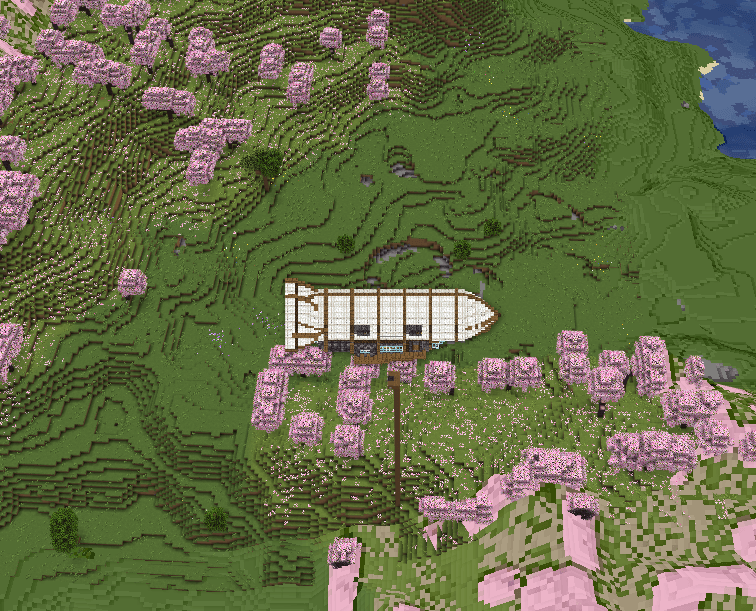
介绍
Sable BlueMap
See your moving Sable builds on BlueMap.
Sable BlueMap adds live map markers for any Sable sublevel—including Create: Aeronautics airships and other builds powered by Sable.
Markers follow their sublevels in real time without forcing BlueMap to rerender the terrain.
Features
Each marker can show:
- Sublevel name
- Position
- Dimension
- Status
- UUID
Marker previews:
- Use the build’s actual block models and textures
- Switch between eight different views as you rotate the map
- Scale dynamically as you zoom
Configuration
Server owners can choose to display:
- All Sable sublevels
- Named sublevels only
- Specific sublevels by UUID
Unloaded sublevels can optionally remain visible at their last known position.
Requirements
- Minecraft: 1.21.1
- NeoForge: 21.1.x
- Sable
- BlueMap
Install Sable BlueMap on the server.
Note: Marker previews are static. Animated Create and Flywheel parts do not animate inside the marker.
常见问题
Sable Bluemap 支持哪些 Minecraft 版本?
Sable Bluemap 支持 Minecraft Java 版 1.21.1,可用的加载器:NeoForge。下载时注意选择和你游戏版本一致的文件。
Sable Bluemap 怎么安装?
先用 PCL2 或 HMCL 启动器安装对应版本的 NeoForge,再把下载的 .jar 文件放进游戏目录的 mods 文件夹,重新启动游戏即可。开启了版本隔离的,mods 文件夹在 versions/版本名 下面。
MichiyoRavencroft 的其他作品
查看全部 →
OpenSecurity
OpenComputers 的安全附加模组
OpenPrinter
OpenComputers打印机

OpenDisks
让添加战利品磁盘更简单的 OpenComputers 附属模组!
OpenFM
Minecraft 电台流媒体模组
评论
登录后评论和评分