
截图
介绍
Rubi
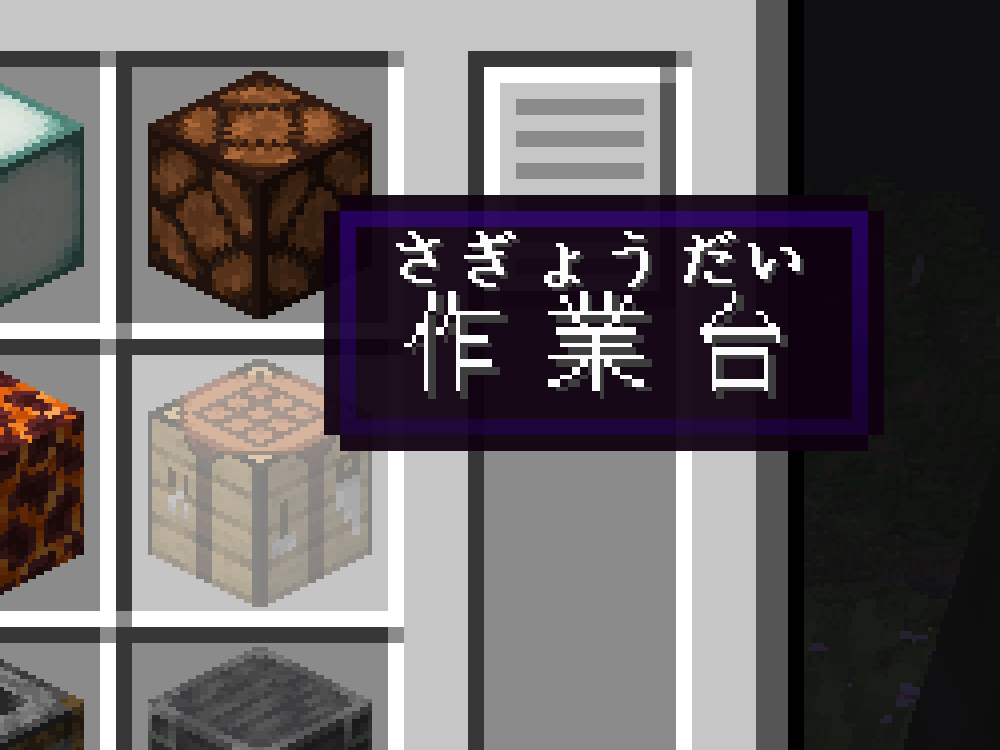
Rubi is a utility mod for Minecraft that, hopefully, will enable you to more easily learn (for example) Japanese words through gameplay by allowing the display of furigana/ruby annotations within the game itself. Additionally, I created/generated a dedicated resource pack to provide compatible ruby annotations for the Japanese language. While the resource pack is fairly comprehensive, please note that I haven’t thoroughly verified every annotation (there are a _lot_ of them), so I should expect there to be some inaccuracies.
NOTE: This mod does basically nothing without a compatible language resource pack.
How do I make my own annotations?
See the section “For resource pack creators”. The same notation can be copy-pasted into books and signs.
Options
By default, ruby annotations are displayed above the annotated text. This can be changed in the game’s accessibility settings. There are four options:
- Above Text (Default): The ruby annotations are displayed above the annotated text.
- Below Text: The ruby annotations are displayed below the annotated text.
- Replace Text: The annotated text is replaced with the ruby annotations.
- Hidden: Self explanatory.
Compatible resource packs
Japanese
For resource pack creators
Due to Modrinth not supporting rubies, this section is best viewed on Github. See the README.
常见问题
Rubi 支持哪些 Minecraft 版本?
Rubi 支持 Minecraft Java 版 1.20–1.21.1,共 9 个版本,可用的加载器:Fabric。下载时注意选择和你游戏版本一致的文件。
Rubi 怎么安装?
先用 PCL2 或 HMCL 启动器安装对应版本的 Fabric,再把下载的 .jar 文件放进游戏目录的 mods 文件夹,重新启动游戏即可。开启了版本隔离的,mods 文件夹在 versions/版本名 下面。运行环境:仅客户端。

评论
登录后评论和评分