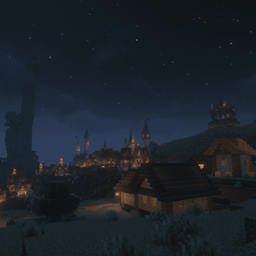
Ambient Music: Medival & Fantasy Edition
This mod gives you 65 new Ambient Music tracks Which are 100% Human Made by Alkakrab
介绍
Whether you’re building a castle, wandering through forests, or working on your next big project, Ambient Music brings a selection of fantasy and ambient music to your time in the world. Warm melodies, mysterious atmospheres, and darker passages provide a varied soundtrack for long building sessions and adventures.
Features
– over 60 selected tracks from four music packs, with a combined runtime of over 2 hours of music.
– Shuffle playback without repeats within a cycle: Each track plays once before the selection is reshuffled. Restarting the game starts a new cycle.
– Adjustable gaps between tracks: Choose anything from no added delay to a 20-minute break.
– Optional Minecraft music mix: Listen exclusively to the included tracks or let familiar Minecraft music join the rotation.
– Client-side only: No server installation required.
Your Music, Your Settings
Find the additional sliders under Options → Music & Sounds.
Ambient music:
pause Sets the gap between tracks, from 0 seconds to 20 minutes | 60 seconds |
Music mix Sets the chance that the next track will be normal Minecraft music
At 0% only the included mod tracks play. At 100% only normal Minecraft music plays. Values in between make a random selection for each new track. Minecraft tracks come from your existing game installation and do not advance the mod’s shuffle cycle.
Your settings are saved between sessions. Changing them lets the current track finish. Use Minecraft’s regular Music volume slider to adjust the volume. When you enter the Overworld, the first track normally starts after 10–30 seconds of active gameplay.
常见问题
Ambient Music: Medival & Fantasy Edition 支持哪些 Minecraft 版本?
Ambient Music: Medival & Fantasy Edition 支持 Minecraft Java 版 1.20.1–26.3,共 3 个版本,可用的加载器:Forge / NeoForge。下载时注意选择和你游戏版本一致的文件。
Ambient Music: Medival & Fantasy Edition 怎么安装?
先用 PCL2 或 HMCL 启动器安装对应版本的 Forge / NeoForge,再把下载的 .jar 文件放进游戏目录的 mods 文件夹,重新启动游戏即可。开启了版本隔离的,mods 文件夹在 versions/版本名 下面。
tmfritz_ 的其他作品
查看全部 →
Epic Fight X Relics + Artifacts+Curios
这个模组让 Epic Fight 兼容 Artifacts、Relics 及其大多数附属模组,也兼容其他使用 Curios 槽位的模组……

Iron Spells X Epic Fight
This mod Is just like my other mod it makes Iron's Spells 'n Spellbooks armors and weapons compatible with Epic Fights animations ....

Ice and Fire X Epic Fight
its very simple the ice and fire Armors are made Compatible with Epic Fights Animations ....
SHATTERED LEGENDS
A dark fantasy RPG modpack for Minecraft 1.21.1, with action combat, magic, exploration and progression.
评论
登录后评论和评分