截图


介绍
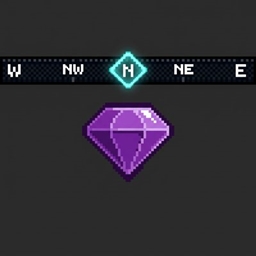
Treat yourself with a fully customizable, waypoint navigation and a certain RPG’s HUD compass system!
Player Features
- HUD Compass Bar – Skyrim-style direction and waypoint tracker.
- 11 Visual HUD Themes – Customize your compass with Aether, Nether, End, Frost, Jungle, Cyberpunk, Wood, Medieval, Minimalist, and Dark Fantasy styles.
- Player GUI Menu – Interactive screen to view, category-filter, and customize personal or discovered waypoints.
- 108 RPG Icons & Item Icons – Choose between the icons or any item or block as a waypoint icon. Also able to be tinted with any RGB color.
- Proximity Discovery – Discover hidden waypoints by walking near them, complete with a visual unlock.
- Icon Scaling – Compass icons scale in size based on player distance.
- See-Through Blocks – Client toggle to view waypoint markers through solid walls.
- Temporary Waypoints – Timed markers with live countdowns that self-destruct upon arrival.
👑 Server Admin Features
- In-Game GUI Editors – Visual menus to easily create and manage waypoints and trigger zones.
- Trigger Zones – 3D areas that automatically load and unload tagged waypoints for players.
- Waypoint Tagging – Group and push tagged waypoints to players en-masse.
- Anti-Lag Caching – In-memory database cache to prevent server micro-stuttering.
- Audit Logs – Searchable, paginated admin logs tracking waypoint additions and removals.
- Waystones Integration – Auto-imports placed Waystones as global waypoints.
⭐Commands
Player Commands /rpg_waypoints compass toggle – Toggles HUD compass visibility.
/rpg_waypoints list – Opens the player GUI for personal and discovered waypoints.
Waypoint list is also able to be opened by keybind.
Admin Setup & Creation
It is recommended to use the in-game editor for editing waypoints for the server and viewing the audit log for server waypoints
/rpg_waypoints admin edit-waypoints-ui – Opens the admin GUI editor for waypoints.
/rpg_waypoints admin create-waypoint <name> [group] [discoverable] [radius] [description] [tag] – Spawns a global waypoint at your coordinates.
/rpg_waypoints admin delete-waypoint <id> – Deletes a server waypoint by ID.
/rpg_waypoints admin add-group <name> – Registers a custom waypoint group.
/rpg_waypoints admin delete-group <name> – Deletes a group and moves waypoints back to Uncategorized.
Tags & Trigger Zones
/rpg_waypoints admin create-waypoint-tag <tag_name> – Creates a new waypoint tag.
/rpg_waypoints admin remove-waypoint-tag <tag_name> – Deletes a tag, removing it from waypoints and zones.
/rpg_waypoints admin load-tagged-waypoints <tag_name> <player> [timer] – Loads tagged waypoints for a player (supports optional timer).
/rpg_waypoints admin unload-tagged-waypoints <tag_name> <player> – Unloads tagged waypoints from a player.
/rpg_waypoints admin create-tagged-zone <name> <x1 y1 z1> <x2 y2 z2> <tag_name> – Creates a trigger zone linked to a tag.
/rpg_waypoints admin remove-tagged-zone <name> – Deletes a trigger zone.
Maintenance & Auditing
/rpg_waypoints admin audit-log [page] [searchQuery] – Opens the searchable administrative audit logs (easier to view in the editor UI, through the audit log button).
/rpg_waypoints admin backup – Generates a timestamped database backup.
/rpg_waypoints admin import <filename> – Imports a backup and hot-reloads caches for all online players.
🌐 Supported Languages
常见问题
RPG Compass and Waypoints 支持哪些 Minecraft 版本?
RPG Compass and Waypoints 支持 Minecraft Java 版 1.20.1,可用的加载器:Fabric / Forge / NeoForge / Quilt。下载时注意选择和你游戏版本一致的文件。
RPG Compass and Waypoints 怎么安装?
先用 PCL2 或 HMCL 启动器安装对应版本的 Fabric / Forge / NeoForge / Quilt,再把下载的 .jar 文件放进游戏目录的 mods 文件夹,重新启动游戏即可。开启了版本隔离的,mods 文件夹在 versions/版本名 下面。
Azure_Ddraig 的其他作品
查看全部 →
Supreme Mining Dimensions
各种维度,应对各种场景!

Simply Tokens or Coins
简单可自定义的货币解决方案

Simply Crush Amethyst for Iron
减少铁傀儡的残忍!将紫水晶粉碎成粉末并烧炼以获得铁!

SMD: Hammers!
使用 SMD: Hammers! 的破格锤子,强化挖掘与战斗体验!
评论
登录后评论和评分