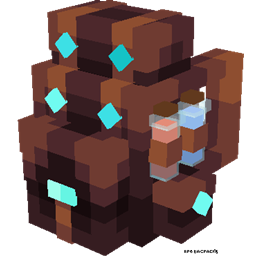
RPG Backpacks
Adds backpacks with different storage capacities for carrying more items.
介绍
RPG Backpacks




RPG Backpacks adds wearable backpacks with different storage capacities to your Minecraft adventures. Carry more items, organize your inventory, and look stylish while exploring the world!
✨ Features
- Tiered Backpacks:
- Leather Backpack: 18 Slots (2 Rows)
- Iron Backpack: 27 Slots (3 Rows)
- Golden Backpack: 36 Slots (4 Rows)
- Diamond Backpack: 45 Slots (5 Rows)
- Netherite Backpack: 54 Slots (6 Rows) & Fire Resistant!
- Wearable: Equip backpacks in your Chestplate slot or Curios Back slot (if installed).
- 3D Models: Custom, detailed 3D models when worn on your back.
- Easy Access: Open your backpack with a keybind (Default:
B). - Convenient Tooltips: Hover over a backpack to see a preview of its contents without opening it.
📥 Installation
- Download Minecraft.
- Install modloader.
- Download the latest version of RPG Backpacks from Modrinth or CurseForge.
- (Optional but Recommended) Install Curios API to wear backpacks without replacing your armor.
- Place the
.jarfile in yourmodsfolder. - Launch the game and enjoy!
🎮 Usage
🛠️ Crafting Recipes
| Item | Ingredients | Recipe Type |
|---|---|---|
| Leather Backpack | 8x Leather + 1x Chest | Crafting Table (Surround) |
| Iron Backpack | 8x Iron Ingots + 1x Leather Backpack | Crafting Table (Surround) |
| Golden Backpack | 8x Gold Ingots + 1x Iron Backpack | Crafting Table (Surround) |
| Diamond Backpack | 8x Diamonds + 1x Golden Backpack | Crafting Table (Surround) |
| Netherite Backpack | 1x Netherite Ingot + 1x Diamond Backpack + 1x Netherite Upgrade Smithing Template | Smithing Table |
[!TIP] Inventory Preservation: When upgrading a backpack, all contents are automatically transferred to the new tier!
🎒 How to Use
- Equipping: Place the backpack in your Chestplate slot or the Curios back slot.
- Opening:
- Right-click while holding the backpack in your hand.
- Press
B(configurable in controls) while the backpack is equipped. Reference priority: Worn > Main Hand > Off Hand.
- Preview: Hover over any backpack in your inventory to see a list of its contents.
🐛 Issues & Support
Found a bug? Have a suggestion?
- Report issues on GitHub.
- Join our Discord Community for support.
- Check the Wiki for detailed guides.
🔗 Links
- Author: Yigit Guven
- GitHub: yigit-guven/RPG-Backpacks
- Modrinth: rpg-backpacks
- CurseForge: RPG Backpacks
📜 License
This project is licensed under the GNU General Public License v3.0. See the LICENSE file for details.
常见问题
RPG Backpacks 支持哪些 Minecraft 版本?
RPG Backpacks 支持 Minecraft Java 版 1.12.2–1.21.1,共 15 个版本,可用的加载器:Forge / NeoForge。下载时注意选择和你游戏版本一致的文件。
RPG Backpacks 怎么安装?
先用 PCL2 或 HMCL 启动器安装对应版本的 Forge / NeoForge,再把下载的 .jar 文件放进游戏目录的 mods 文件夹,重新启动游戏即可。开启了版本隔离的,mods 文件夹在 versions/版本名 下面。
yigitguven 的其他作品
查看全部 →
Easy Hammers
Adds pickaxe-style tools that effortlessly break a 3x3 area.
MX Lib
Simple library for MX Team's mods
Leather Craft
Create leather by smelting rotten flesh.
Petting – Tame any mob!
Pet mobs and have them become protective companions that follow you, offering support and assistance during your adventures.
评论
登录后评论和评分