
介绍
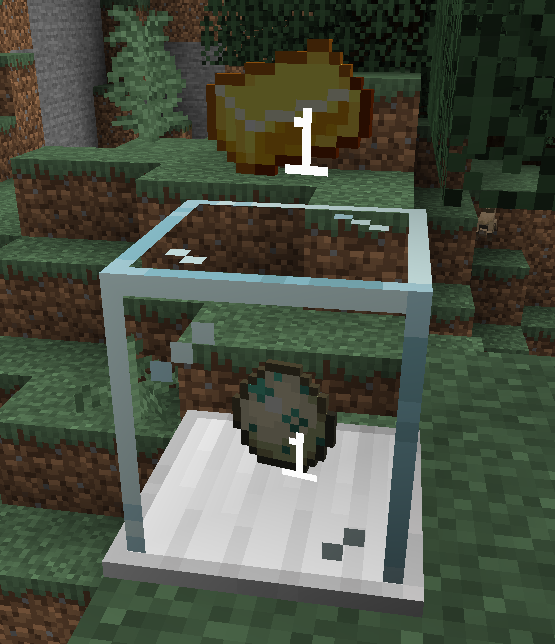
The Vending Block allows players to easily accept item trades.
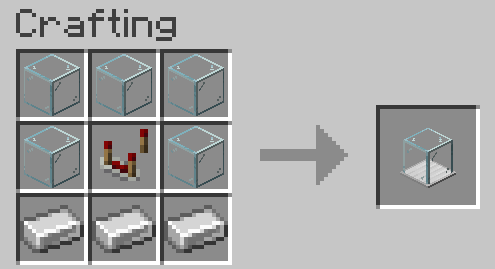
Crafting
How to Use
To set up a Vending Block, place it on the ground and right-click to open a menu. The player that placed it is the only player that can open the configuration/inventory.
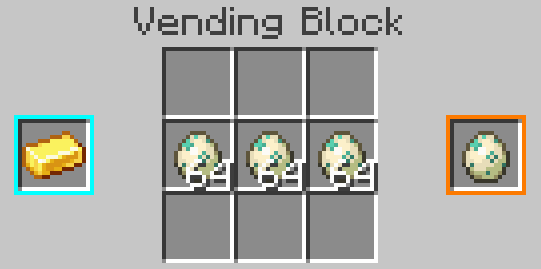
The blue slot on the left is the stack accepted for trade, and the orange slot on the right is the stack that will be returned to the customer. These slots don’t consume items, but can be clicked with a stack to set them.
In the center is the inventory of the block, which should contain the stock of items to distribute. Items paid by users will also appear here, so make sure to leave space for them.
Once configured, players can exchange items by right-clicking on the block with the required item in hand.
Creative Vending Block
A variant of the Vending Block, this item is not craftable and meant to be used by server admins. It has no inventory, and will infinitely allow the configured trade.
Exposed Vending Block
A variant of the Vending Block that can interact with item transport (e.g. hoppers). Note that this weakens the security of the block, as other players could extract items.
Contact
常见问题
Eric’s Retail 支持哪些 Minecraft 版本?
Eric’s Retail 支持 Minecraft Java 版 1.14.4–1.19,共 10 个版本,可用的加载器:Fabric / Forge。下载时注意选择和你游戏版本一致的文件。
Eric’s Retail 怎么安装?
先用 PCL2 或 HMCL 启动器安装对应版本的 Fabric / Forge,再把下载的 .jar 文件放进游戏目录的 mods 文件夹,重新启动游戏即可。开启了版本隔离的,mods 文件夹在 versions/版本名 下面。


评论
登录后评论和评分