
Resource Reload Guard
Prevents accidental, unnecessary, and unsafe client resource reloads by allowing them to be blocked, confirmed, or deferred until restart.
截图
介绍
Resource Reload Guard
Resource Reload Guard is a client-side mod for Minecraft Java Edition.
Reloading client resources can take several minutes in large modpacks and may cause long garbage-collection pauses, hangs, or crashes. This mod does not make resource loading faster. Instead, it guards known user actions so an expensive reload does not begin accidentally or unnecessarily.
Supported environments
Resource Reload Guard is client-side only and is available for:
- Fabric (Fabric API required)
- Forge
- NeoForge
Features
Resource packs
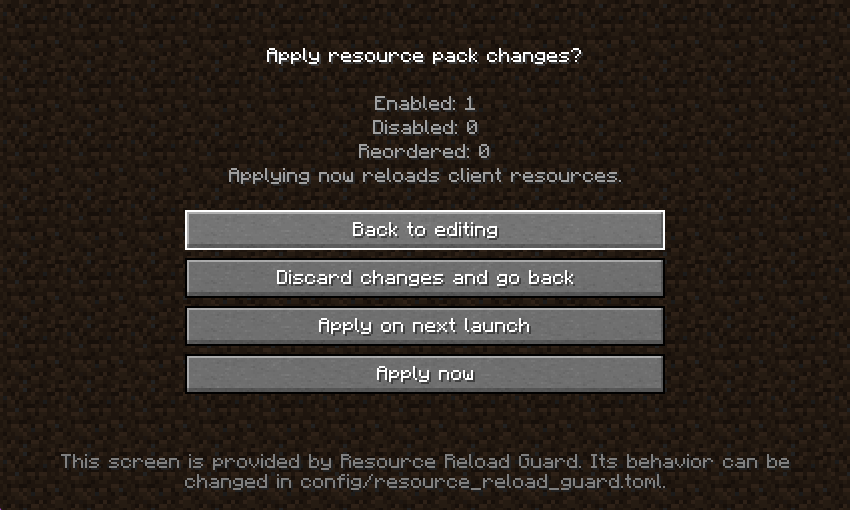
- Detects enabled, disabled, and reordered packs.
- Skips applying a selection when the pack IDs and order are unchanged.
- Lets you return to editing without losing the current selection.
- Can discard the selection and restore the state from before the screen was opened.
- Can apply now or save the selection for the next launch.
Language
- Skips the reload when the selected language is unchanged.
- Shows the current and selected languages before applying.
- Can apply now or save the language for the next launch.
Mipmap levels
- Detects a mipmap-level change before leaving Video Settings.
- Can return to Video Settings, discard only the mipmap change, defer it until the next launch, or apply it now.
- Reloads client textures only when Apply now is selected.
Safety measures
- Dangerous actions never receive initial focus.
Escalways returns to a safe screen.- Dangerous buttons remain disabled until both the configured number of client ticks and the equivalent monotonic time have elapsed.
- Initial loading, mod-initiated reloads, server resource packs, recovery reloads, and reloads of unknown origin are not globally cancelled.
F3+T
- Stops the vanilla reload before it starts.
- Runs it only after explicit confirmation.
- Prevents duplicate prompts and reloads caused by key repeat.
- Rejects additional user requests while a reload is active.
Configuration
A commented TOML file is generated on first launch:
config/resource_reload_guard.toml| Key | Default | Description |
| — | — | — |
| debugKeyPolicy | CONFIRM | Policy for F3+T |
| resourcePackPolicy | CONFIRM | Policy for resource-pack changes |
| languagePolicy | CONFIRM | Policy for language changes |
| mipmapPolicy | CONFIRM | Policy for mipmap-level changes |
| skipUnchangedResourcePackApply | true | Skip unchanged pack selections |
| allowDeferredResourcePackApply | true | Allow pack changes to be deferred |
| allowDeferredLanguageApply | true | Allow language changes to be deferred |
| allowDeferredMipmapApply | true | Allow mipmap changes to be deferred |
| blockUserRequestsWhileReloading | true | Reject additional guarded requests during reloads |
| dangerousButtonDelayTicks | 20 | Delay before dangerous buttons become active |
| showLoadedModCount | true | Show the loaded mod count as context |
| largeEnvironmentWarningThreshold | 200 | Mod-count threshold for a non-blocking warning |
Available policy values are ALLOW, CONFIRM, BLOCK, and RESTART_ONLY. The loaded mod count is used only for an informational warning; it never automatically blocks a reload or estimates its duration.
Known limitations
- The mod does not predict reload duration or optimize the reload pipeline.
- Mods that substantially replace the Resource Packs, Language, or Video Settings screens—or inject into the same vanilla methods—may conflict with its Mixins.
- Server resource packs and reloads whose origin cannot be identified are outside the guard’s scope.
- The mod does not restart the Minecraft process automatically.
常见问题
Resource Reload Guard 支持哪些 Minecraft 版本?
Resource Reload Guard 支持 Minecraft Java 版 1.20.1–1.21.1,共 2 个版本,可用的加载器:Fabric / Forge / NeoForge。下载时注意选择和你游戏版本一致的文件。
Resource Reload Guard 怎么安装?
先用 PCL2 或 HMCL 启动器安装对应版本的 Fabric / Forge / NeoForge,再把下载的 .jar 文件放进游戏目录的 mods 文件夹,重新启动游戏即可。开启了版本隔离的,mods 文件夹在 versions/版本名 下面。运行环境:仅客户端。


评论
登录后评论和评分