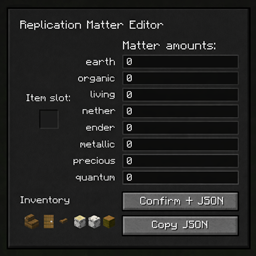
Replication Matter Editor
Adds a simple in-game editor that lets you assign and export Replication matter values to items directly as JSON.
介绍
Adds a simple in-game editor for the mod Replication by Buuz135 that lets you assign and export matter values to items directly as JSON.
Features
In-game GUI for editing Replication matter values
Automatically detects the item in your main hand
Supports all matter types:
- earth
- organic
- living
- nether
- ender
- metallic
- precious
- quantum
Currently:
- Export matter values as Replication JSON
- Copy JSON directly to clipboard
- Designed for modpack developers and datapack workflows
- Client-side utility (no gameplay changes)
To do:
Remove/Change the selected item from overlap- Tag support
Multi-item selection & multi-export
How to Use
-
Hold the item you want to assign matter values to in your main hand
-
Press M to open the Replication Matter Editor
-
Enter matter values in the provided fields
-
Choose an export option:
-
Confirm → JSON to save the file
-
Copy JSON to copy the output to clipboard
-
Note – JSON files are saved in the minecraft instance folder where it will auto generate the path file is this: minecraft\Instances\YOURCUSTOMPACK\extendedreplication\matter_values
常见问题
Replication Matter Editor 支持哪些 Minecraft 版本?
Replication Matter Editor 支持 Minecraft Java 版 1.21.1,可用的加载器:NeoForge。下载时注意选择和你游戏版本一致的文件。
Replication Matter Editor 怎么安装?
先用 PCL2 或 HMCL 启动器安装对应版本的 NeoForge,再把下载的 .jar 文件放进游戏目录的 mods 文件夹,重新启动游戏即可。开启了版本隔离的,mods 文件夹在 versions/版本名 下面。
0olyvion0 的其他作品
查看全部 →
Replication Addition
A lightweight add-on for Replication that adds craftable matter blueprints, and balanced matter values for replica ingots.

Extended Replication
Adds tons of matter value for several items from other mods

Allumne
Allumne is a tightly-knit modpack that focuses on free player decisions such as exploration, combat overhaul, settlement building, and a bit magic. In addition with the included tech mods, it will greatly aid in automation of farming, and ore excavation.
评论
登录后评论和评分