
Remote Control From Telegram!
作者:kadirmt
Control your own Minecraft client from your own Telegram bot: chat and commands, anti-AFK, auto-fishing, screenshots and live status.
截图
介绍
中文介绍正在准备中,下面暂时显示原文。
Control your own Minecraft client from your own Telegram bot.
You create a bot with BotFather, paste its token and your numeric Telegram user id
into the mod’s config screen, press a key in game to arm it, and from then on you can
drive your own client from your phone.
CLIENT-SIDE ONLY. It is never installed on a server.
SETUP
1. Create a bot with @BotFather and copy the token.
2. Get your numeric Telegram user id (for example from @userinfobot).
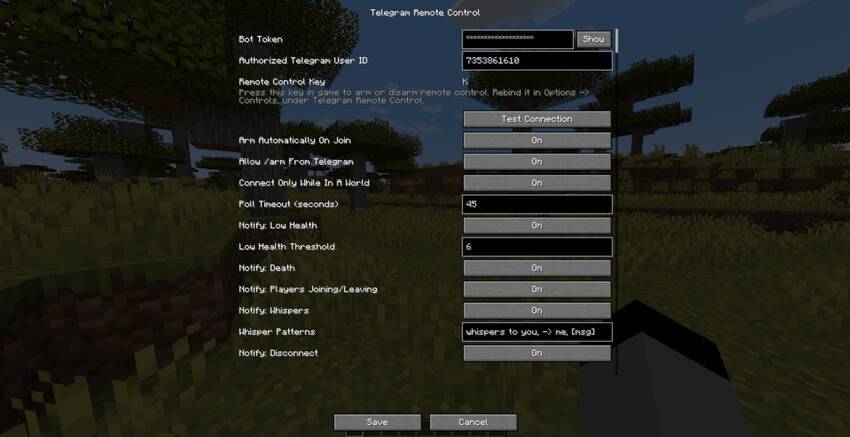
3. Mods -> Telegram Remote Control -> Config. Paste both, then press Test Connection.
On Fabric this button is provided by Mod Menu; without Mod Menu you can open the
same screen from a keybind.
4. Open your bot in Telegram and press Start, so it is allowed to message you.
5. Join any world, singleplayer or multiplayer.
6. Press the remote-control key (default K, rebindable in Options -> Controls).
COMMANDS
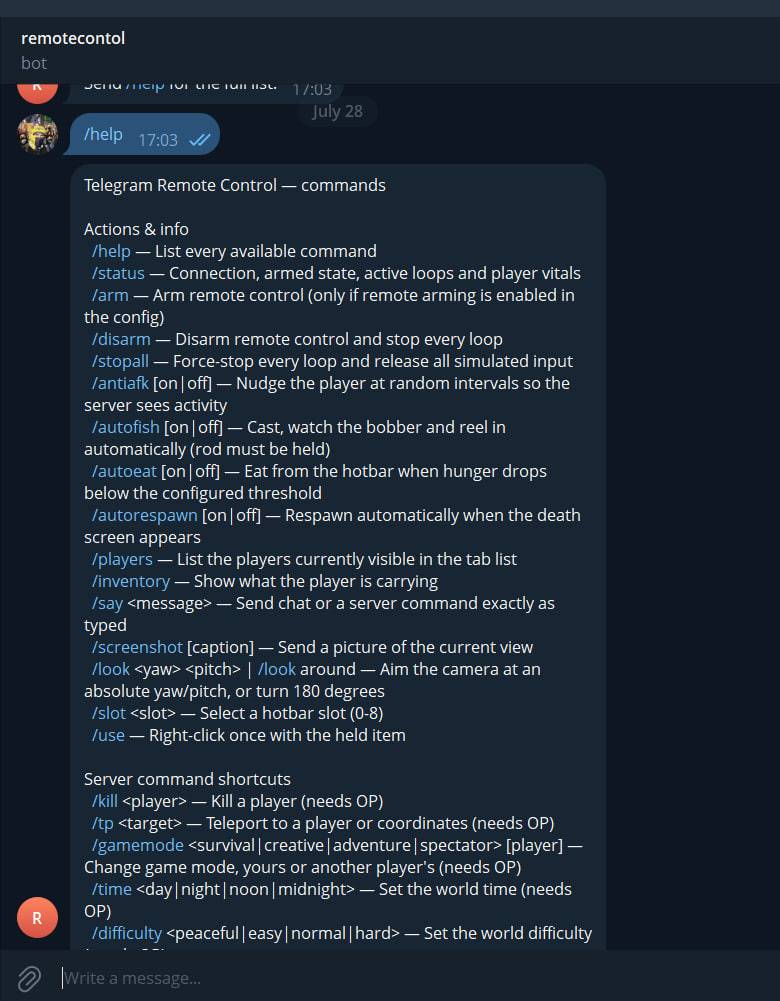
/help /status /arm /disarm /stopall
/say <text> sends the text exactly as if you typed it in the chat box
/screenshot sends the current frame as a photo
/antiafk small random movements so you are not kicked for idling
/autofish casts, watches the bobber, reels in on a bite, repeats
/autoeat /autorespawn
/players /inventory /look /use /slot
Shortcuts: /kill /tp /gamemode /time /weather /gamerule /difficulty /give /effect /seed
The bot can also notify you: low health, death, whispers, players joining or leaving,
and unexpected disconnections. Each can be turned off.
SECURITY
Only one Telegram account can control the mod: the numeric user id you enter yourself.
Messages from anyone else are ignored silently. Nothing is sent anywhere except to your
own bot, using your own token, from your own machine. Remote arming is off by default,
so the mod also requires that somebody pressed the key at the keyboard at least once.
NOTE
Some multiplayer servers forbid automation, anti-AFK and macros under their own rules.
That is between you and the server, not a limitation of this mod, but you should know
it before you start.
Available for Forge and Fabric, Minecraft 1.20.1 and 1.21.1.
常见问题
Remote Control From Telegram! 支持哪些 Minecraft 版本?
Remote Control From Telegram! 支持 Minecraft Java 版 1.20.1,可用的加载器:Forge。下载时注意选择和你游戏版本一致的文件。
Remote Control From Telegram! 怎么安装?
先用 PCL2 或 HMCL 启动器安装对应版本的 Forge,再把下载的 .jar 文件放进游戏目录的 mods 文件夹,重新启动游戏即可。开启了版本隔离的,mods 文件夹在 versions/版本名 下面。
评论
登录后评论和评分