
截图
介绍
Redstone Shop
Need to make a ticket booth? Minigame? A shop? Redstone Shop will help you with all of those! You set up a price which when paid activates redstone signal. You can then use it to open doors, start games, dispense items, or anything else!
Basically
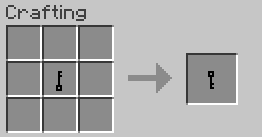
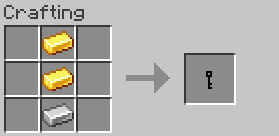
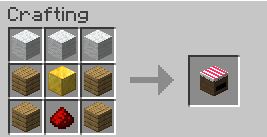
Redstone Shop adds one block – the redstone shop – and one item – the shop key. The redstone block allows the holder of its key to to set a price and withdraw from the "cash register". Anyone else can then pay the price to to the block to make it emit redstone power for a short while. This greatly simplifies what would otherwise require quite a bulky redstone contraption and more importantly speeds it up to make your shopping experience as smooth as possible.
Redstone Shop Block
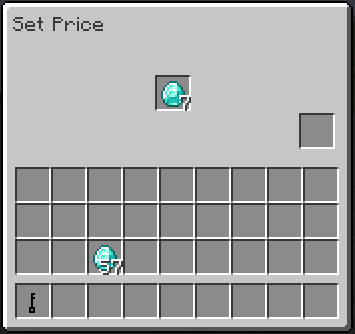
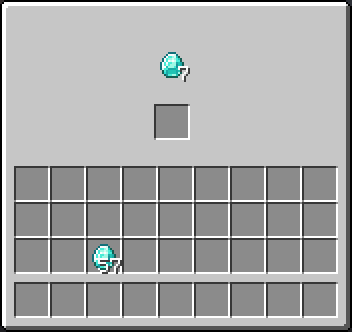
When clicked on with a blank key, it will bind the key to the block. When clicked with the bound key, it will open a GUI where you can set the price by simply placing the required items to the middle slot. (e.g. you place five diamonds in and that sets the price to five diamonds). You can also retrieve paid items from this screen. Alternatively, paid items can be withdrawn using hoppers.
When clicked without a key, the block will show the price and allow the player to put their items in. When the price is paid, a redstone signal gets emitted for a short while allowing you to activate whatever contraption you want
常见问题
Redstone Shop 支持哪些 Minecraft 版本?
Redstone Shop 支持 Minecraft Java 版 1.20.1,可用的加载器:Forge。下载时注意选择和你游戏版本一致的文件。
Redstone Shop 怎么安装?
先用 PCL2 或 HMCL 启动器安装对应版本的 Forge,再把下载的 .jar 文件放进游戏目录的 mods 文件夹,重新启动游戏即可。开启了版本隔离的,mods 文件夹在 versions/版本名 下面。

评论
登录后评论和评分