
RecursiveAE2PatternProvider
Automatically generate dependency patterns for complex AE2 recipes
截图

介绍
Recursive AE2 Pattern Provider
🔄 Overview
Recursive AE2 Pattern Provider revolutionizes Applied Energistics 2 automation by automatically generating dependency patterns for complex recipes directly within your network. Say goodbye to tedious manual pattern creation and hello to effortless multi-tier crafting automation!
✨ Features
🎯 Automatic Pattern Generation
- Smart Dependencies: Automatically creates patterns for missing crafting ingredients.
- Recursive Logic: Generates patterns for ingredients of ingredients, as deep as you configure.
- Recipe Discovery: Only creates patterns for items that have valid crafting recipes.
⚠️ Note: If you set a non-crafting pattern as Recursive, you must place it in a Pattern Provider directly attached to a Molecular Assembler.
🖥️ Terminal GUI Integration & Per-Pattern Control
- Direct Terminal Toggle: Easily toggle recursion ON/OFF directly inside the Pattern Encoding Terminal (Crafting Pattern tab) next to the fluid substitution buttons.
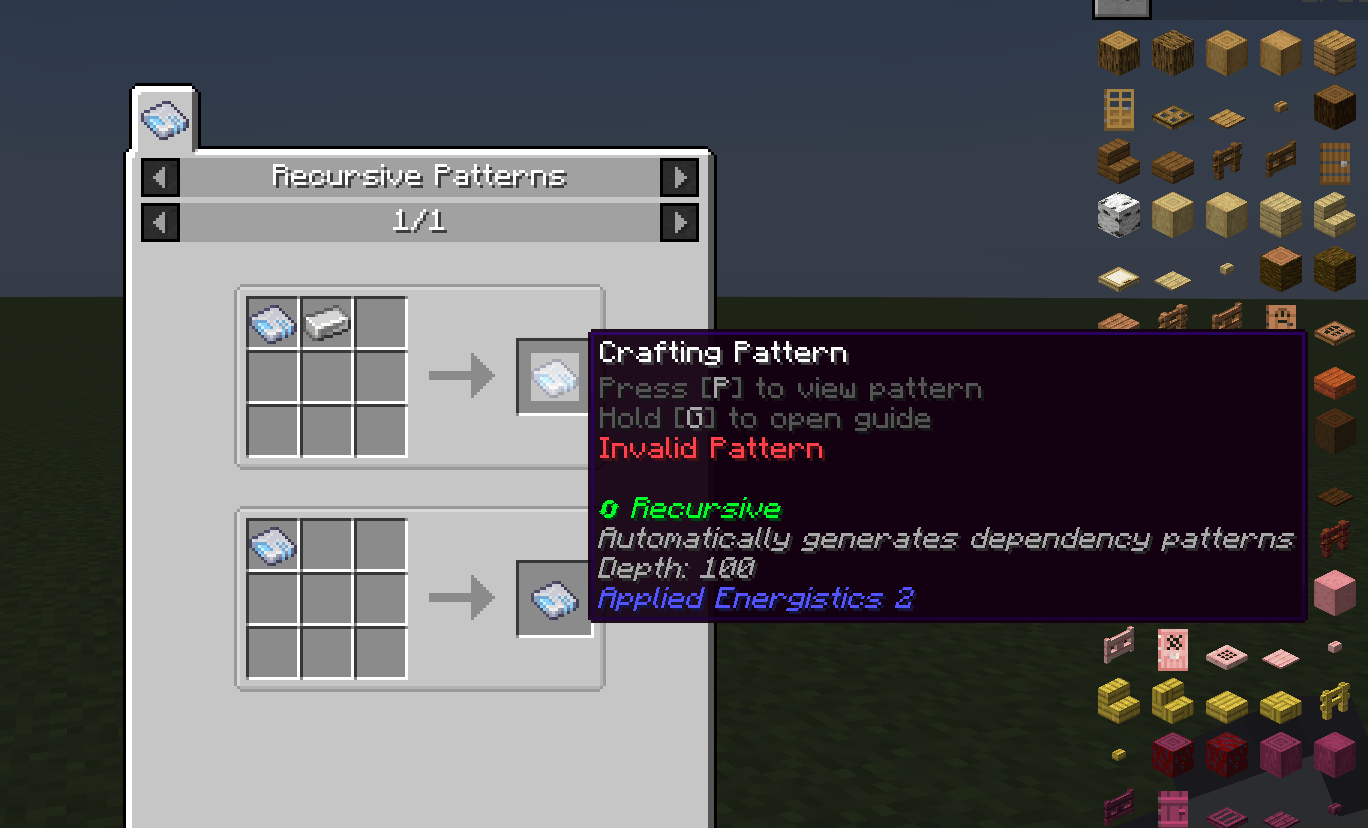
- Crafting Table Alternative: Convert patterns using a crafting table recipe (
[AE2 Pattern] + [Recipe Item] → [Recursive Pattern]). - Automatic Persistence: Re-encoding an existing recursive pattern in the terminal automatically preserves its recursive status.
- Universal Support: Works with ALL AE2 pattern types:
- Crafting Patterns
- Processing Patterns
- Smithing Table Patterns
- Stonecutting Patterns
- Remove Recursion: Craft a recursive pattern alone (without the recipe item) in a crafting table to convert it back to a normal pattern.
🎨 Visual Feedback
- Clean Native Tooltips: Displays a subtle, green Recursive tag directly above the “Encoded by” line for Crafting Patterns.
⚙️ Configuration Options
- Terminal GUI Toggle: Enable or disable the recursive button in the Pattern Encoding Terminal (
enableEncodingGuiToggle). - Recursion Depth: Control how deep pattern generation goes (
-1= unlimited,0= disabled,1+= max depth limit). - Recipe Item: Customize which item is required to craft recursive patterns (default:
minecraft:iron_ingot). - Substitute Inheritance: Auto-generated patterns inherit substitute settings from parent patterns.
- Default Settings: Configure default substitute behavior for patterns without parent context.
🎮 How to Use
Method A: Pattern Encoding Terminal (Recommended)
- Open the Pattern Encoding Terminal.
- Select the Crafting Pattern mode.
- Toggle the Recursive Pattern button to ON (green checkmark).
- Insert your recipe and click Encode Pattern.
Method B: Crafting Table Recipe
[AE2 Pattern] + [Recipe Item] → [Recursive Pattern]
Craft the pattern with the configured recipe item (default: Iron Ingot) in any crafting table.
Remove Recursion
[Recursive Pattern] → [Normal Pattern]
Craft the recursive pattern alone (without the recipe item) to make it normal again.
💡 Customizing the Recipe Item
To change which item is required for crafting recursive patterns, edit config/recursiveae2patternprovider-common.toml:
[recursiveae2patternprovider-common.toml]
recipeItem = "minecraft:diamond" # Use diamond instead of iron
# Or use any other item:
# recipeItem = "minecraft:gold_ingot"
# recipeItem = "ae2:calculation_processor"
常见问题
RecursiveAE2PatternProvider 支持哪些 Minecraft 版本?
RecursiveAE2PatternProvider 支持 Minecraft Java 版 1.21.1–26.1.2,共 2 个版本,可用的加载器:NeoForge。下载时注意选择和你游戏版本一致的文件。
RecursiveAE2PatternProvider 怎么安装?
先用 PCL2 或 HMCL 启动器安装对应版本的 NeoForge,再把下载的 .jar 文件放进游戏目录的 mods 文件夹,重新启动游戏即可。开启了版本隔离的,mods 文件夹在 versions/版本名 下面。运行环境:客户端和服务端都要装。
Lumengrid89 的其他作品
查看全部 →
Oritech Things
Oritech Things 是一个开源科技模组(目前适用于 Minecraft 1.21),旨在为 Oritech 模组添加更多内容。

PipezRetriever
An addon mod for [Pipez](https://www.curseforge.com/minecraft/mc-mods/pipez) that adds **Retrieve Mode** to pipes, allowing you to pull items, fluids, and energy FROM connected inventories instead of pushing TO them.
Recursive AE2 Pattern Provider
Automatically generate dependency patterns for complex AE2 recipes
RecursiveAE2PatternProvider
Automatically generate dependency patterns for complex AE2 recipes
评论
登录后评论和评分